Blog

The most powerful notes engine ever built.

And this is just one of the many apps in Oyren, all built to move your work along faster.

See all the appsStart free
DDevelopment
Search workspace…CtrlF
Upload
49,952
AAlex Morgan
quote.note
solve engine · loading
·
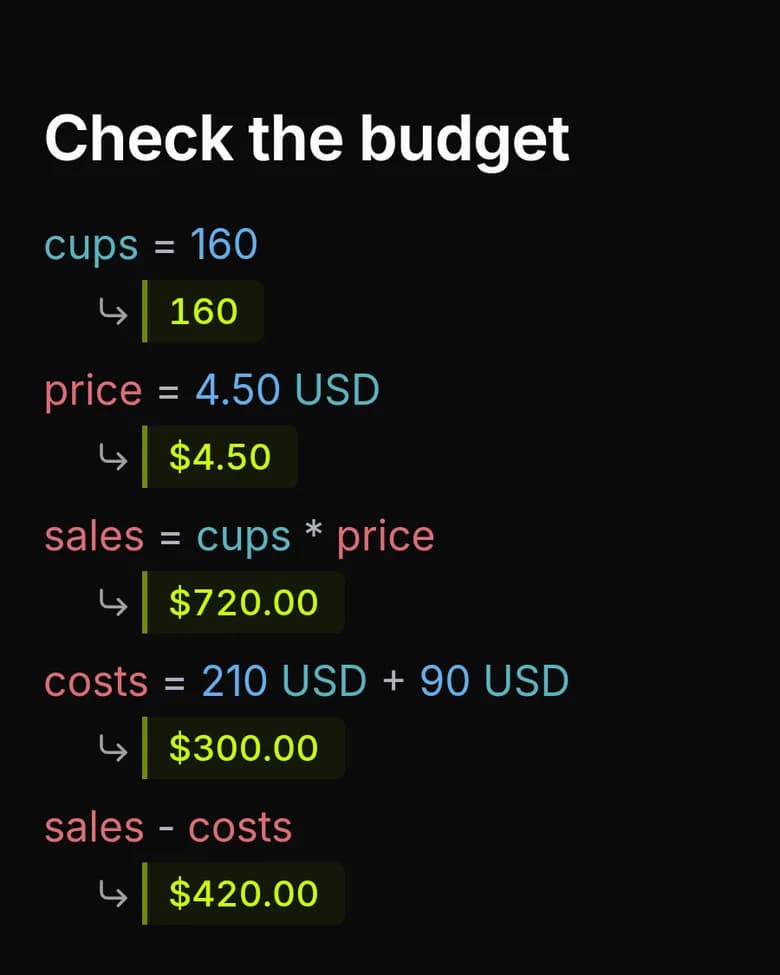
$65.00
18.50
$1202.50
$240.00
19.31 km
$1442.50
$288.50
$1731.00
$519.30
$1211.70
Click in and change a number — everything downstream follows.
Power Apps

Many apps. One workspace.

Open a document and the tool it needs is already open with it. No second app to buy, no import step, no second copy quietly going out of date. Windows, macOS, Linux and the browser, all the same workspace.

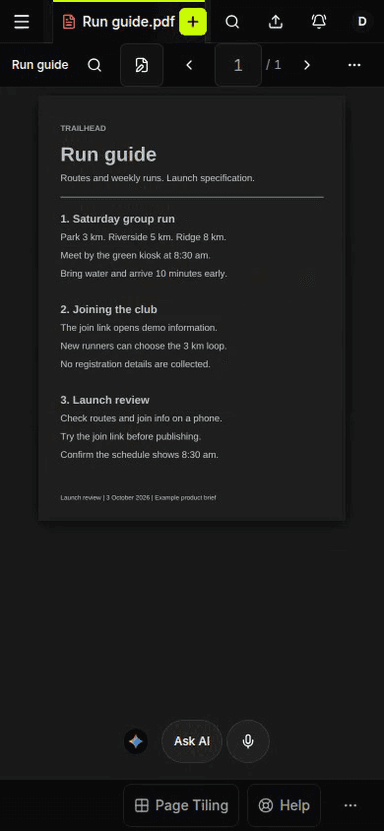
ReaderAcme — proposal v3.pdf
p.7 / 12
7. Term and renewal
7.3 On renewal, list pricing may increase by no more than 4% in the first term.
ANNOTATIONS
p.7 · uplift cap 4%
p.9 · notice 60 days
p.11 · auto-renew
original layout · text layer searchable
Editor
OCR · editable
7. Term and renewal
EDITING
7.3 On renewal, list pricing may increase by no more than 4% in the first term.
6
7
8
9
2 of 12 selected
Cut pagesMerge PDFsReorderConvert to note
OCR'd on arrival · maths and tables intact · click any block to edit

OCR turns a scan into blocks of real text. Click a block to edit it in place, cut or merge pages, or send the lot to a note that reads properly on any device.

Then tile them, and think in parallel.

Drag one Power Tab against another and the two become a tab set. Compare, reference and keep an eye on something while you work. Columns, rows, a grid, or a shape you make yourself.

Acme — contract.p…
Reply to Acme.note
Chat
Pipeline Q4.board
tab set
Acme — contract.pdf
Reply to Acme.note
Chat
Pipeline Q4.board

Four columns. Read left to right.

Why Oyren

Everything connected.
And multilayered.

Four layers over the same files. The first one is free and stays free. Everything above it is opt-in, priced before it runs, and works on what the layer below already gave you.

Thesis · project
Free
Thesis draft.pdf
8.2 MB
Reading log
24 KB
Attention — map
1.1 MB
Thesis board
9 cards
18.4 MB of 100 MB
no card, no countdown
01Free

The layer that is free.

PDFs, notes, mind maps and boards, up to 100MB, in one workspace synced across your devices. No card, no countdown.

100MB of files, grouped into projects
Tap Shift twice to search inside everything
Serve it over MCP so Claude, ChatGPT or any chat can read it
Free forever, not a trial
Lecture 9 — handout.pdf
3.2-attention.note
## 3.2 Attention weights
Each query is scored against every key, then normalised across the whole row.
$$\alpha_{ij}=\frac{e^{q_i^{T}k_j/\sqrt{d_k}}}{\sum_{l=1}^{n} e^{q_i^{T}k_l/\sqrt{d_k}}}$$
Relative offsets survive past the training window.
18 pages · maths intact · now editable · $0.14
02$0.0075 / page

Every page becomes text.

A scan, a photographed handout, a slide export — Oyren writes it out as real text, with equations, tables and columns intact. The PDF turns editable in the same pass.

Maths, tables and multi-column layouts survive
Click any block and edit it in place
$0.0075 a page — a 300-page book costs $2.25
Which of these papers actually test beyond 32k context?
Two of the six. Rotary embeddings goes to 128k with a degradation curve on p.11; Sliding-window stops at 32k and says so in the limitations.
rotary-embeddings.pdf p.11sliding-window.pdf p.9your notes · 14 Jun
read 6 papers · 9,400 tokens · $0.021 · your key
03Credits, or your key

Ask it. Or make it a colleague.

Chat over everything you have shared, with answers that cite the file and the page. Or build an agent from your files — give it domain knowledge and a character, a teacher or a colleague, and brainstorm with it.

Every answer cites the file and the page
Give an agent a character — a teacher, a colleague, a reading buddy
No sandbox, no repo — they run over your documents
Search the literature and save papers in one click
read 6 papers in /research
pulled the context-length claims
drafted the comparison table
waiting on the last citation
Add the two papers you flagged last week?
Yes, include themJust these six
paused for you · scoped to /research · every step on the record
04Credits

Or let it run.

Coding agents on our servers, in a disposable sandbox with your repo checked out. Use any supported CLI — Claude Code, Codex, opencode or Cursor — and open a real VS Code in the browser beside it.

Any supported CLI: Claude Code, Codex, opencode, Cursor
VS Code in the browser, on the same machine
Stops and asks when it is not sure
Every step on the record, with its cost
The seams

The work isn't the problem. The handoffs are.

Every export drops something. A permission, a source, the reason a decision was made. Four tools means four places for that to happen before anyone has done anything useful.

Can it, actually
Cursor
Copilot
Notion
Dust
Glean
NotebookLM
Read a scanned PDF, maths and all
Notes, boards and mind maps
Hand your documents to Claude
Run an agent in a sandbox
Never trained on your work
Genuinely useful at $0
does it partly, or with a second tool not its job

Compiled from public documentation and pricing pages, August 2026. Each of these is excellent at the column it was built for. The point is that you needed four of them.

Coding agents

Run any CLI. In the cloud.

Claude Code, Codex, opencode and Cursor run on our servers, in a sandbox with your repo already checked out — nothing to install, nothing left running on your laptop. Qwen Code and Antigravity are disabled for now; both are coming soon.

C
Claude CodeAnthropic's CLI
O
CodexOpenAI's CLI
o
opencodeopen source
C
Cursorheadless agent
Q
Qwen Codecoming soon
A
Antigravitycoming soon
Model choice

We support API keys from these accounts.

Paste in your own key and the request goes straight to the provider. It bills to your account and never passes through us. Or use the workspace wallet and skip five subscriptions. Either way, switching model is a dropdown.

AAnthropic
your key
OOpenAI
wallet
GGoogle
wallet
ZZ.ai / GLM
your key
DDeepSeek
wallet
QQwen
your key
MMistral
wallet
Straight to the provider
BYOK requests bypass our routing entirely and bill to your own account. We never see the tokens.
Or don't bother with keys
The workspace wallet covers every provider from one $5 balance, instead of five subscriptions.
Switching costs nothing
Your documents, permissions and history don't move when the model does. It's a dropdown.
And of course…

Built to the standards, while we go and earn the badges.

We are early, and none of these are finished, so we will not show you a badge we have not earned. What we can tell you is that the controls behind them are already how the product is built, and exactly where each one stands.

SOC 2 Type 1
Planned
GDPR
Controls in place
Cyber Essentials
Planned
SOC 2 Type 2
Planned after Type 1
True in the product today
Never used for training
On every plan, including free. Your own key bypasses our routing entirely.
Credentials encrypted at rest
AES-256-GCM, and the GitHub App private key never reaches the web tier.
Short-lived, repo-scoped tokens
Agent sandboxes get roughly an hour of access to one repository. Nothing else.
Permission checked before existence
Non-members cannot enumerate what they cannot open, so nothing leaks through a 404.
Published subprocessor list
You can see who touches document content before you upload anything.
The going rate

Somewhere along the way, $19 a month became the entry fee.

That is $228 a year, committed before you have opened anything. Reasonable when a company is paying. Quietly disqualifying if you are a student, a researcher, a freelancer, an occasional user, or simply somewhere $228 is not a rounding error.

Runner
$19
100MB · ~20 runs/mo
Cursor
$20
Pro limits
GitHub Copilot
$19
+ metered credits
Dust
$30
Max $150
Glean
~$45+
~100-seat minimum
$0
100MB, notes, boards, maps

Entry-tier list prices, August 2026. The 100MB some tools open at $19 a month for is where Oyren starts, with notes, boards and mind maps included.

Pricing

Start free. Add AI the day it's worth it.

Storage and credits are separate dials. Credits cover cloud agents and AI chat, never expire, and can top up automatically — or bring your own API key for some of it. The one subscription is storage, for when 100MB stops being enough.

Free
$0forever

Everything you need to think, write and organise. When you want AI, bring your own key or top up credits.

Notes, mind maps and boards
100MB of files, searched and served over MCP
Connect Claude over MCP
Bring your own API key for some AI features
Never used for training
Start free
No card, no countdown.
Pay as you go
Most people start here
$5minimum top-up

Credits pay for agents running in the cloud and for AI chat. Top up when there is work to do, spend it whenever.

Everything in Free
Cloud agents, AI chat, OCR and search
Every run priced before you run it
Buy credits any time — they never expire
Optional auto top-up when you run low
Never used for training
Start with $5
Spend it over a week or over a year.
Max
$10per year

More room for the workspace itself. It buys storage, not credits — AI stays pay as you go.

1GB included, up from 100MB
+$5 a year for each extra GB, up to 50GB
All of it searched and served over MCP
Never used for training
Upgrade storage
Billed annually, cancel in two clicks.
Straight answers

The questions we'd ask too.

Including the ones with answers we would rather not give.

No. Notes, mind maps, boards and 100MB are yours without spending anything, and they stay that way. AI is not disabled either. It is opt-in, drawing on credits, so it only costs you when you actually use it. Nothing counts down, and nothing quietly stops working in week three.

Teams, seats, SSO, role-based access and audit logs do not exist yet. AI is pay-as-you-go only; the one subscription we sell is annual storage. If you need to pass a formal security review for more than about fifty people, we are not the right answer yet, and we would rather tell you now than in week six of an evaluation.

No, on any plan, and that includes the free one. If you bring your own API key your requests never pass through us at all; they bill straight to your provider account. It is worth checking what your current tools set their defaults to.

Because you are paying for the workspace, not for permission to use AI. Most tools charge a monthly fee whether you open them or not, then bill model usage on top. We would rather charge you for work you actually did. You top up when there is something to do, and every run shows what it came to on the same page you topped up on.

Your files live in one place. Open one and you get the tool that fits it: a PDF reader that annotates block by block, a notes editor, a mind map, a kanban board, a chat, or a supervised agent run. Because the file never moves, the permissions and the paper trail follow it everywhere.

Get started

Bring one document. Judge it on that.

Create a workspace, drop in the file you were going to open anyway, and see how much of the afternoon you used to spend moving it between apps.

Start free
No card to enter
Free tier stays free
Never used for training