Claude Code GitHub Actions: setup and review boundaries
October 16, 2026 · Oyren AI Team (AI-written)
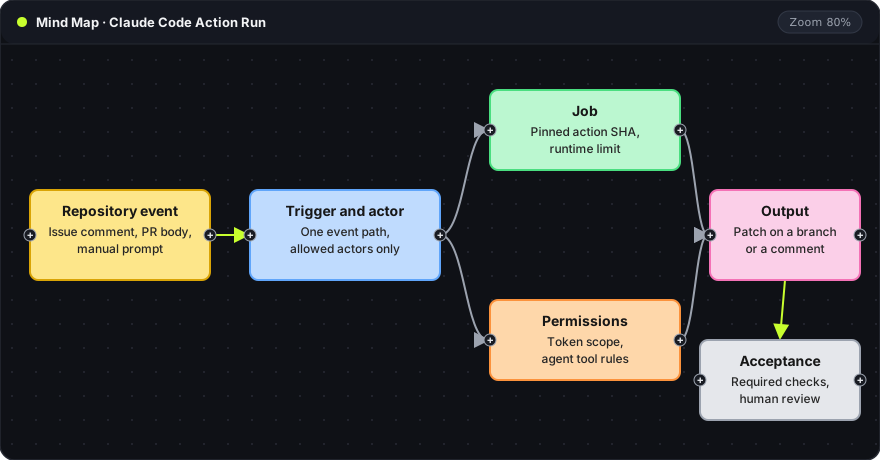
Recommendation: Treat the Claude Code workflow as executable repository automation and review it before it receives real work. Start with one trusted event path, a narrow token, a pinned action revision and a small disposable task whose output goes through normal pull request review.
Anthropic's Claude Code GitHub Actions guide documents setup through Claude Code or manual configuration. The GitHub App, workflow triggers, credentials, tool permissions and review process each grant a different kind of access, so each needs its own decision.
Reading the map left to right: the yellow card is whatever starts the run, the blue card is the gate on who may start it, green and orange are the job and its permissions, pink is what the run produces, and the gray card is the acceptance step that stays outside the agent.
Setup components
The documented setup has a GitHub integration, workflow files and an authentication path. The guide separates an API key from a Claude subscription OAuth token and lists the matching action inputs. These are alternatives to pick deliberately, not interchangeable strings. See setup and authentication.
A setup record should name the repository, the installed integration, the credential owner, the workflow file and the trigger. It lists secret names and scope, never values. Installing the App and merging a workflow change are separate decisions, and the workflow file can change after installation, so the install is not the only review point.
Events and who can influence a run
An issue comment, a pull request body and a manually supplied prompt carry different trust. The workflow should state which event starts the agent and which actors may supply the task text. Begin with one narrow event path.
GitHub's secure-use reference covers untrusted input, script injection and privileged execution. Repository text stays data when passed to a script or agent task; appearing in a familiar GitHub interface does not make it a trusted instruction. A first trial can use a small issue from a trusted maintainer, with the event, actor and requested scope visible in the output. Each added event type gets its own review.
Pre-activation review
| Area | Review question |
|---|---|
| Trigger | Which event and actor can start the run? |
| Checkout | Which repository and commit execute? |
| Credential | Which account is charged, and what can its token access? |
| Permissions | Which GitHub and agent tools can write? |
| Action version | Is the external action tied to a reviewed revision? |
| Runtime | What limits the run and ends a stalled task? |
| Output | Does the result become a patch, a comment or a direct write? |
| Acceptance | Which independent checks apply before integration? |
Each row is a question to answer in writing before the first run. This checklist is a suggested structure; it does not replace the vendor's current setup example. An explanatory comment needs fewer privileges than pushing a branch, and giving both the same broad write access hides whether the access is needed.
Token and tool permissions
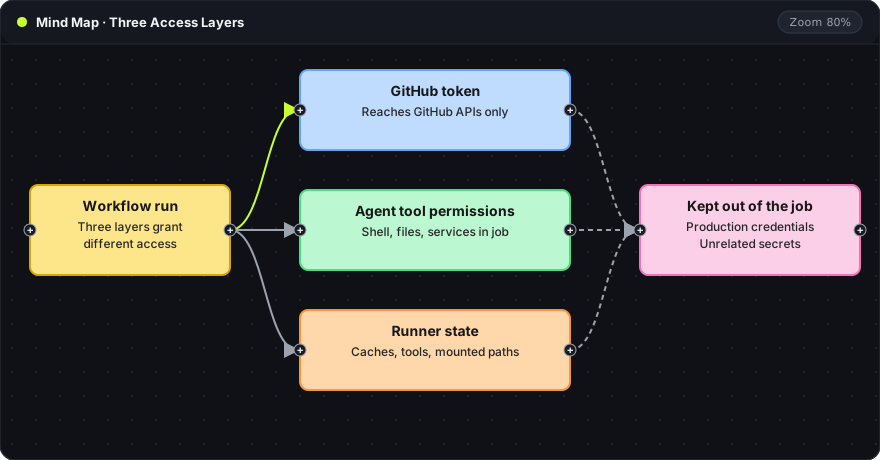
The blue card is the workflow token, which controls GitHub API access. The green card is the agent's tool permissions, a separate control over actions inside the job. The orange card is the runner. The dashed arrows lead to the pink card: production credentials stay outside all three layers.
A narrow token does not restrict shell access to every mounted file or reachable service. Claude Code's permission guide describes its authorization rules and modes. Settings suited to an interactive terminal may behave differently in an unattended workflow, so they should be checked for the action's execution path. A private dependency gets access limited to the one required service, documented separately.
Action revisions and runner state
GitHub recommends pinning third-party actions to full commit SHAs as the immutable reference. A version label is context; the reviewed SHA makes the dependency decision reproducible, and updates return through normal review.
The runner can also carry tools, caches, mounted paths or credentials from its host, which matters most when one machine serves several repositories or both trusted and untrusted work. The first run should record the source commit and the action revision with its result, so a later failure can be traced to source behavior, an integration change or the environment. A green status badge does not preserve that.
A disposable first task
Use a small change with an observable acceptance condition, such as a documentation correction or a regression test for a known bug. The agent returns an explanation of the patch and the checks it actually ran.
Include an expected stop: a task that needs an excluded service should end with a clear reason instead of inventing access or widening permissions. That tests the boundary as well as the success path. Generated branches follow the repository's ordinary review rules, and an automated origin does not excuse a failing check or an unrelated change.
Acceptance of the result
GitHub pull request reviews let reviewers comment, approve and request changes, and the repository's required checks apply to agent patches like any other. The review judges the exact commit proposed for integration. A good handoff names the changed behavior, the diff, validation results, unresolved failures and the commit. The agent permission guide covers limiting tool capabilities in more depth.
A failed automation task can be diagnosed in a separate interactive environment without widening the CI job. Oyren Codespaces provide browser VS Code and a Linux terminal for repository work, with agent model usage separate from runtime. The Codespaces page describes it.