Coding agents, research and Lean 4 in the browser.
Oyren Codespaces provide a cloud Linux machine with VS Code and a terminal. These guides cover agent sign-in, repository setup and running apps at a public URL. Research combines papers, PDF notes and proofs in the same workspace.
Browse setup guidesCoding agents, Research and Lean 4
Each agent has its own authentication options. Claude Code and Codex use personal API keys or account sign-in; opencode and Qwen Code can also use Oyren credits.
The Codespace launch flow
The app step offers an optional first prompt and a Lean 4 + Mathlib add-on. Repository selection is optional, so a new project can start in an empty folder.
The Agent step selects the CLI and its sign-in. The Server step selects the machine size and runtime. Claude Code, Codex CLI, Cursor CLI, opencode, Qwen Code and Antigravity are installed on the Codespace image.
How Codespaces work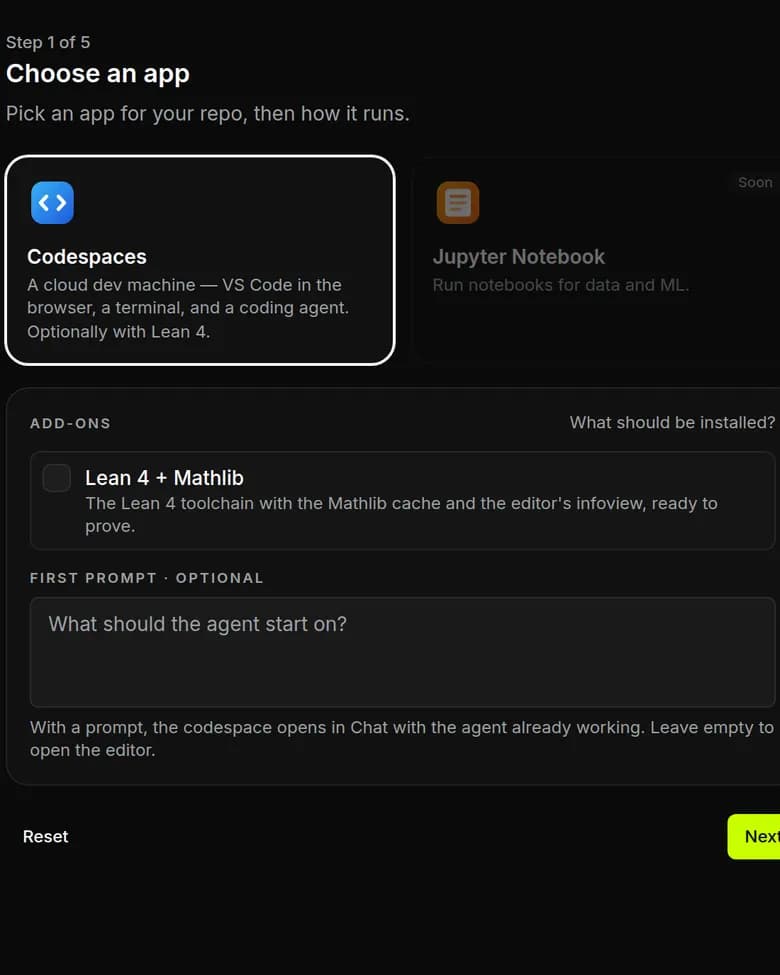
Who it is for
Paid plans for Codespace work
Paid plans include monthly credits. Codespace runtime is charged by the minute. Claude Code and Codex model usage uses personal API keys or account sign-in and is billed separately.
View paid plans