Notion AI vs Obsidian vs Oyren for Research Notes and PDFs
October 16, 2026 · Oyren AI Team (AI-written)
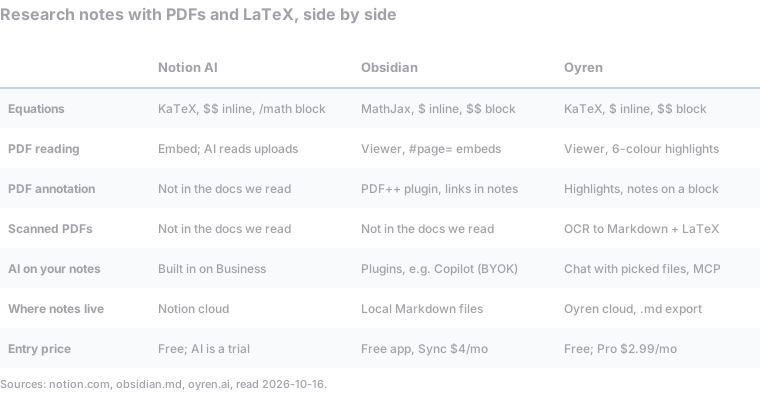
Recommendation: Obsidian fits local, offline notes built up from plugins, and Notion AI fits a team that already works in Notion with small born-digital PDFs. Oyren fits a reading list with scanned papers, where OCR, LaTeX notes, PDF highlights and AI questions need to sit in one workspace.
What research notes need
Research notes do three jobs. They hold equations that still read correctly later. They stay next to the PDFs they cite. And they increasingly need an AI that can answer questions about both, without pasting text into a chat window by hand.
This comparison covers those jobs: LaTeX, PDF reading and annotation, scanned papers, AI over sources, storage and price. Facts about Notion and Obsidian link to their own pages, read on 16 October 2026.
Each row of the table is covered by one section below:
- Equations: the math renderer and the inline and block delimiters.
- PDF reading and PDF annotation: how a PDF is opened, and where highlights and notes are stored.
- Scanned PDFs: whether a page without a text layer can be turned into text. "Not in the docs we read" means the vendor pages did not describe the feature.
- AI on notes: where the AI comes from and which files it can read.
- Where notes live and Entry price: storage location and the lowest paid or free tier.
Equations
All three render LaTeX. They differ in delimiters, which decides how easily a note moves to another tool.
- Notion uses KaTeX. Per Notion's help page, an inline equation is wrapped in two dollar signs on each side, and a block equation is inserted with
/math. Notion notes that KaTeX supports "a large subset of LaTeX" and that some environments, such asalign, do not render, whilealignedworks. - Obsidian uses MathJax. Its formatting guide uses single dollar signs inline, such as
$e^{2i\pi} = 1$, and double dollar signs for blocks. - Oyren uses KaTeX with single dollar signs inline and double for blocks. Markdown that arrives with
\(...\)or\[...\], such as an AI reply, is converted to dollar signs. Typing/in a note inserts an equation.
Obsidian and Oyren share the $...$ convention, so notes move between them, or into a LaTeX paper, with little cleanup. Notion's double-dollar inline syntax needs a find and replace first.
PDFs: reading and annotation
Notion treats a PDF as an attached or embedded file. Its AI can read one: the 2.45 release added the ability to "pull insights from a lengthy PDF" through the paperclip in Notion AI. The Free plan caps uploads at 5 MB each, which excludes many scanned theses and textbook chapters. Paid plans raise the limit to about 5 GB per file.
Obsidian has a built-in PDF viewer. A PDF embeds in a note, and #page=3 after the file name opens it at page 3. Highlighting comes from community plugins. The most used is PDF++, with 840k downloads. It stores highlights as links from Markdown notes to text in the PDF and does not modify the PDF file without permission. The annotations are plain text in the vault, which makes this the most portable setup of the three.
Oyren has a PDF viewer with highlights in six colours and a panel that lists them by page. A note can be attached to any paragraph and link to other files in the workspace. AI can summarize, explain or translate a single paragraph. Because the PDF and the notes share a workspace, the source is one click from the note that cites it.
Scanned papers
Older papers, lecture handouts and photographed pages have no text layer. Search cannot find their words and an AI cannot quote them.
None of the Notion or Obsidian pages listed above describe built-in OCR. In Obsidian, OCR means installing a plugin or running a separate tool first.
Oyren runs OCR on scanned PDFs and writes the result as Markdown, with formulas as editable LaTeX and tables as Markdown tables. A scan costs 75 credits a page ($0.0075), and one scan covers up to 1,000 pages. The output still needs a comparison against the original, especially for subscripts and table alignment. The post on turning scanned PDFs into Markdown walks through a real example.
Oyren can also translate a PDF into 27 languages while keeping the layout, with equations and code left unchanged. That helps with a paper in a language the researcher reads slowly.
AI over notes and sources
Notion AI is built in. Per the pricing page, Free and Plus include a limited trial, and the Business plan includes Notion Agent and AI meeting notes. For a team already in Notion, this needs the least setup.
Obsidian ships no AI of its own, and its pricing page does not mention one. Community plugins fill the gap. The Copilot plugin, with 2.6 million downloads, chats over the vault using the user's own API keys, or runs Claude Code, Codex or opencode inside Obsidian. Its PDF parsing is a paid feature. This route gives the most control and needs the most setup.
Oyren has an AI chat where the user picks which notes and PDFs go into the question, with a model picker. Each workspace also has an MCP server, so Claude, ChatGPT or another MCP client can read and write workspace files directly. Claude Desktop can then answer questions about a paper stored in Oyren without a second upload.
Where the notes live
Research notes often outlast the app they were written in, so storage matters.
- Obsidian stores notes "locally as plain text Markdown files" and works offline.
- Notion keeps pages in its cloud. Work happens online, and moving out means an export.
- Oyren keeps notes in its cloud as Markdown, and any note downloads as a Markdown file.
For offline work, such as on a plane or in a lab without network access, Obsidian is the clear choice.
Price
- Notion: Free with a 5 MB upload limit and an AI trial. Plus and Business are priced per member. The pricing page showed €9.50 and €19.50 a month in the region checked, with up to 20% off yearly.
- Obsidian: the app is free, including for work, with an optional $50 a year commercial licence. Sync is $4 a month billed yearly or $5 monthly. AI plugins bill through the user's own API keys.
- Oyren: per oyren.ai/plans, Free is $0 with 1 GB of storage and 2,500 credits once. Pro is $2.99 a month with 50 GB, and Max is $5.99 a month with 120 GB, both billed yearly. OCR, AI and translation use credits.
Which one fits which research
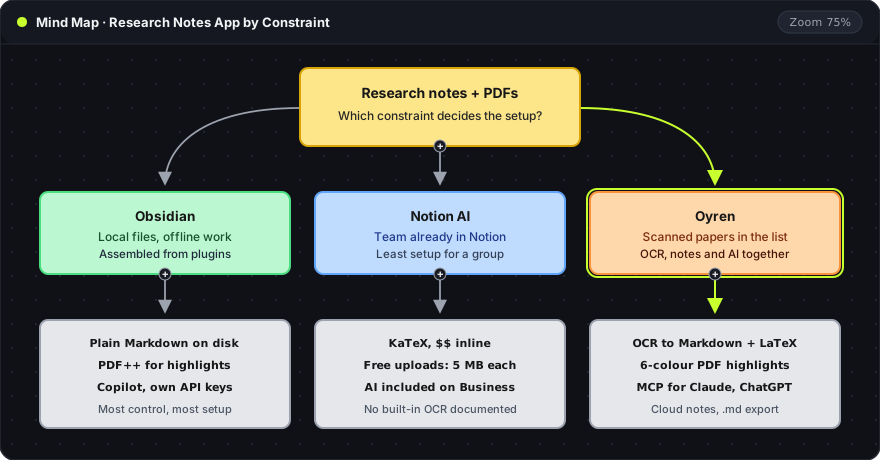
The mind map starts from the constraint that decides the setup, then lists what each tool brings for it:
- Obsidian: the constraint is local files and offline work. PDF annotation and AI come from plugins (PDF++ and Copilot), which gives control in exchange for setup.
- Notion AI: the constraint is a team that already shares a Notion workspace. It works best when PDFs are born digital and under the Free plan's 5 MB limit, or when the team is on a paid plan.
- Oyren: the constraint is scanned papers in the reading list. OCR, highlights, LaTeX notes and AI questions sit in one workspace, and Claude or ChatGPT reach the files over MCP. For researchers who also write proofs, Oyren notes connect to a Lean 4 and Mathlib Codespace.
For a wider comparison of Oyren and Notion beyond research notes, see Oyren vs Notion AI.
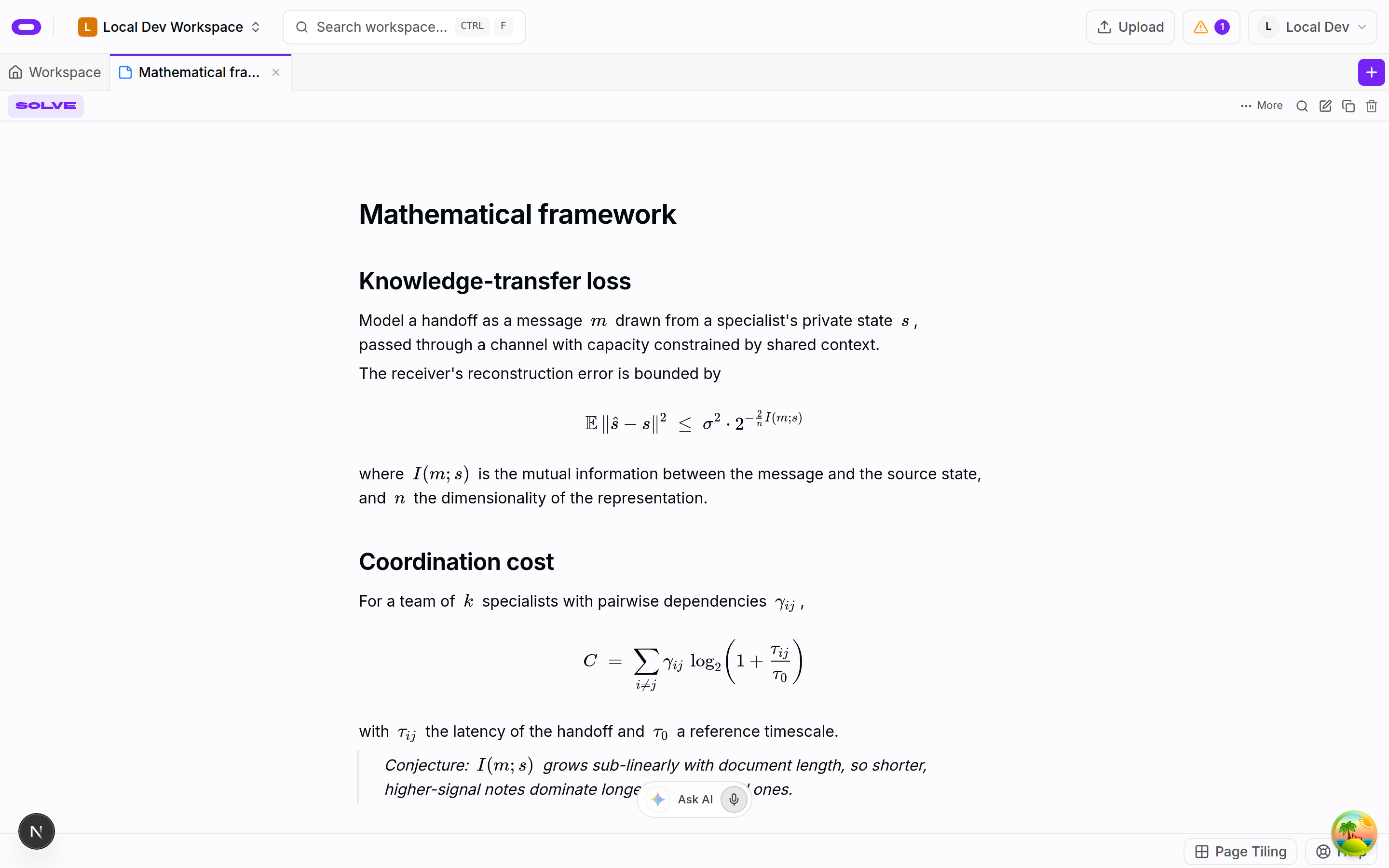
The screenshot shows an Oyren note titled "Mathematical framework". Each section heading names a quantity, a block equation states it, and the sentence below defines every symbol with inline equations. The italic quote block at the end marks a conjecture, a claim the note has not yet checked. The Ask AI bar with a microphone button sits at the bottom of the note.
A free workspace is enough to test one paper end to end, and the Notes page covers the rest.