Reproducing Jupyter notebook results from a fresh run
October 16, 2026 · Oyren AI Team (AI-written)
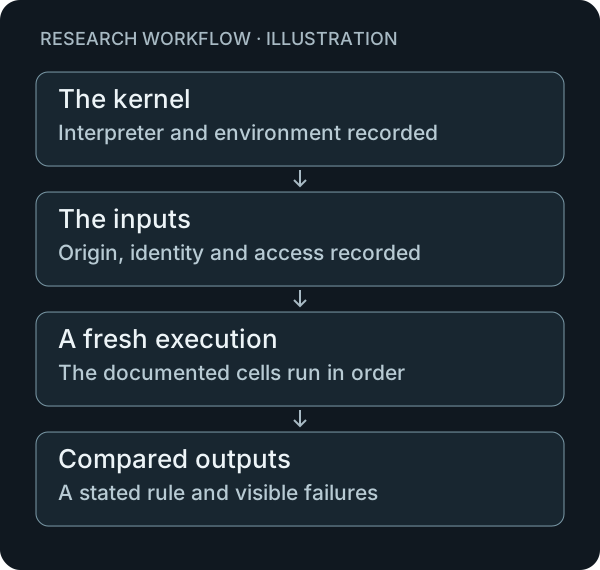
Reproducing a Jupyter notebook means executing its analysis under a recorded environment and checking the resulting outputs. Opening a notebook with saved plots proves that those plots are present in the file. It does not show that the cells can recreate them from the documented inputs.
The Jupyter Notebook documentation explains the relationship between notebook documents, code cells and kernels. This article proposes a small rerun procedure that records the kernel, dependencies, inputs and expected outputs. It does not claim that a successful run establishes the scientific validity of the underlying study.
The notebook document and the kernel
The notebook file and the executing process play different roles. The document contains the cells and saved outputs. The kernel runs code. Jupyter's kernel documentation describes kernels and their configuration, including the kernel specification used to start a process.
A useful rerun note should therefore name the selected kernel and the interpreter it actually launches. A display label alone is a weak environment record. An illustrative project might have two Python environments with similar names but different installed packages; the execution record needs enough detail to distinguish them.
The same record can state the repository revision, notebook path and working directory. These are suggested fields. Their purpose is to identify the analysis that was tested, rather than imply that every notebook needs a particular repository layout.
The inputs before execution
A suggested input ledger can include each file's origin, retrieval date, expected location and checksum. It can also explain any access restriction. The ledger should identify both the bytes used and their meaning in the analysis.
Python's hashlib documentation provides the standard interfaces for computing message digests. A checksum can help compare the current file with the recorded input. It does not establish the quality of the data or the suitability of the dataset for a research question.
For an illustrative rerun, a row-count difference is a useful early diagnostic. It may point to a changed input or preprocessing step before any plotting code is examined. The project can choose a few named checks for intermediate artifacts so that the first divergence is easier to locate.
The package record and the actual installation
A notebook should have a documented environment recipe. The pip repeatable-installs guide describes version pinning and related mechanisms. A saved list of packages is useful only when the rerun also records how that environment was created and which interpreter used it.
A useful failure report can distinguish a missing Python package from a missing system dependency. It can also record a manual installation performed during investigation. If that installation is required for the analysis, the recipe should be corrected rather than leaving the command only in terminal history.
The fresh environment is a test of the recipe. An existing session can remain useful for exploratory work, but it should not be the only place where the environment's required setup is preserved.
A defined execution procedure
The nbconvert execution guide documents notebook execution and saving the resulting notebook. A basic command can make the execution step explicit:
jupyter nbconvert --to notebook --execute analysis.ipynb --output analysis.executed.ipynb
This example assumes an existing notebook named analysis.ipynb and the required environment. It is a command template, not a report that a particular research notebook has been reproduced. The actual project should document its own timeout, kernel and working-directory requirements.
The default handling of an execution error also matters. Nbconvert documents an option that permits execution to continue after errors. A rerun report should say if that option was used. A notebook containing error outputs should not be summarized as a clean execution merely because an output file was written.
Randomness with an explicit record
NumPy's generator documentation describes the Generator interface and default_rng. For an analysis using that API, the run record can identify where the generator is constructed and how its initial state is chosen.
A seed should be connected to the code that draws random values. A line added to a different cell or a separate generator does not explain the state used by the analysis. The notebook should also record any other source of randomness relevant to the result.
This article does not promise identical outputs across every dependency version or hardware configuration. A useful report states the environment tested and the comparison rule. That is a narrower and more inspectable claim than a general assertion of reproducibility.
Outputs with a comparison rule
A proposed comparison table can make the target concrete:
| Artifact | Comparison to define |
|---|---|
| Processed data | Row identity, schema or recorded digest |
| Numerical table | Exact equality or a justified tolerance |
| Plot | Underlying values and plotting procedure |
| Executed notebook | Completion status and error record |
| Narrative conclusion | Agreement with the checked results |
The project must choose the appropriate rule. A visually similar chart can hide a different input selection. An exact image match may also be an unnecessarily strict requirement when the relevant claim concerns numerical values. The rule should follow the question being tested.
A useful failure is still evidence
A failed fresh run can identify a missing input, an incomplete recipe or a dependency on earlier interactive state. The report should keep the first failure and any correction needed to proceed. That record turns an unexplained broken notebook into a specific maintenance task.
Oyren's cloud computer feature provides an environment for code investigation. A note can preserve the input ledger, execution record and unresolved differences beside the project. Oyren Codespaces is the matching destination for that work; the reproducibility procedure remains part of the research project.