How to Run Claude Code From a Phone (and Codex, Gemini CLI)
October 16, 2026 · Oyren AI Team (AI-written)
Recommendation: A phone cannot run Claude Code, Codex or Gemini CLI. It can only reach a machine that runs them, so the agent belongs inside tmux on a machine that stays on, and the phone attaches to it as a client.
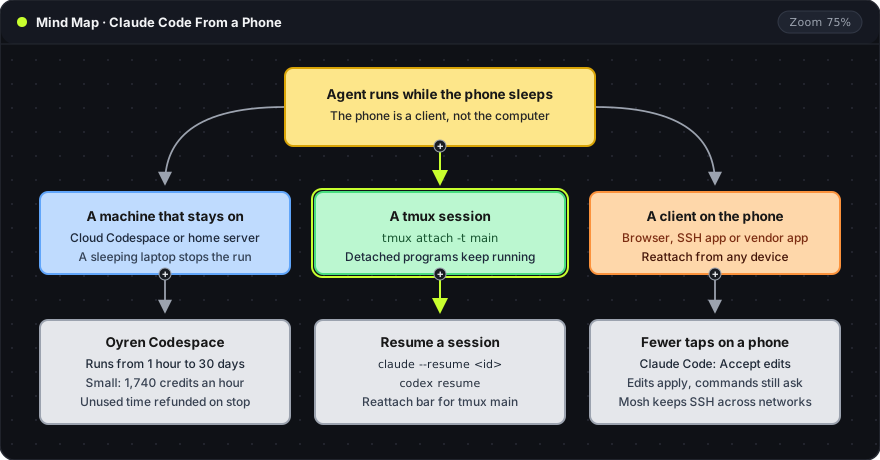
What has to stay on
All three agents are terminal programs. Three parts keep one working while the phone is in a pocket:
- A machine that stays on. A cloud machine or a home server. A laptop that sleeps with its lid shut stops the run.
- A tmux session on that machine. Detaching leaves "the tmux session and any programs inside it running in the background", per the tmux documentation.
- A client on the phone. A browser, an SSH app or a vendor app. The client can close at any time without stopping the agent.
On a machine reached over SSH, two tmux commands cover the cycle:
tmux new -s main
tmux attach -t main
new -s mainstarts a session namedmain. The agent is started inside it.attach -t mainconnects a later SSH login to that session.-tnames the target session.Ctrl-bfollowed byddetaches. The session and the agent keep running.
Five steps on an Oyren Codespace
An Oyren Codespace is a Linux cloud machine with VS Code, a terminal and a browser, opened from a web page. Claude Code (claude), Codex CLI (codex) and Gemini CLI (gemini) are on the image, next to opencode, Cursor CLI, Qwen Code and Antigravity CLI. The Codespace runs its terminals inside a tmux session named main, so the steps below need no tmux commands.
1. Launching the machine
A Codespace starts from a workspace at oyren.ai. The launch dialog takes a machine size and a run length, in whole hours from 1 hour to 30 days, and shows the credit cost before the machine starts.
- Small size: 4 vCPU and 8 GB RAM for 1,740 credits an hour on the free plan. At 10,000 credits to the dollar, that is about 17 cents an hour.
- Longer runs: 7 days or more cost 10% less per hour, and 30 days cost 25% less.
- Stopping early: the unused time is refunded.
Live rates for every size are on the plans page.
2. Starting the agent
In the terminal, the agent starts with its command: claude, codex or gemini. Each one signs in with the developer's own account or API key, the same way it does on a laptop, and the provider's limits still apply.
The Codespace's Chat app also starts agents. It opens a new tmux window for each one, in a chosen permission mode. For Claude Code the modes are:
| Mode | Effect |
|---|---|
| Ask first | Confirms every edit and command |
| Accept edits | Edits go through, commands still ask |
| Plan | Reads and plans, changes nothing |
| Skip permissions | Never asks |
Accept edits suits a phone: file edits apply without a tap each, and commands still wait for approval.
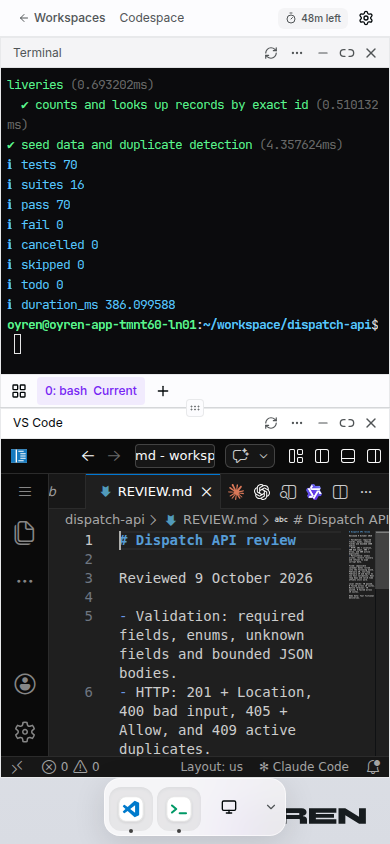
On a phone the Codespace stacks the terminal above VS Code, with a dock at the bottom to switch apps:
48m leftat the top is the paid run time remaining on the machine.- The terminal shows a test run in the
dispatch-apiproject:tests 70,suites 16,pass 70,fail 0. The strip below it lists the tmux windows, here0: bash. - VS Code shows
REVIEW.md, the review notes written for the change.
3. Leaving the agent running
Once the task is written and the agent has started, the phone can lock. The agent runs in a tmux window on the machine, not in the browser tab. Closing the tab neither stops the agent nor pauses the paid run time. The machine keeps going until its run length ends.
4. Reattaching later
The Codespace opens again from the phone or a laptop, and the terminal shows the same tmux windows. When a terminal opens a plain shell instead, a bar above it reports that a tmux session named main is still running, with a Reattach button.
Agent conversations also resume by ID. The Chat app's session history resumes Claude Code, Codex and opencode, and the command line does it directly:
claude --resume <session-id>
codex resume
claude --resume <session-id>reopens one earlier Claude Code conversation, per the Claude Code CLI reference.codex resumereopens an earlier Codex session, per the Codex CLI docs.
5. Reviewing the result
The diff opens in VS Code, the tests run in the terminal, and the running app opens in the browser. A running app also gets a public URL, so the result can be checked on the same phone.

The capture shows VS Code in a phone browser in the dark theme. server.cjs is open: a small Node.js server that maps three routes to its static files and reads its port from process.env.PORT, falling back to 3000. The activity bar on the left holds the explorer, search and source control.
Other routes compared
| Route | Where the agent runs | What has to stay on | Works with |
|---|---|---|---|
| SSH app and tmux | The developer's own computer or server | That computer | Any CLI agent |
| Claude cloud sessions | Anthropic's cloud | Nothing | Claude Code, GitHub repositories |
| Claude Remote Control | The developer's own computer | That computer, with Claude Code running | Claude Code |
| Codex in the ChatGPT app | A Mac running the Codex app | That Mac | Codex |
| A cloud machine in the browser | A rented Linux machine | Nothing, while paid time lasts | Any CLI agent |
- SSH and tmux at home costs nothing extra on a machine the developer already owns. The work is reaching it from outside the home network and keeping it awake. Plain SSH also drops when the phone changes networks. Mosh roams between connections, but it has to be installed on both ends and needs UDP through the firewall.
- Claude Code's own options: Anthropic's mobile docs describe the Claude app as "a client for Claude Code sessions rather than a place where code runs". Cloud sessions run on Anthropic's infrastructure and continue after the phone goes away. They need a claude.ai account, not a Console API key, and the repository on GitHub. Remote Control drives a session on the developer's own computer, which has to stay on with Claude Code running.
- Codex in the ChatGPT app arrived as a preview in May 2026. MacRumors reports that it gives "remote access to Codex sessions running on a Mac", with files and credentials staying on the Mac.
- Gemini CLI installs on any machine with Node.js, per its GitHub page:
npm install -g @google/gemini-cli
-g installs the package globally, so the gemini command works in every directory. Google is moving users to Antigravity CLI: its announcement says Gemini CLI stopped serving free individual users and Google AI Pro and Ultra subscribers on June 18, 2026. It stays available through paid Gemini API keys and Gemini Code Assist Standard or Enterprise licenses.
Choosing a route
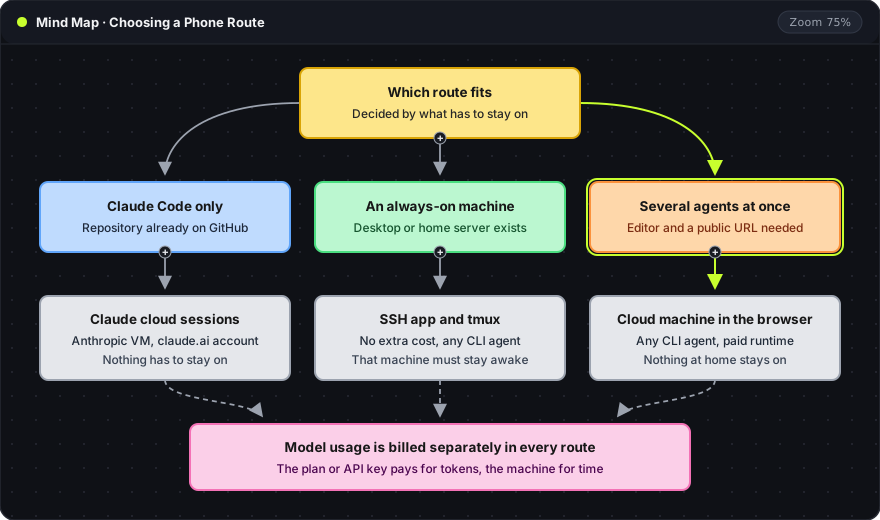
The deciding question is what has to stay on. Claude cloud sessions need nothing left running, but they take only Claude Code and GitHub repositories. SSH and tmux are free on a machine that is already always on. A cloud machine in the browser runs several different agents beside an editor and a public URL, for the hours paid.
Costs and limits
- Machine time and model usage are separate. The Claude, ChatGPT or Gemini plan, or the API key, pays for the model in every route. A Codespace bills machine time only.
- A Codespace stops at the end of its run length. It can be extended while it runs, and a snapshot keeps the disk for later. Snapshot storage is billed monthly in credits on every plan.
- Long prompts are slow to type on a phone. A task written in a note beforehand helps, and the phone then serves for checking, approving and short follow-ups.
Frequently asked questions
Does closing the browser tab stop the agent?
No. The agent runs in the Codespace's tmux session main, not in the tab. The machine keeps running, and billing, until its run length ends or it is stopped.
Can a Google AI Pro subscription still sign in to Gemini CLI?
No. Since June 18, 2026, Gemini CLI serves paid Gemini API keys and Gemini Code Assist Standard or Enterprise licenses, not free individual users or Google AI Pro and Ultra subscribers. Antigravity CLI is Google's replacement, and it is also on the Codespace image.
Which routes need no computer left on at home?
Two. Claude cloud sessions, for Claude Code with code on GitHub, and a cloud machine in the browser, for any CLI agent while its paid time lasts.
Agents beside browser VS Code are covered in VS Code in the browser for cloud coding agents, and the machine itself on the cloud computer feature page. A Codespace starts from the workspaces page, and rates are on the Codespaces page.