Symbolic vs numerical math: a research note guide
October 16, 2026 · Oyren AI Team (AI-written)
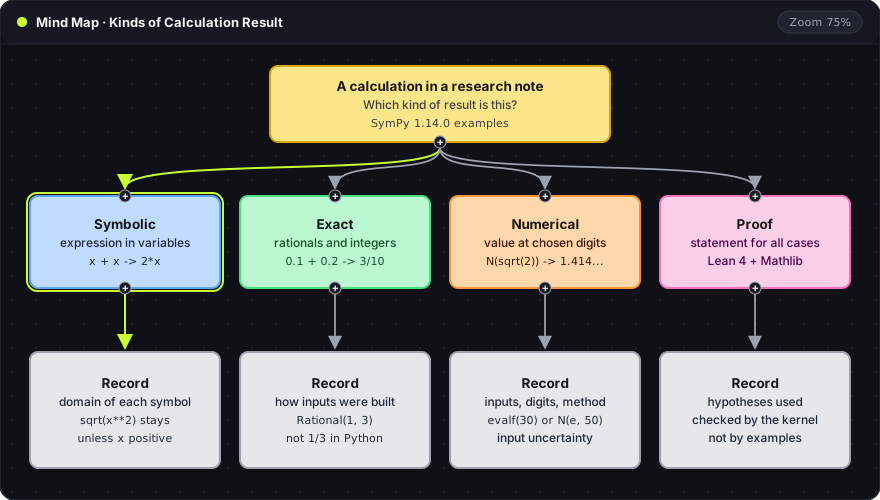
Recommendation: A calculation in a research note is one of four things: a symbolic expression, an exact value, a numerical approximation or a proved statement. Labeling which one it is, with the assumptions, input construction or precision that result depends on, keeps the note checkable months later.
The map reads top to bottom. The yellow root is the question every calculation in a note has to answer: which kind of result is this? The four colored branches are the kinds of result, each with a one-line example. The gray card under each branch is what the note must record for that result to be checkable. The examples come from SymPy 1.14.0, the Python library for symbolic mathematics, run with Python 3.12.
Four kinds of result
| Kind | What it produces | What the note records |
|---|---|---|
| Symbolic | An expression in variables, such as 2*x | The domain and assumptions of each symbol |
| Exact | A rational, an integer or an exact expression, such as 3/10 | How each input was constructed |
| Numerical | An approximate value, such as 1.41421356237310 | Input values, digits of precision and method |
| Proof | A statement shown to hold under hypotheses | The hypotheses and the proof itself |
Equation rendering is not on this list. LaTeX makes a formula readable, but a rendered formula says nothing about whether it is true. One research task often uses several of these: a derivation suggests a formula, a numerical run evaluates it, and a proof states the conditions under which it holds. Each result keeps its own label.
Expressions and values
A symbolic expression keeps the variables. A value comes from substituting numbers into it.
from sympy import symbols

x = symbols('x')
expr = x + x
print(expr)              # 2*x
print(expr.subs(x, 3))   # 6
symbols('x')creates a SymPy symbol namedx. Without it, Python has no value forxand raises an error.x + xis simplified to2*xas the expression is built. The result is still an expression, valid for everyx..subs(x, 3)substitutes3forxand returns6, a value for that one case.
Both lines can belong in a note, with different labels. 2*x is a relationship. 6 is the result for x = 3, and it says nothing about other inputs.
Exact values depend on how the input was built
Python evaluates its own arithmetic before SymPy sees it. SymPy's gotchas guide covers this boundary. The same fraction written two ways gives two different results:
from sympy import Rational, symbols

x = symbols('x')
print(1/3)                                # 0.3333333333333333
print(Rational(1, 3))                     # 1/3
print(x + 1/3)                            # x + 0.333333333333333
print(0.1 + 0.2)                          # 0.30000000000000004
print(Rational('0.1') + Rational('0.2'))  # 3/10
1/3is Python division. It returns a binary floating-point number before SymPy is involved.Rational(1, 3)builds the exact fraction one third.x + 1/3keeps the variable symbolic but carries the float0.333333333333333. The expression is no longer exact.0.1 + 0.2prints0.30000000000000004, because neither decimal has an exact binary representation. Python's floating-point tutorial explains why.Rational('0.1')reads the decimal string exactly, so the sum is exactly3/10.
Importing SymPy does not make a calculation exact. The input construction does, so the note records it. A fraction meant to be exact is written as Rational(1, 3). A decimal read from an instrument keeps its measurement context, rather than being treated as an exact number with every digit significant.
Assumptions change the answer
A symbolic simplification is only valid in the domain where it holds. SymPy's assumptions guide explains how symbol assumptions control which rewrites are allowed. The square root of a square shows it:
from sympy import Symbol, sqrt

x = Symbol('x')
r = Symbol('r', real=True)
p = Symbol('p', positive=True)
print(sqrt(x**2))   # sqrt(x**2)
print(sqrt(r**2))   # Abs(r)
print(sqrt(p**2))   # p
Symbol('x')has no assumptions.xcould be complex, so SymPy leavessqrt(x**2)unchanged.real=Truetells SymPy the symbol is a real number. The result becomesAbs(r).positive=Trueadds positivity, and the result simplifies top.
Three symbols, three different answers. A note that writes sqrt(x**2) = x without stating that x is positive records a result that is false for negative x. The record for each symbol is short: its name, its domain, its units if it has any, and where the assumption came from. A measured parameter and a mathematical hypothesis are different sources, and the note says which one applies.
Precision is a setting, not a property of the answer
SymPy's numerical evaluation documentation describes evalf and N, which turn an exact expression into an approximation at a chosen number of significant digits:
from sympy import N, Rational, sqrt

print(sqrt(2))                  # sqrt(2)
print(N(sqrt(2)))               # 1.41421356237310
print(sqrt(2).evalf(30))        # 1.41421356237309504880168872421
print(N(0.1, 30))               # 0.100000000000000005551115123126
print(N(Rational(1, 10), 30))   # 0.100000000000000000000000000000
sqrt(2)stays exact. SymPy does not approximate unless asked.N(expr)evaluates to 15 significant digits by default..evalf(30)andN(expr, 30)set the number of significant digits, here 30.N(0.1, 30)exposes the binary error already stored in the float0.1. More digits show the error, they do not remove it.N(Rational(1, 10), 30)starts from an exact tenth and prints exact zeros.
The last two lines are the main point of this section. Thirty printed digits are only as good as the input. For a calculation with measured lengths, extra digits do not reduce the uncertainty of the measurements. A numerical record therefore keeps three things apart: the input values and their uncertainty, the requested precision, and the method. If a result is compared with another implementation, the record also states the tolerance and why it fits the problem. No tolerance is universal.
Checks before a result enters the prose
Three checks catch most errors in calculation notes:
- A small case with a known answer. The implementation is compared with a case whose result can be worked out independently. Agreement supports that case, not the general expression.
- A boundary from the assumptions. If the method needs a positive parameter, the note shows what happens at zero or below. The outcome is a documented limit, not a set of plausible outputs.
- The claim matches the evidence. A sentence about all inputs needs a proof. A few numerical examples support only the cases tested, and a result for one recorded case is not rewritten as a general statement when the note is summarized.
Calculation, notation and proof in Oyren
Oyren notes evaluate calculation lines in place with SOLVE. The Solve Engine 2.40.0 article lists what it handles: exact decimal arithmetic, where 0.1 + 0.2 == 0.3 is true, integers beyond 2^53, unit algebra, and check assertions on dependent lines. SOLVE returns values. Rearranging expressions in variables, as in the SymPy examples above, is work for a computer algebra system.
For notation and proof, the maths notes feature covers LaTeX in notes and formal proofs in a Lean 4 + Mathlib Codespace, where the Lean kernel checks each proof against its stated hypotheses. Oyren notes keep the expression, the numbers and the argument in one place, each labeled as what it is.
Frequently asked questions
Is a result with many digits more accurate?
No. Printed digits reflect the requested precision, not the quality of the inputs. N(0.1, 30) prints 30 digits of a float that was already off in the 18th significant digit.
When does a calculation need SymPy rather than a calculator?
When the answer has to stay in terms of variables, or when exact rationals and roots must not be rounded. A calculator, including SOLVE in a note, returns a value for given inputs.
Does a symbolic result prove a statement?
No. A computer algebra result is a computation under the assumptions given to the system. A proof states hypotheses and shows the statement follows from them. In Lean 4, the kernel checks that step.
Does LaTeX check a formula?
No. LaTeX renders notation. A correctly typeset formula can still be wrong, so its meaning is checked by calculation or proof.