ChatPDF alternatives for questions, notes and translation
October 16, 2026 · Oyren AI Team (AI-written)
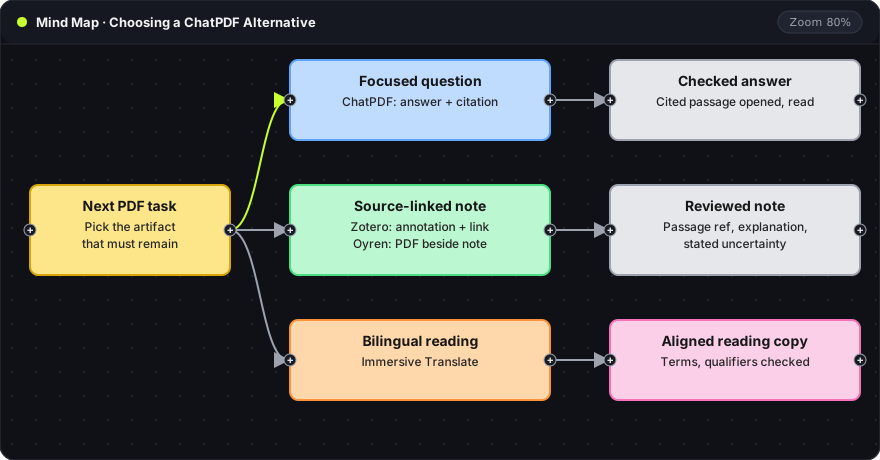
Recommendation: Pick the alternative by the artifact that must remain after the session: a cited answer, a source-linked note or a bilingual reading copy. Keep ChatPDF for one-off questions about a single document, and move to Zotero, Immersive Translate or Oyren only when the task needs what they store.
This comparison covers documented workflows as of October 16, 2026. It is not an accuracy benchmark or a price comparison.
The root card is the next PDF task. Each branch is one task type with the tool that fits it. Each gray or pink card on the right is the checked result that makes the branch finished. A branch with no checked result is not finished, whichever tool produced it.
ChatPDF as the reference point
ChatPDF's product page describes questions and summaries, citations linked to the PDF, a chat-and-document view and multi-file conversations. These fit a focused question about uploaded material. A citation shows where an answer came from; it does not prove the answer reads the passage correctly, so the cited passage still has to be opened.
Another tool is worth considering only for a specific gap: annotation-linked notes, bilingual passage comparison or extracted text that can be corrected. A general search for a better AI reader has no finish line.
Task comparison
| Tool | Documented role | Evaluation question |
|---|---|---|
| ChatPDF | PDF questions, summaries, source-linked responses | Does each important answer match its cited passage? |
| Zotero | PDF annotations and notes with links back to the source | Can an observation return to the original page? |
| Immersive Translate | Bilingual PDF reading | Can corresponding passages be compared easily? |
| Oyren | Workspace PDFs, editable notes, AI chat context | Can reviewed material stay with the source for later work? |
Columns: Documented role is what the vendor's own documentation or Oyren's code supports. Evaluation question is the one check that decides whether the tool fits the task. The table compares tasks, not feature parity; Zotero's reader is not an AI chat service, and Oyren's workspace scope does not make it better at every document question.
Zotero for annotation-led notes
Zotero's PDF reader documentation describes adding annotations to notes with links back to the PDF page and citations. It fits work where the main output is a set of source-linked observations for later writing.
A single reading session tests it: save one important passage with a short explanation, then reopen the note later. If the reason for saving the passage is still clear, the workflow holds. The explanation still depends on careful reading, and quotation must stay distinct from paraphrase.
Immersive Translate for bilingual reading
Immersive Translate documents PDF bilingual translation with separate routes for standard and more complex documents. The documented Pro workflow includes paragraph comparison and scanned-document support.
The useful result is a readable relationship between source and translated passages, which a question-and-answer tool does not give. A trial should use the real source type and language pair, and should inspect terminology, qualifiers and figure references. No claim is made that its translation is more accurate than another system's.
Oyren for sources, notes and follow-up work
Oyren's code supports choosing workspace files as AI chat context, keeping PDFs beside notes and converting scanned material into editable Markdown notes. The source-to-note guide describes the sequence.
Boundaries:
- OCR uses credits, and extracted text needs comparison with the source.
- Block-level translation returns generated text for review before insertion or replacement; saved block edits can be exported as a new PDF.
- Holding the documents in a workspace does not guarantee citation-correct answers, perfect OCR or a particular model's reasoning quality.
A note is complete when it holds the passage reference, the explanation and any uncertainty. An unreviewed answer stays marked as provisional.
A same-document trial
Use one document and three questions: a definition, a stated limitation and a relationship involving a table or figure. These are suggested test cases, not a product benchmark. Record whether each tool finds the relevant material, keeps the qualifications and supports a return to the source. A tool that cannot handle a case is marked out of scope for it, not given an invented score.
Per route, the check differs: open and read every cited passage for conversations, save and reopen the note for note-taking, and inspect alignment and terminology on one difficult passage for bilingual reading.
The output after the session
The comparison ends when the preferred workflow has produced a checked artifact for the real task: a short answer with a verified source, an annotation-linked note or a translated reading copy. The routes also combine. A bilingual session can feed a source-linked note, and a focused AI question can point to a passage for closer reading. Source text and generated explanation stay visibly separate throughout.
The AI chat with notes and PDFs feature describes Oyren's workspace-context workflow.