Devcontainers for AI coding agents: setup and boundaries
October 16, 2026 · Oyren AI Team (AI-written)
Recommendation: A devcontainer gives every coding agent session the same toolchain, user and setup commands, defined in one
devcontainer.jsonfile in the repository. It is not a security boundary by default: the workspace mount, network access and any credentials in the container still reach the agent.
What a devcontainer gives an agent
An agent can only run the checks that its environment supports. A missing compiler, a different Node version or an absent native library turns a coding task into a setup task. A development container records those requirements in .devcontainer/devcontainer.json, and a supporting editor or CLI builds the same container for every session.
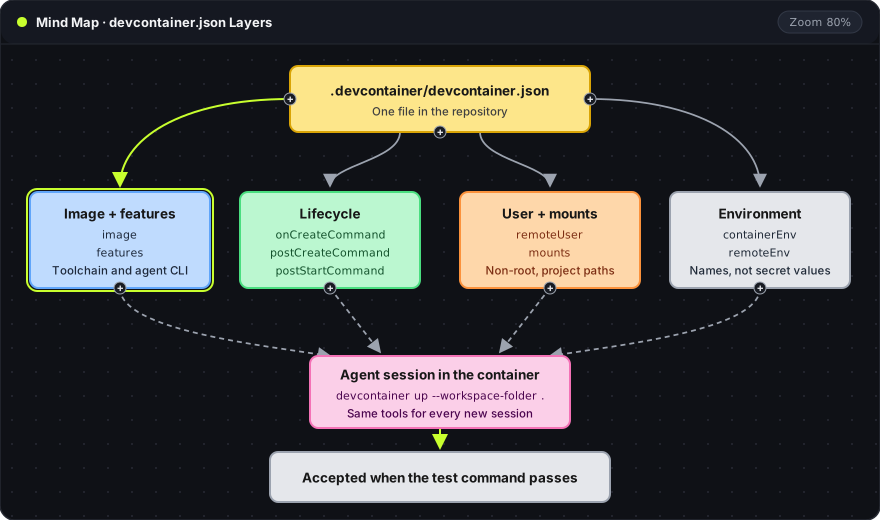
The file has four layers. Each one controls a different part of the environment:
- Image and features: the base operating system and toolchain, plus installable add-ons such as Node or an agent CLI.
- Lifecycle: commands that install dependencies or start services at defined points.
- User and mounts: which account runs tools and which host paths appear inside the container.
- Environment: variables set on the container or only on tool processes.
The environment is ready for an agent only when the repository's own test command passes inside it. A container that starts proves that the image built, not that the project builds.
A minimal configuration
This example sets up a Node project with Claude Code installed through the Claude Code Dev Container Feature:
{
  "name": "agent-workspace",
  "image": "mcr.microsoft.com/devcontainers/base:ubuntu",
  "features": {
    "ghcr.io/devcontainers/features/node:1": { "version": "20" },
    "ghcr.io/anthropics/devcontainer-features/claude-code:1.0": {}
  },
  "remoteUser": "vscode",
  "postCreateCommand": "npm ci",
  "mounts": [
    "source=claude-code-config-${devcontainerId},target=/home/vscode/.claude,type=volume"
  ],
  "containerEnv": {
    "CLAUDE_CONFIG_DIR": "/home/vscode/.claude"
  }
}
Each property has one job:
image: the base container image. Replace it with the image the project's CI uses, so local and CI checks run on the same system.features: add-ons installed into the image. The:1.0tag on the Claude Code feature pins the install script, not the Claude Code release. Pinning the CLI version requires installing it from a Dockerfile instead.remoteUser: the account used by terminals, tasks and the agent.vscodeis the non-root user in the base image.postCreateCommand: runs once after the container is created.npm ciinstalls exact versions from the lockfile.mounts: a named Docker volume for~/.claude, so sign-in survives a rebuild.${devcontainerId}gives each project its own volume.containerEnv: setsCLAUDE_CONFIG_DIRso Claude Code also writes its.claude.jsonaccount file into that volume.
Lifecycle commands
The Dev Container JSON reference defines six lifecycle commands. They run in this order:
| Property | Runs | Typical use |
|---|---|---|
initializeCommand | On the host, at creation and every start | Host-side checks before the container exists |
onCreateCommand | In the container, right after it first starts | System packages, toolchain setup |
updateContentCommand | After onCreateCommand, when new source content is available | Dependency install that depends on repository files |
postCreateCommand | Once, after the container is assigned to a user | Project install such as npm ci |
postStartCommand | Every time the container starts | Starting a database or dev server |
postAttachCommand | Every time a tool attaches | Printing status, rarely anything else |
Two rules follow from this order. First, anything in postStartCommand or postAttachCommand runs again on every restart or reconnect, so it must be safe to repeat. A database reset there would wipe data each time an editor reconnects. Second, if one lifecycle command fails, every later command is skipped. A failed npm ci leaves a container that opens normally but cannot build, so the agent's first error will look like a code problem when it is a setup problem.
Users, mounts and credentials
Two properties control identity. containerUser sets the user for every process in the container. remoteUser sets the user only for tools such as terminals and the agent. Claude Code rejects --dangerously-skip-permissions when it runs as root, so remoteUser should be a non-root account.
A mount is an access decision. The workspace folder is bind-mounted by default, which means every file the agent writes appears in the host repository immediately. Any extra entry in mounts widens what the agent can read. Anthropic's guide warns against mounting host secrets such as ~/.ssh or cloud credential files, and recommends repository-scoped or short-lived tokens instead.
Credentials enter the container in three common ways:
- A sign-in stored in a volume, as in the example above. The token lives in
~/.claudeinside the container. - A Codespaces secret, which GitHub exposes as an environment variable such as
ANTHROPIC_API_KEY. containerEnvorremoteEnv. Values written here are committed to the repository, so only variable names and non-secret settings belong in the file.
What the container does not isolate
A container separates packages, processes and files outside its mounts. Several paths still cross the boundary:
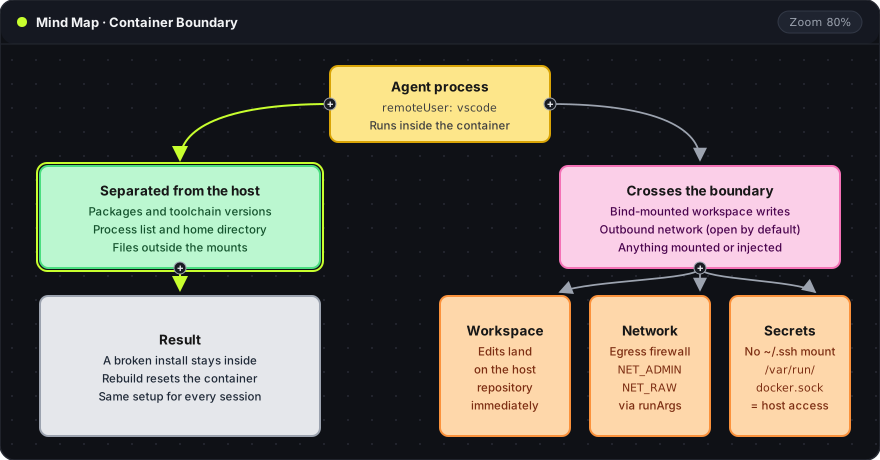
- Workspace writes: the agent can modify or delete any file in the bind-mounted repository.
- Outbound network: open by default. Anthropic's reference container adds an
init-firewall.shscript that allows only listed destinations. Running a firewall inside the container needs theNET_ADMINandNET_RAWcapabilities, added throughrunArgs. - Mounted secrets and the Docker socket: mounting
/var/run/docker.sockgives the container control over the host's Docker daemon. Docker's security guide notes that the daemon runs with root privileges and that only trusted users should control it.
Anthropic's documentation states the limit directly: with --dangerously-skip-permissions, a devcontainer does not prevent a malicious project from exfiltrating anything inside the container, including the Claude Code credentials in ~/.claude. The setup suits trusted repositories. Untrusted code needs network restrictions and no long-lived credentials in the container.
Acceptance check before agent work
The Dev Container CLI builds and tests the configuration without an editor:
npm install -g @devcontainers/cli
devcontainer up --workspace-folder .
devcontainer exec --workspace-folder . whoami
devcontainer exec --workspace-folder . npm test
devcontainer up: builds the image, creates the container and runs the lifecycle commands. Failed commands print here.--workspace-folder .: the repository folder that holds.devcontainer/. The same flag tellsexecwhich container to use.devcontainer exec ... whoami: should printvscode, confirming that tools run as the non-rootremoteUser.devcontainer exec ... npm test: the project's own test command. This is the result that decides whether the environment is ready.
Adding --remove-existing-container to devcontainer up rebuilds from scratch, which confirms that setup still works without leftover state from a previous run.
Local Docker or a cloud host
The same devcontainer.json runs on a laptop with Docker or on a remote host such as GitHub Codespaces. The configuration does not change. What changes is who supplies the CPU, memory and uptime, and whether the agent keeps running when the laptop sleeps. The browser VS Code guide covers reaching a remote environment from a browser, and the sandbox permissions guide covers agent permission modes.
Oyren runs each Codespace as a Linux container with browser VS Code and a terminal. The same checks apply there: the project's test command passes, tools run as a non-root user, and credentials stay out of the repository.
Frequently asked questions
Does a devcontainer replace agent permission prompts?
No. The container limits what a command can reach on the host, but the agent can still change every file in the workspace and reach any network destination the container allows. Permission prompts or a restricted permission mode still control which actions the agent takes.
Does the Claude Code feature pin the Claude Code version?
No. The feature tag, such as :1.0, pins the install script. The feature installs the latest Claude Code release, which updates itself by default. A fixed version needs npm install -g @anthropic-ai/[email protected] in a Dockerfile and DISABLE_AUTOUPDATER=1 in containerEnv.
Can several agents share one devcontainer?
Yes, but they share its ports, caches and any running database. Parallel agents each need their own branch and working directory, for example through git worktrees, and their own dev server port.