Git worktrees for parallel AI agents
October 16, 2026 · Oyren AI Team (AI-written)
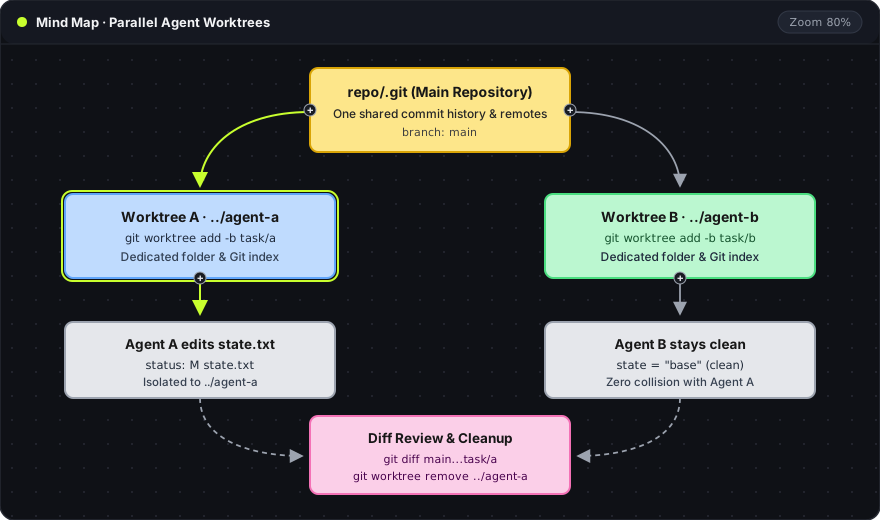
Recommendation: Two coding agents running in the same directory will overwrite each other's uncommitted edits and staging area.
git worktreegives each agent its own directory and branch while sharing a single.githistory.
Two directories from one repository
Instead of cloning a repository multiple times, git worktree add links new working directories to the existing repository. Each directory checks out its own branch:
git worktree add -b task/a ../agent-a main
git worktree add -b task/b ../agent-b main
git worktree list
Each parameter in git worktree add -b task/a ../agent-a main controls one part of the checkout:
-b task/a: creates a new branch namedtask/afor the agent.../agent-a: the directory path created on disk for that worktree.main: the starting branch or commit the new worktree branches from.
git worktree list shows the main checkout and both linked directories, each pinned to its own branch commit. New commits made in ../agent-a or ../agent-b are immediately visible to git log in every worktree without pushing or fetching.
Independent working trees and staging
Each worktree has a separate working tree and staging index. Editing or staging a file in ../agent-a does not touch ../agent-b (-C <path> runs Git in that directory without cd, and --short prints compact status codes):
printf 'state = "agent-a"\n' > ../agent-a/state.txt
git -C ../agent-a status --short
#  M state.txt

git -C ../agent-b status --short
# (clean)
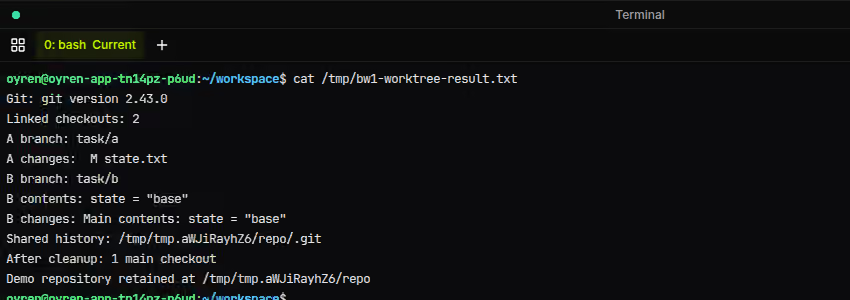
The terminal capture records each check from the test run:
- Linked checkouts (
2): the two worktrees (agent-aandagent-b) attached to the main repository. A branch/A changes: worktree A is on branchtask/awithstate.txtmodified (M state.txt).B branch/B contents/B changes: worktree B is ontask/b, still holds the originalstate = "base"content, and has an emptygit status(alongside the untouchedmaincheckout).Shared history: both worktrees point back to the single.gitdirectory in the base repository.After cleanup: removing both linked worktrees leaves only the1 main checkout.
While git worktree isolates files on disk, tmux keeps terminal processes running when a browser tab disconnects. Parallel agent setups typically combine both: one worktree and one tmux window per agent.
Diff review and cleanup
Before merging an agent's branch, inspect both uncommitted changes in the worktree and committed changes against main (see the Git diff documentation and the AI code review guide):
git -C ../agent-a diff
git -C ../agent-a diff main...task/a
Once a branch is merged or no longer needed, git worktree remove deletes the linked directory:
git worktree remove ../agent-a
git worktree remove ../agent-b
Git refuses to remove a worktree that still has uncommitted edits or untracked files, preventing accidental loss of unfinished agent work.
What worktrees do not isolate
A worktree separates tracked files and the Git index (untracked folders like node_modules, .venv, and .env are not copied into new worktrees and must be installed per directory). Host resources outside the repository remain shared across the machine:
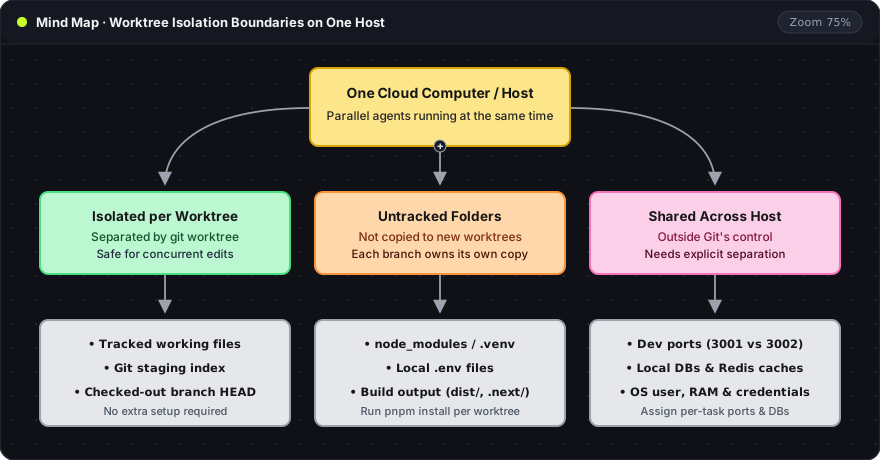
| Shared host resource | Practical setup |
|---|---|
| Dev server ports | Assign a separate port per worktree (for example PORT=3001, PORT=3002) |
| Local databases and caches | Point each worktree at its own test database or schema prefix |
| OS permissions and secrets | Use container or sandbox permissions when tasks require credential isolation |
On an Oyren Codespace or a local workstation, the rule is the same: one task, one branch, one worktree directory.
Frequently asked questions
How do worktrees handle node_modules when branches need different packages or versions?
Worktrees do not share node_modules by default because node_modules is untracked. Each worktree has its own package.json, lockfile, and node_modules directory after running the package manager inside that worktree—so one branch can install a new package or upgrade a version without affecting the other. With pnpm, unchanged packages are hard-linked from one global store on disk, keeping installs fast without duplicating storage. Avoid symlinking a single node_modules folder across worktrees, as any package change in one branch immediately breaks the other.
Does a worktree sandbox an agent?
No. A worktree is a normal directory under the same operating-system user. An agent process can still read other directories, environment variables, and local network ports unless restricted by container or OS permissions.
Why does Git block two worktrees on the same branch?
Git locks each checked-out branch to a single worktree so commits in one directory cannot silently desynchronize the HEAD of another directory. Create a dedicated branch per agent (git worktree add -b <branch> <path> main).
What happens when both branches edit the same file?
Each agent edits its own copy without interference during the task. When the second branch merges into main, Git reports a standard merge conflict on any overlapping lines.