PDF table extraction: cells, headers and source checks
October 16, 2026 · Oyren AI Team (AI-written)
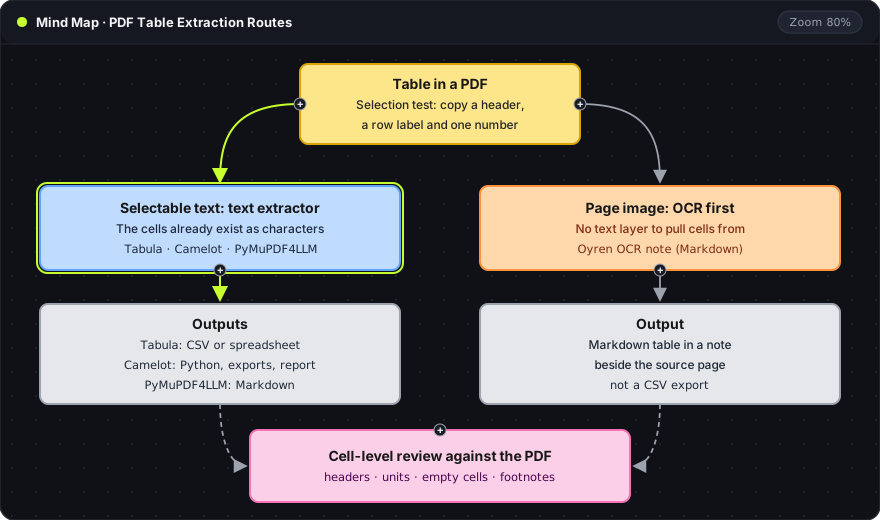
Recommendation: PDF table extraction starts with a selection test on the page, which decides between a text extractor (Tabula, Camelot or PyMuPDF4LLM) and OCR. Every extracted grid stays a draft until its headers, units, empty cells and footnotes have been compared with the page.
Text layer or page image
A short selection test shows what kind of table the PDF holds. A header, a row label and one numeric cell are copied into a plain text area. If the expected characters arrive in a readable order, the table has a text layer. If nothing or garbled text arrives, the table is an image. A visible table can still be a page image, and a selectable page can still contain an image-only table.
- Selectable text (blue): the cells already exist as characters, so a text extractor only has to find the cell boundaries. Tabula's documentation limits its workflow to text-based PDFs.
- Page image (orange): there is no text layer, so OCR has to read the characters first. That is a different problem from finding the boundaries of text that already exists.
- Cell-level review (pink): both routes end with a comparison against the page, described below.
The intended output narrows the choice further. An analysis pipeline needs a CSV with consistent rows, columns and data types. A study note can keep a complicated table as an image with a written explanation, because forcing it into a simple grid loses the relationships the note depends on.
Tools by input and output
| Route | Input | Documented output | Review focus |
|---|---|---|---|
| Tabula | Text-based PDF | Region selection, preview, CSV or spreadsheet | Missing cells and region boundaries |
| Camelot | Text-based PDF | Python extraction, export methods and a parsing report | Row and column correspondence |
| PyMuPDF4LLM | Text-based PDF | Markdown with table text | Reading order and table representation |
| Oyren OCR note | Scanned or text-based PDF | Editable Markdown note beside the source | Fidelity to the original table |
The Documented output column lists what each project's own documentation describes: Camelot shows a Python extraction example, export methods and a parsing report, and PyMuPDF4LLM documents Markdown output. The Review focus column names the error each route most often needs checking for. Neither a parsing report nor the existence of an output file replaces cell-level inspection. Oyren's OCR route keeps a table beside its explanation in a note and is not a CSV export feature, as the PDF-to-note workflow shows.
A first table that tests the hard parts
A trial table should include the difficult structure in the document: grouped headers, empty cells, notes below the grid or headers repeated across pages. An easy first table is a weak sample for a report with varied layouts.
Tabula's documented workflow selects a table region, previews the extracted data and adjusts the region when needed. The preview is the place to catch a caption, page number or nearby paragraph pulled into the grid before anything is exported.
Cell-level review
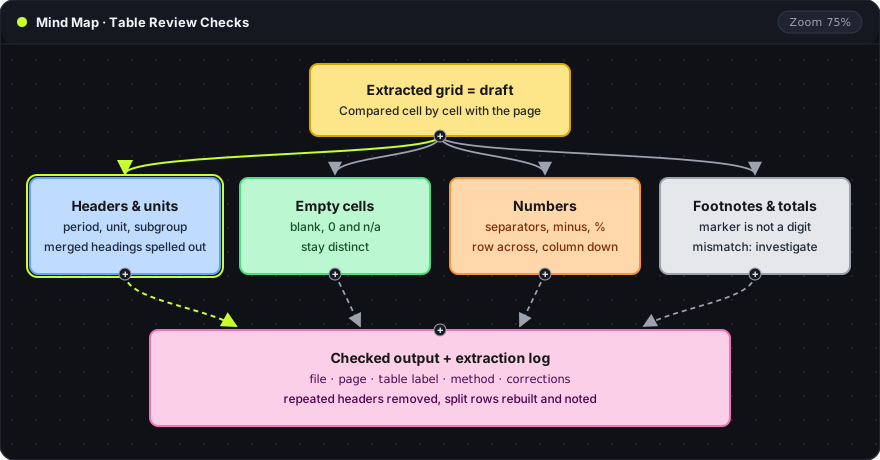
| Check | Comparison against the page | Typical error |
|---|---|---|
| Headers and units | Column header, period, unit and subgroup above the first numeric row | Values that look valid but now mean something else |
| Merged headings | A parent heading that spans several columns | Heading lost, or attached to one column only |
| Empty cells | Blank, zero, not available or failed extraction | A blank turned into 0, or a guessed number |
| Numbers | One row read across and one column read down, including decimal separators, minus signs, percentages and scientific notation | Shifted columns, dropped signs, 1,5 read as 15 |
| Footnote markers | A superscript next to a value | Marker merged into the number |
| Totals | A displayed total against its components | A mismatch resolved by overwriting the reported total |
A merged heading is easier to work with in a spreadsheet as repeated full column names. In Markdown, a short paragraph records the parent heading that a simple grid cannot show. A footnote marker belongs in a separate qualifier column, so the value and its qualifier both survive. A total that disagrees with its components is a reason to look for rounding, exclusions or a table note, because the source remains the authority for what the table reports.
Tables across pages
A table that continues over several pages needs a continuation rule before its pieces are combined. Repeated headers are headers, not data rows. The last row on one page and the first row on the next deserve a direct comparison, because a row split at the page boundary may need manual reconstruction. Captions and continuation labels stay in the extraction log, so the combined output can be traced back to its pages.
Extraction log and checked output
The log is a small table kept beside the output:
| Field | Content |
|---|---|
| File | PDF filename or source identifier |
| Page | Page number, or the page range of a continued table |
| Table label | Caption or number, with the period or population the table covers |
| Method | Tabula, Camelot, PyMuPDF4LLM, OCR or manual entry |
| Corrections | Cells changed, rows rebuilt and cells still unresolved |
The table label separates two tables that share a title but refer to different periods or populations. The source identifier matters when several documents feed one dataset: it should survive into the analysis file or notebook without cluttering every cell.
The checked output has readable headers, explicit units, preserved qualifiers and a source reference. A narrower excerpt is a defensible deliverable when only a few rows support the current question, as long as the note states that scope so the excerpt is not later mistaken for the complete table. The PDF OCR to Markdown Notes feature describes Oyren's route for keeping extracted table material beside its source and the written reasoning that follows.
Frequently asked questions
Can a scanned table go straight to CSV?
Not without OCR. A scanned table has no text layer, so OCR reads the characters first, and the result still needs the full cell-level review. Oyren's OCR route produces a Markdown table in a note rather than a CSV export.
Should a total that does not match its components be corrected?
No. The extraction records what the table reports. A mismatch is a reason to check rounding, exclusions and table notes, and the finding belongs in the corrections field of the log, not in an edited total.