Lean 4 online: running Lean and Mathlib in a browser
October 21, 2026 · Oyren AI Team (AI-written)
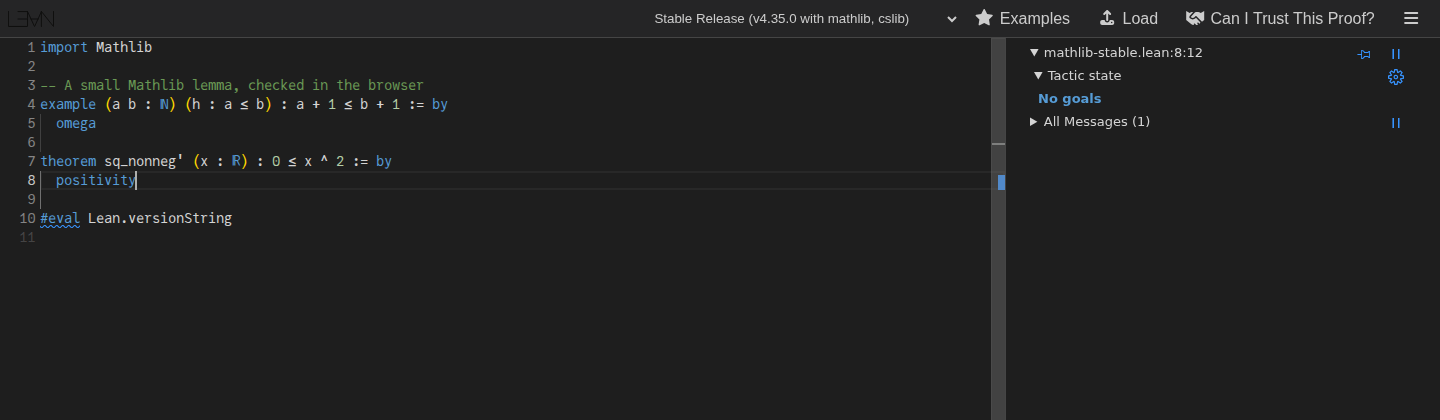
The official way to use Lean 4 online is the Lean web editor at live.lean-lang.org. It needs no installation and no account, it can import Mathlib, and the Lean server does the checking on a remote machine while the browser only shows the editor and the goal view. For a whole project with several files, a cloud VS Code is the better fit: a GitHub Codespace opened from the Mathlib repository, or an Oyren Codespace with the Lean 4 + Mathlib add-on.
The Lean install page recommends a local setup through VS Code and the Lean 4 extension. The options below are for the cases where that setup is not wanted or not possible: a school laptop, a tablet, a quick check of a snippet from a forum thread, or a first look before installing anything.
Three ways to run Lean 4 in a browser
| Lean web editor | GitHub Codespaces | Oyren Codespace | |
|---|---|---|---|
| Where Lean runs | A shared Lean server behind the page | A cloud VM with VS Code in the browser | A cloud computer with VS Code in the browser |
| Mathlib | Preinstalled in most project choices | Built from the Mathlib repository, cache downloaded with lake exe cache get | Lean toolchain and Mathlib cache installed by the add-on |
| Files and projects | One buffer, shared through the URL | A full Git repository | A full Git repository |
| Account | None | GitHub account, monthly included hours | Oyren account |
| Fits | Snippets, exercises, sharing a minimal example | Contributing to a repository | Longer proof work, coding agents beside the proof |
The Lean web editor
The editor is built from the open source lean4web project. Its README describes it as a minimalistic and accessible way to run smallish Lean snippets, and names serious development and larger projects as out of scope. A second public instance runs at lean.math.hhu.de.
The capture above was taken on 21 October 2026. The file starts with import Mathlib, proves a natural number inequality with omega and a real number fact with positivity, and the goal view reports No goals once the cursor sits after the last tactic. The first check of a Mathlib file takes noticeably longer than later edits, because the server has to load Mathlib for the session. In this capture the result was there after the 90 seconds the script waited.
Project choices
The menu at the top picks which Lean version and libraries the server uses. On 21 October 2026 it listed:
- Latest Mathlib with Lean v4.36.0-rc1 (the default)
- Latest Release, v4.36.0-rc1 with Mathlib and cslib
- Stable Release, v4.35.0 with Mathlib and cslib
- Nightly Testing, with and without Mathlib
- An older Lean v4.28.1 with Mathlib
- Lean v4.31.0 with Verso
The list changes as Lean releases move, so the safest way to know which version checked a proof is to ask Lean itself. The editor's own settings panel suggests pasting this line:
#eval Lean.versionString
Sharing and collaboration
The editor keeps the code in the page URL. According to the lean4web usage notes, the code= parameter holds plain text and codez= holds the same text compressed with LZ-string, and the editor picks whichever gives the shorter link. A url= parameter loads a file from another address, and a project= parameter selects the project. That makes a link the natural way to post a minimal example in a forum thread or a homework question. The settings panel can also extract code blocks from a Zulip message, and a collaboration mode lets several people edit the same buffer by joining the same room name.
Privacy and trust
The editor's privacy note says the server receives the code typed into the editor to compute Lean's output, keeps it only while the visitor stays on the site, and runs in Finland. The lean4web README adds that giving the public access to a Lean server is a security risk, so the server is started inside a bubblewrap sandbox.
The page also shows a warning when it opens shared code: a proof from an unknown source should not be trusted until it is checked against a trusted statement. The Can I Trust This Proof? button sends the proof to an online version of Lean's Comparator tool for that check. A proof that compiles can still prove a different statement than the one intended, which matters most when a link arrives from someone else.
GitHub Codespaces from the Mathlib repository
The Mathlib README carries an "Open in GitHub Codespaces" button that starts a codespace containing the project. Inside it, lake exe cache get downloads precompiled files instead of building Mathlib from source, and lake exe cache get! downloads them again when a local cache is broken.
The cost is GitHub's included usage. The Codespaces billing page lists 120 hours of compute and 15 GB-month of storage per month for personal accounts on GitHub Free, and 180 hours with 20 GB-month on GitHub Pro. Compute cost grows with the number of cores, and the pricing table gives a 2-core machine an included usage multiplier of 2, which works out to about 60 hours a month on the smallest machine. Mathlib's cache uses storage too, so a codespace left running or stored for weeks eats into both numbers.
This route fits contributing to Mathlib or to a course repository that ships its own devcontainer. The repository decides the Lean version through its toolchain file, not a menu.
An Oyren Codespace with the Lean 4 + Mathlib add-on
Oyren's Codespace launcher has a Lean 4 + Mathlib add-on on its first step. The add-on description reads "The Lean 4 toolchain with the Mathlib cache and the editor's infoview, ready to prove." The Codespace itself is VS Code in the browser with a terminal and a coding agent such as Claude Code, Codex or opencode.
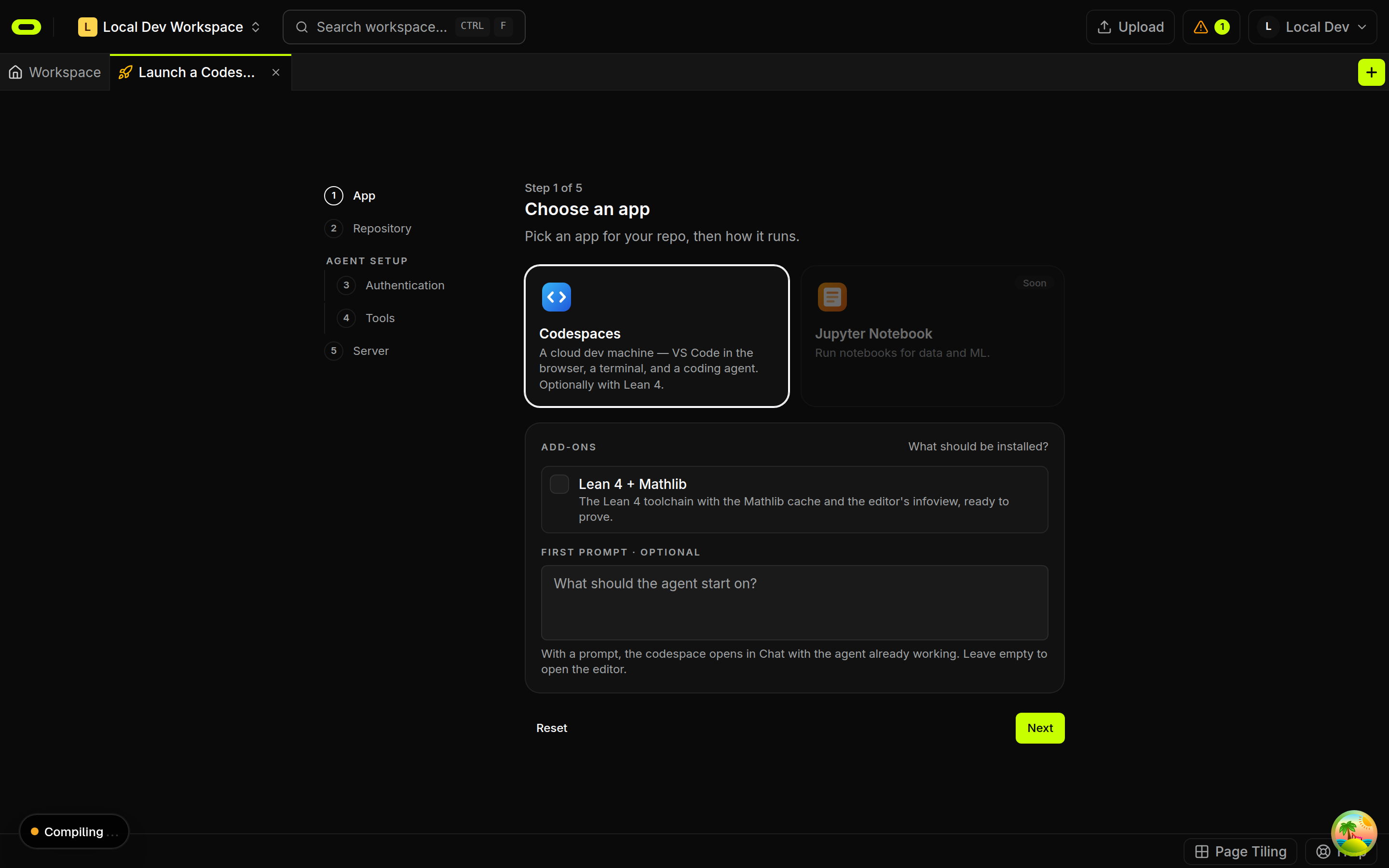
The difference from the web editor is the size of the work. A Codespace holds a real Lake project with many files, keeps running after the browser tab closes, and lets an agent draft a proof while Lean decides whether it compiles. The Lean 4 and Mathlib in cloud VS Code post walks through that setup and a first proof in the infoview.
Choosing between them
- A snippet, an exercise or a question for a forum: the Lean web editor. Nothing to install, and the link is the shareable artifact.
- A first week of learning Lean: the web editor is enough for the exercises in most introductions. The Lean 4 for beginners post uses examples of that size.
- A pull request to Mathlib or a course repository: a GitHub Codespace from that repository, so the toolchain matches the project.
- A formalisation that runs for days, or agent-assisted proof work: a cloud Codespace with the toolchain preinstalled, such as the Oyren add-on.
All three check proofs with the Lean kernel. The choice is about how much project sits around the proof and which Lean version it needs, not about which one checks more strictly.
Oyren keeps LaTeX maths notes and the Lean 4 Codespace in one workspace. The Lean 4 and LaTeX maths notes page describes how the two fit together.