Four Markdown note taking apps compared
October 21, 2026 · Oyren AI Team (AI-written)
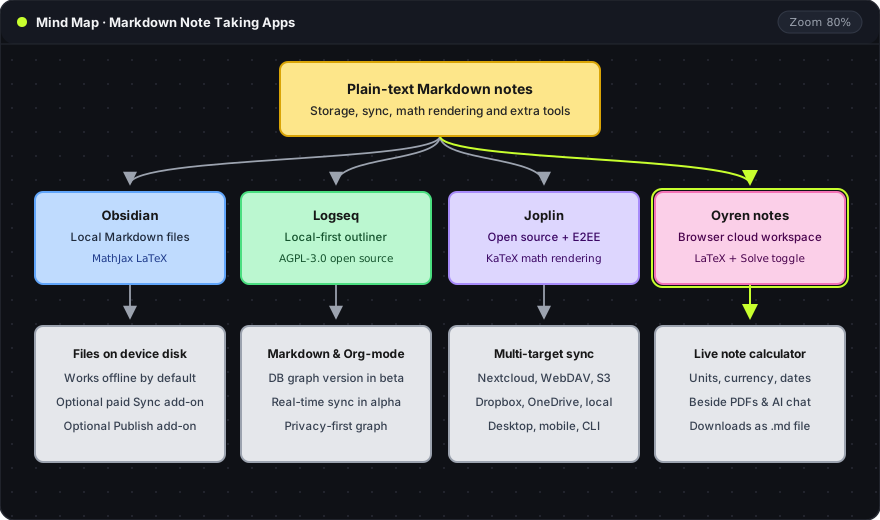
A Markdown note taking app stores notes as plain text with a few marks for structure: # for a heading, - for a list item, ** for bold. The text stays readable in any editor, so the notes outlive the app. The real differences between apps sit elsewhere: where the files live, how they sync, whether math renders, and what the app does beyond writing. This comparison covers Obsidian, Logseq and Joplin, three widely used Markdown apps, and Oyren's browser notes, with every product claim taken from the vendor's own pages in October 2026.
Four apps at a glance
| Obsidian | Logseq | Joplin | Oyren notes | |
|---|---|---|---|---|
| Where notes live | Plain text Markdown files on the device | Local-first; Markdown and Org-mode files, plus a database version in beta | In the app, synced through a chosen service | In a cloud workspace, opened in the browser |
| Licence | Free for personal and commercial use | Open source, AGPL-3.0 | Open source | Hosted service |
| Math | MathJax with LaTeX notation | Not stated on the pages checked | KaTeX notation | LaTeX, inline and block |
| Sync | Optional paid Sync add-on | Sync in alpha for the database version | Joplin Cloud, Nextcloud, WebDAV, Dropbox, OneDrive, S3, local filesystem | Built in, notes are in the workspace |
| Beyond writing | Publish add-on for websites | Markdown and Org-mode in one graph | End-to-end encryption, terminal app | Calculations in notes, mind maps, AI chat beside notes and PDFs |
Sources: obsidian.md, Obsidian pricing, Obsidian advanced syntax, the Logseq repository, joplinapp.org, Joplin synchronization and Joplin's Markdown guide. Oyren details come from its notes page and the note calculator page.
Obsidian: local files first
Obsidian's homepage states that it stores notes locally as plain text Markdown files and that they stay available offline. Any other text editor can open the same files. Obsidian is free for personal and commercial use with no sign-up. The paid parts are optional: Sync costs $4 per user per month billed annually or $5 billed monthly, Publish costs $8 per site per month billed annually or $10 monthly, and an optional commercial license is $50 per user per year.
Math uses MathJax with LaTeX notation, inline between single dollar signs and as a block between double ones. For a researcher who wants every note as a file on disk and is happy to manage sync, Obsidian is the most direct fit.
Logseq: an open source knowledge base
Logseq describes itself as "a privacy-first, open-source platform for knowledge management and collaboration," under the AGPL-3.0 license. It supports Markdown and Org-mode files and is tagged local-first. The project is in a transition: a database version introduces DB graphs, and its README marks that version as beta, with the mobile app and real-time sync still in alpha.
That transition is the main thing to weigh. A team that needs stable sync today should read the current release notes before committing a large set of notes to it.
Joplin: notes with optional encryption
Joplin is an open source app with a choice between a Markdown editor and a rich text editor. It runs on Windows, macOS, Linux, Android and iOS, and also as a terminal app. Notes sync through Joplin Cloud, Nextcloud, WebDAV, Dropbox, OneDrive, S3 or the local filesystem. End-to-end encryption is optional and must be enabled before encrypted synchronization begins.
Joplin follows the CommonMark specification and adds features through plugins. Its guide notes that plugin features are not part of CommonMark, so they may not render in other Markdown readers. Math uses KaTeX, with $...$ for inline expressions and $$...$$ for blocks. For notes that must stay private across a phone and a laptop, Joplin's encryption is the distinguishing feature.
Oyren notes: Markdown with math that calculates
Oyren's notes run in the browser inside a workspace, next to PDFs, mind maps and an AI chat. They support Markdown and LaTeX, and any note downloads as a Markdown file, so the text is not locked in. The difference from the three apps above is the Solve toggle in the note header: with it on, the note calculates supported expressions and shows the result beneath each line.
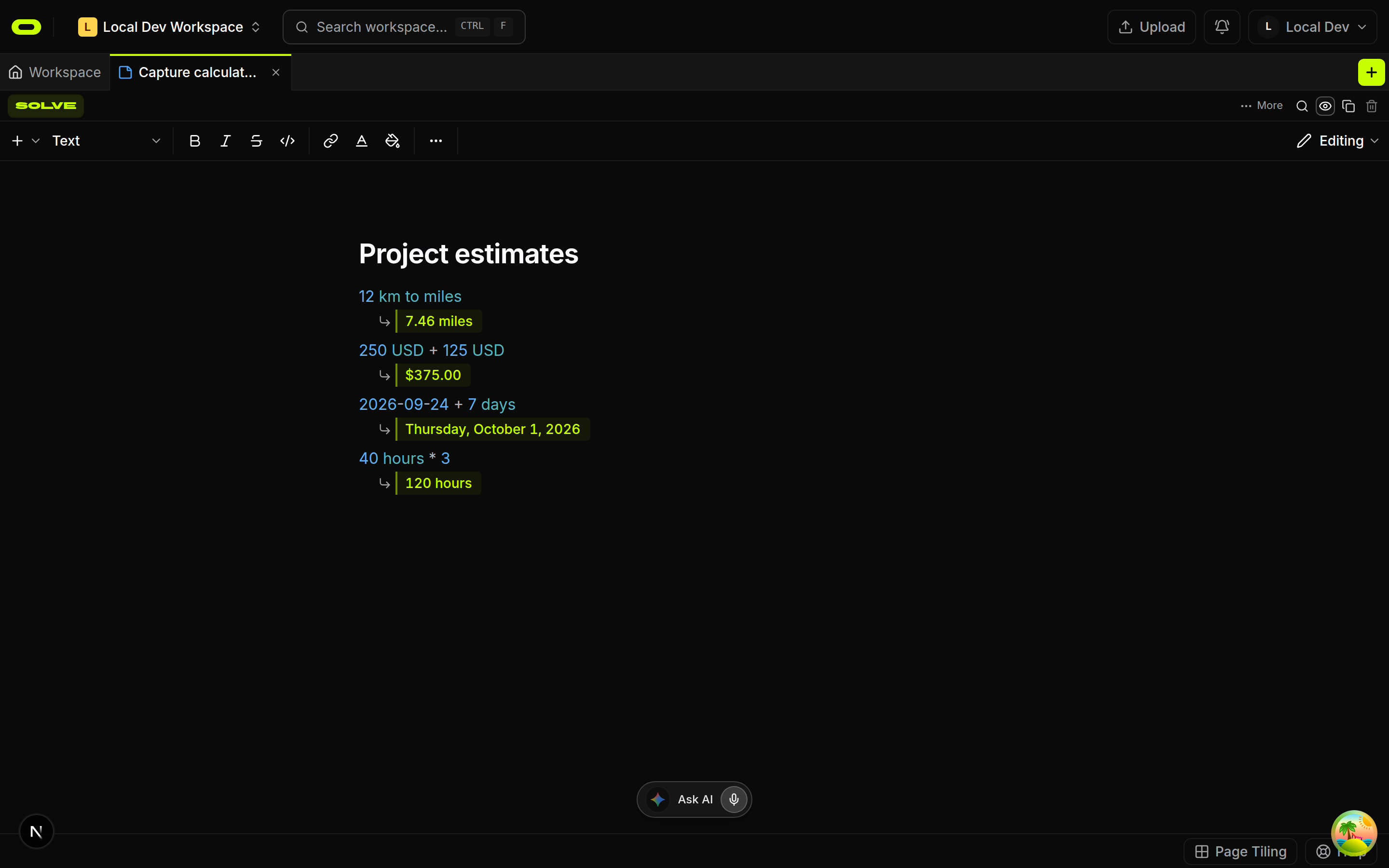
The capture above is a real note from a development workspace. Only the expressions were written into the note. Every answer was calculated by the app: a unit conversion, a currency sum, a date offset and a multiplication. The calculator covers arithmetic, units, currency, percentages and dates, and currency expressions can fetch live rates. Ordinary prose around each line records the assumptions, so an estimate keeps its reasoning next to its numbers.
LaTeX in an Oyren note formats an equation. It does not check that the equation is true. For formal proofs, Oyren keeps a separate Lean 4 environment, described on the Lean 4 and LaTeX maths notes page.
The trade-off is the other side of the table: Oyren notes live in a cloud workspace, not as files on the device. A person who needs offline access to every note on a plane will be better served by Obsidian or Joplin.
Choosing by what the notes are for
- A personal archive of files on disk, edited for years: Obsidian. The files are the notes, and the app is optional.
- A knowledge base under an open source licence, with Markdown and Org-mode side by side: Logseq, with an eye on the database version's progress.
- Private notes synced across many devices: Joplin, for its end-to-end encryption and wide platform list.
- Notes with numbers that change, beside papers and an AI chat: Oyren, for calculations inside the note and Markdown downloads when the text needs to leave.
The Markdown itself is the common ground. Notes written in any of the four can move to another app with headings, lists and links intact. App-specific extras, such as plugin syntax or calculated results, are the parts that may not travel.
Oyren notes, mind maps and the note calculator are described on the notes page.