SOLVE in Oyren Notes vs Obsidian in-note calculators
October 25, 2026 · Oyren AI Team (AI-written)
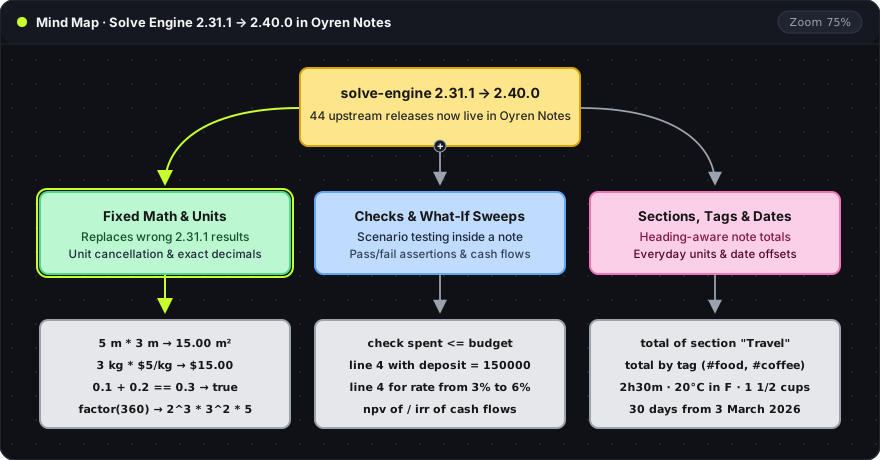
TL;DR: SOLVE is the built-in deterministic line calculator in free Oyren Notes, enabled by default on every note via
solve-engine2.40.0in a browser Web Worker. Unlike core Obsidian, which typesets LaTeX with MathJax and requires community plugins for in-note line evaluation, Oyren Notes computes units, currencies, dates, section totals, and boolean checks out of the box without language-model calls.
Every new note in Oyren Notes opens with SOLVE switched on by default, evaluating arithmetic, unit algebra, currencies, dates, and variables directly underneath each Markdown line. The note calculator overview covers the workspace surface, and Solve Engine 2.40 in Oyren Notes documents the engine upgrade from 2.31.1 to 2.40.0.
In-note calculation in Oyren Notes vs Obsidian
Core Obsidian renders mathematical notation with MathJax and LaTeX (Obsidian advanced syntax) and evaluates property formulas inside database views with Bases, while none of the 29 Obsidian core plugins evaluates prose lines in a note. Line-by-line calculation in Obsidian comes from community plugins:
| Option | Where it runs | How expressions are written | Engine and security notes |
|---|---|---|---|
| Oyren Notes SOLVE | Built into free Oyren Notes (on by default; header toggle or Ctrl+Shift+S) | Any top-level Markdown line in the full note editor | solve-engine 2.40.0 (MIT) in a dedicated browser Web Worker; live currency rates fetched over HTTPS |
| Obsidian core (MathJax & Bases) | Built into Obsidian | LaTeX $...$ for notation (LaTeX guide); Bases functions such as (2.3333).round(2), abs, ceil, floor, max, min on note properties | MathJax typesets formulas without evaluating them; Bases evaluates note properties in a table view |
| Solve for Obsidian (GitHub) | Obsidian community plugin (v2.0.1, 28k downloads) | Natural-language and math lines in the note; clicking an inline result commits it as text | Uses the same MIT solve-engine by Liam Riddell, without AI |
| Numerals (GitHub) | Obsidian community plugin (v1.10.2, 74k downloads) | Fenced math, math-plain, math-tex, or math-highlight blocks, plus inline #: and #=: | Built on mathjs; supports units, currency, $-variables, @prev, @total/@sum, and [[note]].property |
| DataviewJS | Obsidian community plugin (Dataview, 5.2M downloads) | Fenced dataviewjs code blocks or inline $= JavaScript expressions | Executes arbitrary JavaScript; the Dataview documentation notes that JS queries have access to the local file system |
Whole-note evaluation in a browser Web Worker
SOLVE operates as a single switch for the whole note via the header SOLVE button or Ctrl+Shift+S (⌘⇧S on macOS), including in reader mode. When active, the editor parses the note as Markdown where each top-level block counts as one line and renders its result chip underneath. An assignment such as total = 2 + 2 inside a list item evaluates, while a table or nested list counts as a single top-level block.
Ordinary prose, Markdown headings, blockquotes, and comments after // stay untouched and never trigger error chips. A bare number such as 120 suppresses redundant echoes, rate = 65 displays 65, and a hex color such as #rrggbb renders a color swatch beside its value. All evaluation runs deterministically through solve-engine 2.40.0 (MIT license, by Liam Riddell) using a lexer, Pratt parser, and bytecode VM inside a browser Web Worker, and the same engine powers quick calculations in the workspace command palette. Notes larger than 256 KB or 1,200 top-level blocks open in windowed mode, where the editor banner notes that SOLVE answers display only in the full editor.
Unit algebra, section totals, and live checks
The engine computes unit algebra (5 m * 3 m to 15.00 m², 3 kg * $5/kg to $15.00), percentages (50% of 200, £50,000 after 20% tax), dates and durations (2h30m, 30 days from 3 March 2026, fridays between 01/06/2026 and 31/08/2026), named variables, section totals, boolean check assertions, and what-if parameter sweeps.
# Travel
flights = £420
hotel = £95 * 4
total above

# Summary
budget = £1000
trip = total of section "Travel"
check trip <= budget
In the note snippet above, total above sums the lines under # Travel up to that heading (£800.00), total of section "Travel" pulls that sum into # Summary, and check trip <= budget renders a passing check chip (or a red refusal chip when a check fails or an expression such as log(-1) falls outside its domain).
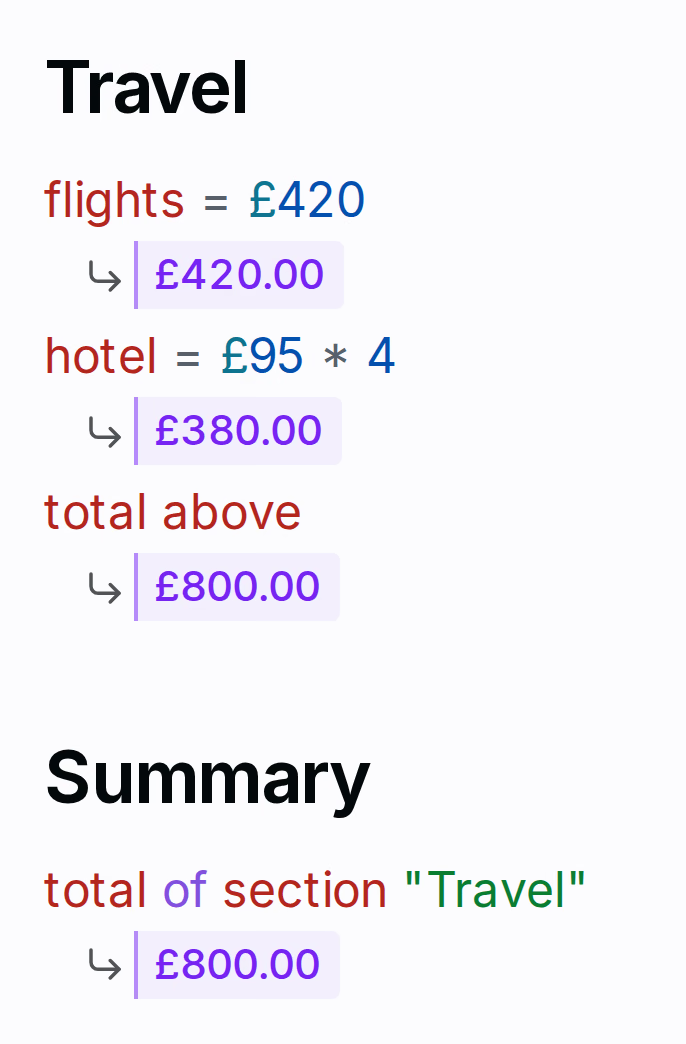
The screenshot above shows section-scoped totals under # Travel feeding directly into # Summary alongside a live check assertion. Arithmetic, units, percentages, and dates run locally in the Web Worker, while live currency conversions (such as 10 USD to GBP) fetch rates on demand from api.frankfurter.dev/v2/rates with a 15-minute cache.
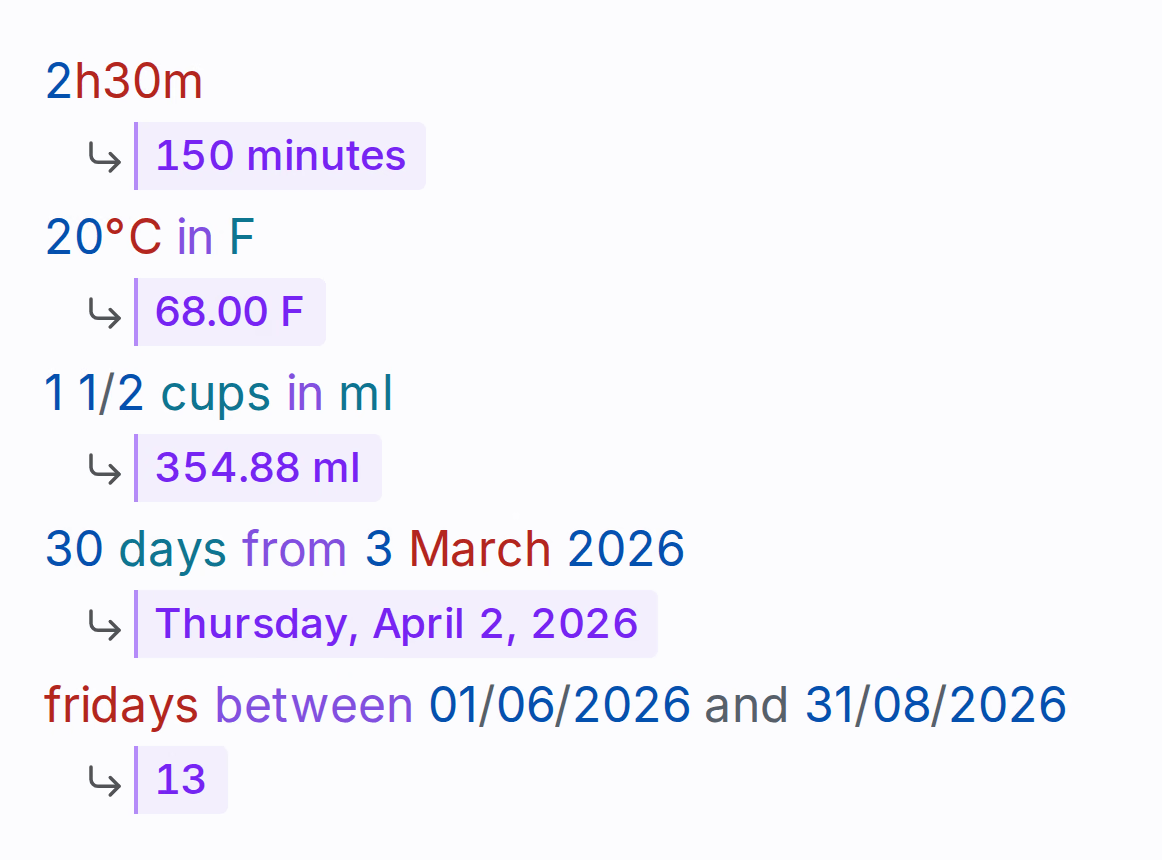
The second capture illustrates compact durations, degree symbols, mixed fractions, date offsets, and weekday counts evaluated inline inside a single Markdown note.