OCR for Scientific PDFs with Equations: 2026 Benchmarks
October 16, 2026 · Oyren AI Team (AI-written)
Recommendation: The right OCR path for a paper depends on what the PDF contains: arXiv TeX source, a clean text layer, born-digital maths or a scan. For maths-heavy and scanned pages, small vision-language models such as PaddleOCR-VL and MinerU 2.5 lead OmniDocBench, but a pilot on the five hardest pages of a collection decides more than a one-point benchmark lead.
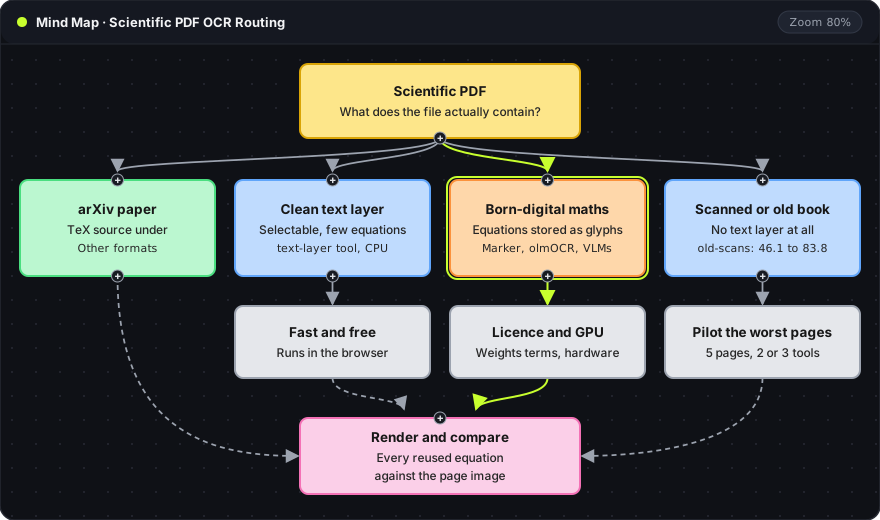
The map above is the whole decision. Each column is one kind of source, and every path ends in the same check: a reused equation is rendered and compared with the page image. The sections below give the evidence for each branch.
Why papers break ordinary extraction
A PDF stores glyphs and their positions, not sentences or formulas. Four things go wrong with papers in particular:
- Equations. A fraction or a sum with limits is a set of glyphs placed in two dimensions. Read in order, they come out as noise. Marker's own benchmark shows the effect: with OCR turned off (pure text-layer extraction), its arXiv maths score is 0.0 (Marker README).
- Tables. Cells become loose text. Merged cells (rowspan, colspan) need HTML to survive, since Markdown tables cannot express them.
- Two columns. Text read straight across the page mixes the left and right columns line by line.
- Scans. A scanned page has no text layer at all. Older mathematics, from before born-digital PDFs, is mostly scans.
The tools and their terms
| Tool | How it reads a page | Licence | Hardware |
|---|---|---|---|
| Nougat (Meta, 2023) | One model turns the page image into markup with LaTeX maths | Code MIT, weights CC-BY-NC (no commercial use) | GPU recommended |
| Marker | Layout detection, text layer where clean, Surya vision model for equations and scans | Code Apache 2.0, weights modified OpenRAIL-M (free under $5M funding or revenue) | GPU, or a slower CPU mode |
| olmOCR (Ai2, 2025) | A fine-tuned 7B vision-language model reads each page image whole | Apache 2.0 | GPU required |
| PaddleOCR-VL, MinerU 2.5, DeepSeek-OCR, dots.ocr | Small specialised vision-language models, 0.9B to 4B parameters | Per model card | GPU |
| Gemini 3, GPT-5.2 | General multimodal models through an API | Provider terms | None locally |
Notes on the rows:
- Nougat (arXiv:2308.13418) was trained on arXiv and PubMed Central papers. Its README says it works best in English and will not work for Chinese, Russian or Japanese.
- Marker can emit tables as HTML. Its optional
--use_llmflag sends cross-page tables and inline maths to a language model for a second pass. - olmOCR (arXiv:2502.18443) puts its cost at 176 USD per million pages on self-hosted GPUs. olmOCR 2 added reinforcement learning with unit-test rewards and reports its largest gains on formulas, tables and multi-column layouts.
olmOCR-Bench: did each fact survive
olmOCR-Bench has over 7,000 pass/fail unit tests across 1,400 documents. A maths test renders an equation from the original TeX source with KaTeX and checks that the same symbols, in the same relative positions, appear in the output. A reading-order test passes when two sentences come out in the right order.
How to read the chart:
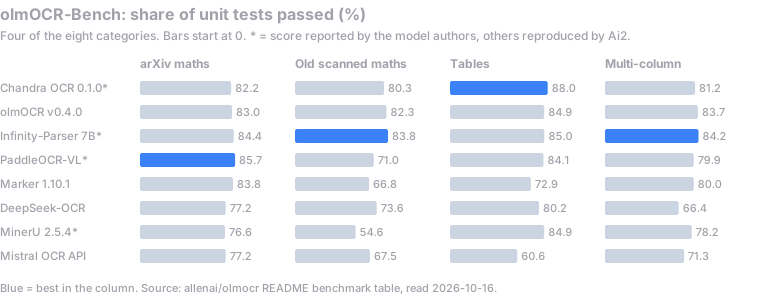
- Each bar is the share of unit tests a system passed in one category, from 0 to 100. The blue bar marks the top score in that column.
- arXiv maths uses recent papers from the arXiv maths section. Old scanned maths uses pages from public-domain textbooks.
- An asterisk marks scores reported by the model authors. The others were reproduced by Ai2. Numbers come from the olmOCR README as of 16 October 2026.
Three results matter for papers:
- On born-digital arXiv maths, the spread is small: 75.4 to 85.7 across the nine systems in the README table.
- On scanned maths, it is large: 46.1 to 83.8. For older books, this is the column that decides.
- Multi-column plain text is mostly solved, with most systems around 80. The multi-column tests deliberately avoid maths.
Overall scores range from 69.5 (Nanonets-OCR2-3B) to 83.1 (Chandra OCR 0.1.0*).
OmniDocBench: how close to the reference
OmniDocBench (CVPR 2025, arXiv:2412.07626) scores 1,651 pages from 10 document types, including papers, textbooks and handwritten notes. Selected rows from the end-to-end leaderboard on the v1.6 dataset:
| System | Overall | Formula CDM | Table TEDS | Reading order edit |
|---|---|---|---|---|
| PaddleOCR-VL-1.6 (0.9B) | 96.34 | 97.53 | 94.76 | 0.128 |
| MinerU2.5-Pro (1.2B) | 95.75 | 97.45 | 93.42 | 0.120 |
| Gemini 3 Pro | 92.91 | 95.99 | 89.15 | 0.165 |
| DeepSeek-OCR 2 (3B) | 90.25 | 91.84 | 83.89 | 0.144 |
| GPT-5.2 | 86.59 | 88.21 | 82.95 | 0.193 |
| olmOCR (7B) | 85.74 | 88.10 | 83.00 | 0.216 |
| Mistral OCR | 85.66 | 89.91 | 76.78 | 0.171 |
| Marker | 78.44 | 85.24 | 65.77 | 0.243 |
What each column measures:
- Formula CDM renders the predicted and reference formulas and matches them visually, so two different LaTeX spellings of the same formula still score well. Higher is better.
- Table TEDS is tree edit distance on the table structure, which penalises lost rows, columns and merged cells. Higher is better.
- Reading order edit is the normalised edit distance between the predicted and reference block order. Lower is better.
Why the two rankings disagree
Marker scores 76.1 on olmOCR-Bench, ahead of Mistral OCR and MinerU 2.5.4. On OmniDocBench it is last in the table above. olmOCR sits near the top of its own benchmark and in the lower half of OmniDocBench.
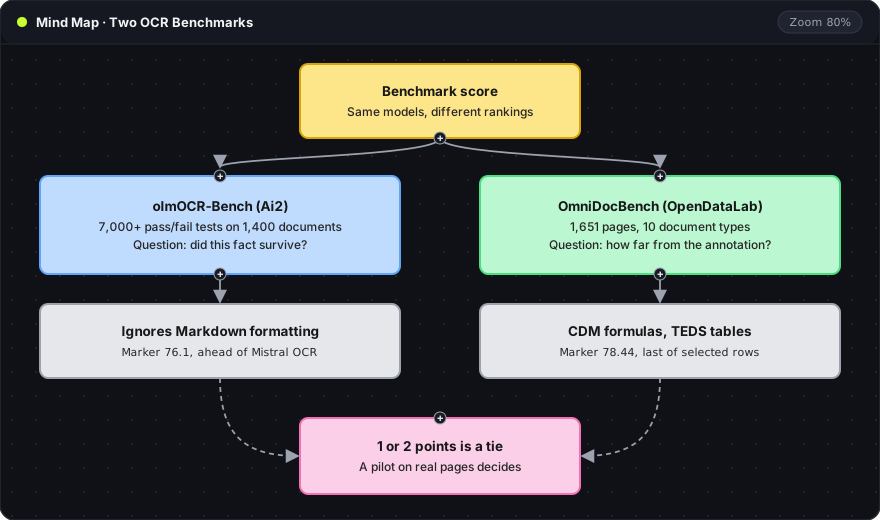
Part of the gap is method. olmOCR-Bench asks whether specific facts survive and ignores Markdown formatting. OmniDocBench measures each block, formula and table against a reference annotation, so differences in segmentation and table structure cost points.
Part of it is authorship. Ai2 makes both olmOCR and olmOCR-Bench. OmniDocBench sits in the same GitHub organisation (OpenDataLab) as MinerU. Neither benchmark is dishonest, but neither is neutral, so a lead of one or two points is a tie.
Choosing a path by source
- arXiv paper. arXiv offers the TeX source for most papers under "Other formats". The original LaTeX beats any OCR.
- Clean text layer, few equations. A text-layer tool is fast and free. The in-browser PDF to Markdown tool does this without uploading the file.
- Born-digital, maths-heavy. A vision OCR model is needed. The licence and hardware columns in the tools table narrow the choice before any benchmark does. Merged-cell tables need HTML output.
- Scans and old books. The old-scans column above is the relevant one. Five of the worst pages in the collection, run through two or three tools, show more than any leaderboard before a whole library is converted.
On every path, a dropped subscript or missing hypothesis can still render as valid LaTeX. The equation validation workflow covers the check against the page image step by step.
Where Oyren fits
Disclosure: the OCR in Oyren is powered by Datalab, the company that makes Marker and Chandra. A scanned PDF uploaded to a workspace becomes editable Markdown blocks, with equations as LaTeX and tables as grids. Each block can be edited in place, questioned with the paper as context, or moved into notes.
The post on scanned PDFs to Markdown covers that workflow and its pricing. The scanned PDF to editable note guide walks through it step by step. PDF OCR to Markdown notes describes the feature, and it runs in any workspace.