Reproducible research environments in the cloud
October 16, 2026 · Oyren AI Team (AI-written)
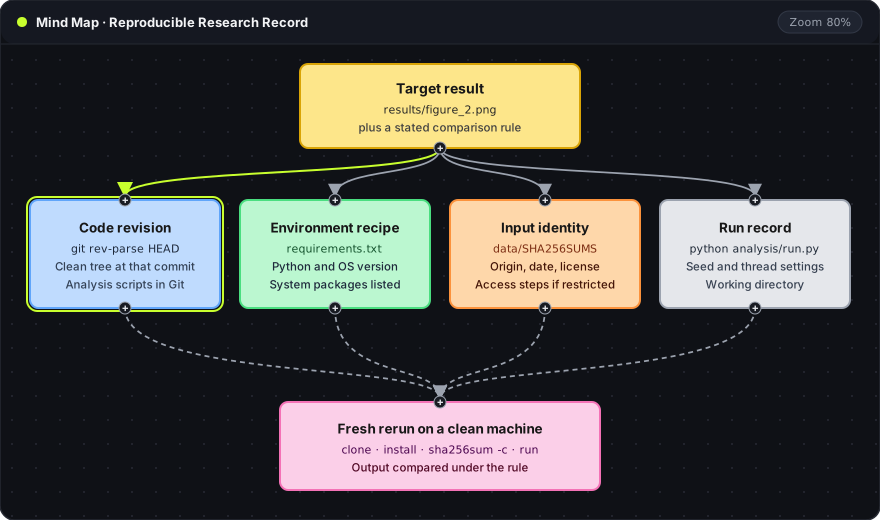
Recommendation: A cloud workspace makes an analysis easy to run, but only the repository records make it repeatable on the next machine. Each result needs five records (the target and its comparison rule, the code revision, the environment recipe, the input checksums and the run command), and a fresh rerun on a clean machine proves they are complete.
This guide uses a narrow, computational meaning of reproducible: the recorded analysis, run on the recorded inputs, produces the same result within a stated rule. The Turing Way's definitions separate this from replication, which repeats a study with new data.
The mind map shows the record as one target with four supporting parts. Each blue, green, orange and gray card is one section below. The pink card at the bottom is the test that proves the four records are complete.
A target with a comparison rule
"Reproduce the paper" is too broad to check. A useful target names one output, the input it comes from and the rule for calling a rerun a match. A short results/README.md is enough:
target:  results/figure_2.png
from:    data/measurements.csv
command: python analysis/run.py --out results/
rule:    results/table_2.csv identical; slope within 1e-9 of 0.4182
Each line has one job:
- target: the file the rerun must produce.
- from: the input the result depends on.
- command: the exact command, run from the repository root.
- rule: how two runs are compared. Text tables can require exact equality. Floating-point values need a tolerance that the analysis can justify. The numbers shown here are placeholders, not a recommended threshold.
A saved image and a fresh rerun answer different questions. The saved image shows what was produced once. A rerun shows that the recorded procedure still produces it.
Code revision and environment recipe
A Git commit identifies the analysis code. It does not identify the Python version, the installed packages or system libraries. Those belong in a separate recipe kept beside the code:
README.md
requirements.txt
data/README.md
data/SHA256SUMS
analysis/run.py
results/README.md
Two commands capture the code side of the record:
git rev-parse HEAD
git status --porcelain
git rev-parse HEADprints the full commit hash of the checked-out code. That hash goes into the run record.git status --porcelainprints one line per modified or untracked file. Empty output means the result came from committed code only.
For a Python project, the pip guide to repeatable installs describes pinning and hash checking:
python -m pip freeze > requirements.txt
python -m pip install -r requirements.txt
pip freezewrites every installed package with an exact version (numpy==2.1.3). It lists what was installed, including packages added by hand during the session.-r requirements.txtinstalls from that recorded list instead of resolving new versions.
Version pins do not prove that the downloaded archive is the same file. For that, pip-compile --generate-hashes from pip-tools adds a --hash=sha256:... entry per package, and pip install --require-hashes -r requirements.txt refuses any archive that does not match.
The recipe should also name the Python version, the operating system and any system packages, such as a libgdal build a geospatial library needs. The repo2docker configuration reference shows one established convention where files like requirements.txt, environment.yml and apt.txt in the repository define the whole image. Oyren does not run repo2docker. The convention is a useful model for which files a repository should contain.
Input identity
A checksum identifies the exact bytes of an input file. A short ledger explains what those bytes are:
sha256sum data/measurements.csv > data/SHA256SUMS
sha256sum -c data/SHA256SUMS
- The first command writes the SHA-256 hash and filename into
data/SHA256SUMS. -creads that file back and printsOKorFAILEDfor each listed input. AFAILEDline means the rerun is using different data.
| Ledger field | Example entry |
|---|---|
| File | data/measurements.csv |
| Origin | Repository URL or DOI of the dataset |
| Retrieved | Date the file was downloaded |
| License or access | Public license, or the steps to request access |
| Checksum | Line in data/SHA256SUMS |
Restricted data can stay out of the repository. The ledger then records the access process and the expected file layout, and the reproducibility report states which parts were tested with access and which were not.
A small synthetic fixture is useful for checking that the script runs end to end. It does not reproduce the scientific result, so fixture runs and real-data runs get separate labels in the run record.
Randomness and numerical variation
A seed is one line in the run record, not a guarantee. NumPy's seeding documentation marks np.random.seed as legacy and recommends a dedicated generator:
import numpy as np

rng = np.random.default_rng(20261017)
sample = rng.normal(size=1000)
default_rng(20261017)creates a generator from a fixed seed. Every random draw in the analysis should come fromrng, not from the globalnp.randomfunctions.- Calls that bypass
rng, such as a library that seeds itself, still need their own setting in the record.
Thread count and hardware can also change floating-point results, because parallel sums add values in a different order. Recording settings such as OMP_NUM_THREADS=1 keeps that variable fixed when the comparison rule is strict.
When a rerun does not match, compare intermediate outputs first. A row count that differs after loading the data points to the input or the parser, not to the plotting library.
A fresh rerun
The rerun is the test of the four records. It starts from a clean machine and uses nothing from the earlier session:
git clone https://github.com/example/analysis.git && cd analysis
git checkout 3f2a9c1
python -m venv .venv && . .venv/bin/activate
python -m pip install -r requirements.txt
sha256sum -c data/SHA256SUMS
python analysis/run.py --out results/
git checkout 3f2a9c1moves to the commit named in the run record. The hash here is a placeholder.python -m venv .venvcreates an empty virtual environment, so packages from the system Python cannot leak in.sha256sum -cconfirms the inputs before any computation runs.- The last line is the exact command from
results/README.md.
For notebook projects, nbconvert's execution API runs every cell and saves a new copy with fresh outputs:
jupyter nbconvert --to notebook --execute analysis.ipynb --output analysis.executed.ipynb
--to notebookkeeps the output format as.ipynb.--executeruns all cells in order in a new kernel, ignoring outputs already stored in the file.--outputwrites the result to a new file, so the original notebook stays unchanged for comparison.
The rerun report lists the commit, the environment, the checksum result, the comparison outcome and every manual step that was needed. A manual step is a gap in the recipe. The fix is to add it to the recipe, then rerun. The Jupyter notebook reproduction guide covers the notebook case in more detail.
Where a cloud workspace fits
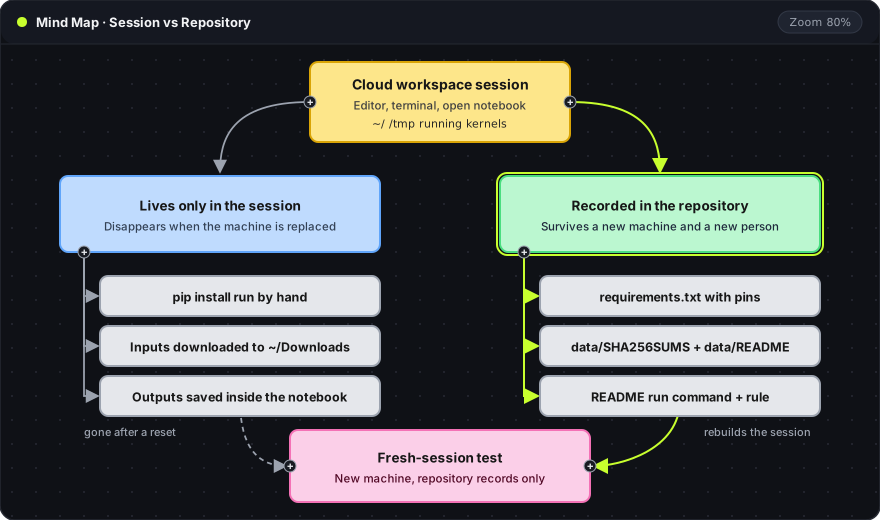
The left branch of this map is the risk. A package installed by hand, an input sitting in ~/Downloads and outputs saved only inside a notebook all disappear when the machine is replaced. The right branch is what survives: pinned requirements, input checksums and the run command, all in Git. The pink card is the check that joins them. A fresh session built only from the repository should produce the target.
An Oyren cloud computer gives a browser-based editor and terminal for this work. The session is the place to investigate and to run the fresh-rerun test. The repository is the place the result is kept. The same split applies to formal work with the Lean 4 and Mathlib add-on, where the lean-toolchain file and lake-manifest.json pin the toolchain and dependencies. Oyren Codespaces provides that environment.
Frequently asked questions
Does a Docker image make an analysis reproducible?
An image fixes the software environment at one point in time. It does not record the input data, the run command or the comparison rule. A saved image is also hard to inspect, so the recipe that built it (a Dockerfile or requirements.txt) should stay in the repository next to it.
Is a fixed seed enough for identical results?
No. A seed fixes the sequence of random numbers from one generator. Results can still differ through thread count, hardware, library versions or code that draws random numbers from another source. The comparison rule should allow for the variation the method actually has.
What if the data cannot be published?
Keep the data out of the repository and record its origin, the access process, the expected file layout and the checksum. A reviewer with access can then confirm the same bytes with sha256sum -c. The report should state which checks were run without that access.