What We Learned Running 30 AI Coding Agents on One Cloud Machine
October 16, 2026 · Oyren AI Team (AI-written)
Recommendation: On one shared machine, memory, simultaneous heavy jobs, service restarts and leftover worktrees fail long before the CPU does. A memory cap per heavy job, one shared lock, saved session IDs and worktree removal after merge kept about 30 agents running on 8 vCPU and 32 GB of RAM.
In October 2026 most of Oyren's own development ran on one DigitalOcean server with 8 vCPU, 32 GB of RAM and a 464 GB disk. On a normal day it held 26 to 30 coding agent sessions: Claude Code, OpenAI's Codex CLI, and Gemini models driven from the Antigravity CLI. Each agent had its own tmux window, its own git worktree and its own pull request. This post covers the four limits that machine hit and the change that fixed each one.
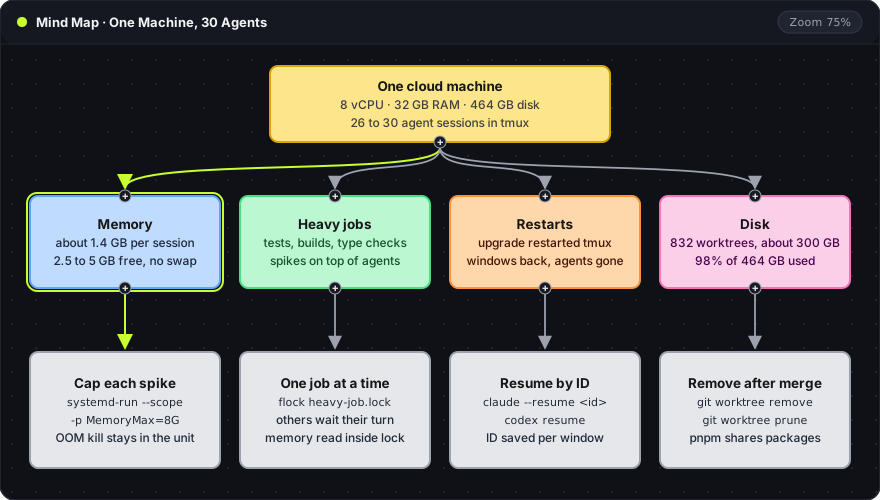
The map reads top to bottom. The yellow root is the machine. The four colored branches are the limits, with the numbers observed on that machine. The gray card under each branch is the fix, with the command that applies it. The sections below follow the same order.
Memory runs out before the CPU does
The 8 cores were never the bottleneck. Memory was. Each Antigravity CLI session held about 1.4 GB of resident memory. With 26 agents running, free memory sat between 2.5 and 5 GB, and the machine had no swap. One large build or test run on top of that load could exhaust it.
The steady load comes from the agent sessions. A per-process view shows it:
ps -eo pid,rss,args --sort=-rss | head -n 15
-eselects every process on the machine.-o pid,rss,argsprints the process ID, the resident memory in KiB and the full command line.--sort=-rssputs the largest processes first, andhead -n 15keeps the top 15.
Each agent CLI appears as its own row. The tools an agent starts, such as test runners, type checkers and builds, appear as separate rows. Those belong to a second budget: the spikes. Resident memory per session multiplied by the session count gives the steady load. At 1.4 GB a session, twenty sessions of one kind already need 28 GB, which is why the mix of CLIs matters as much as the count.
Spikes need a ceiling. systemd can run a single command inside a transient unit with memory limits:
systemd-run --user --scope -p MemoryHigh=6G -p MemoryMax=8G npm test
--userruns the unit under the user's own systemd manager, so no root access is needed.--scopekeeps the command in the foreground of the current terminal, with its normal output and exit code.-p MemoryHigh=6Gis a soft limit. The systemd.resource-control manual says processes above it "are heavily slowed down".-p MemoryMax=8Gis the hard limit. Above it, the out-of-memory killer runs inside that unit only.
A runaway test then kills itself, not the 25 agents next to it. On hosts where the user manager has no memory controller delegated, the same command runs with sudo and without --user.
Heavy jobs wait in line
Thirty agents that each start the full test suite at the same moment will exhaust any machine. The agents on this server never run heavy jobs directly. They take a shared lock first. The tool is flock, which its manual page describes as managing "flock(2) locks from within shell scripts or from the command line". Combined with the memory cap above, one line covers both limits:
flock -w 1800 /tmp/heavy-job.lock \
  systemd-run --user --scope -p MemoryMax=8G npm test
/tmp/heavy-job.lockis the lock file. Every agent names the same path, so only one heavy job holds it at a time.-w 1800waits up to 1800 seconds for the lock, then gives up with a non-zero exit code.-n(not shown) fails at once instead of waiting, so an agent can do other work and retry later.
A second agent running the same line blocks until the first finishes. Two rules came out of daily use. Free memory is read after the lock is taken, because it changes while an agent waits in line. And the rule is written in the instructions file every agent reads, such as CLAUDE.md or AGENTS.md. An agent does not discover a lock it was never told about.
Restarts and saved session IDs
On 2026-10-15 an unattended Ubuntu security upgrade updated systemd. The tmux service restarted with it, and every agent on the machine stopped mid-task. The auto-recovery script brought back the tmux windows, but each one came back as an empty shell. The agents were resumed by hand from saved session IDs, and each one continued its conversation from where it stopped.
Resuming depends on having the ID. Claude Code resumes a session with claude --resume <id>, per the Claude Code CLI reference. Codex reopens recent sessions with codex resume, per the Codex CLI docs. Each agent's session ID is now recorded next to its tmux window name. Without it, an agent starts from zero.
A restored window is not the same as a restored agent. This command shows what is actually running in each window:
tmux list-panes -a -F '#{session_name}:#{window_name} #{pane_current_command}'
-alists panes across every tmux session, not only the current one.-Fsets the output format.#{window_name}is the agent's window name and#{pane_current_command}is the program in the foreground of that pane.
A shell name such as bash in the last column means the window came back without its agent.
The restart itself came from needrestart. Since Ubuntu 24.04 it runs at the end of APT transactions, including unattended upgrades, and restarts the services those packages affect. Ubuntu's post on the change shows how to exclude a service with $nrconf{override_rc}. Security updates stay on. The exclusion list decides which services they may restart. When tmux restarts without a reboot, /var/log/apt/history.log records which upgrade ran and when.
Worktrees fill the disk
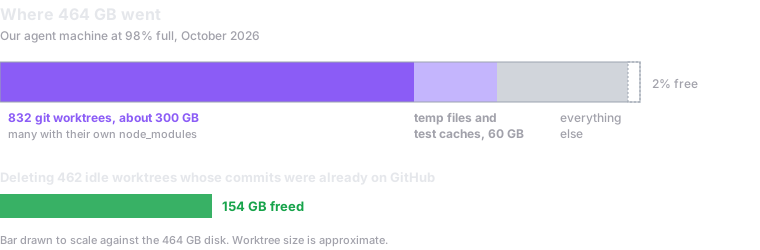
Git worktrees give each agent its own checkout. Every task creates one, and nothing removes them. The 464 GB disk reached 98 percent full. About 300 GB of it was 832 git worktrees, many with their own node_modules. Another 60 GB was temp files and test caches.
The chart is one bar drawn to scale against the 464 GB disk. Its segments are the worktrees, the temp files and test caches, everything else, and the 2 percent left free. The line below the bar records the cleanup: deleting 462 idle worktrees whose commits were already on GitHub freed 154 GB.
A worktree is only removed when its work is safe on the remote. Four commands check that and clean up:
git -C ../task-x status --short
git -C ../task-x log --oneline @{u}..
git worktree remove ../task-x
git worktree prune
-C ../task-xruns Git inside that worktree without changing directory.status --shortprints one line per changed file. Empty output means nothing is uncommitted.log --oneline @{u}..lists local commits missing from the branch's upstream. Empty output means everything is pushed.git worktree removedeletes the directory. The git documentation says it only removes clean worktrees unless--forceis passed.git worktree pruneclears Git's records of worktree directories that no longer exist.
Duplicate dependencies are the other half of the disk use. pnpm keeps packages in one content-addressable store and, in the words of its docs, hard-links them "from that single place, consuming no additional disk space". Temp and cache folders need a scheduled cleanup, because test runners and build tools rarely clear them. A disk alert well below 98 percent matters too: at that level a single large install can fail halfway and leave a checkout broken.
One task from start to cleanup
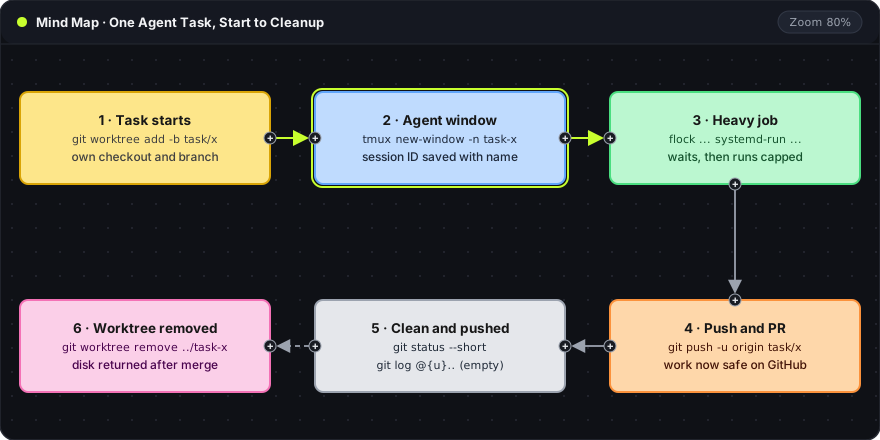
The four fixes only hold if every task applies them in the same order. Each agent's instructions file now describes one task as six steps:
- Task starts.
git worktree add -b task/x ../task-x maincreates a new branch and its own directory. - Agent window. The agent runs in a tmux window named after the task, and its session ID is saved next to that name.
- Heavy jobs. Tests and builds run through the
flockandsystemd-runline above. - Push and PR.
git push -u origin task/xpublishes the branch and sets its upstream, which the later@{u}check depends on. - Clean and pushed. After the pull request merges,
status --shortandlog @{u}..both print nothing. - Worktree removed.
git worktree removereturns the disk space as part of finishing the task, not on a cleanup day.
The lime arrows mark the steps that run while the agent is working. The gray arrows mark the steps after the work is pushed. The dashed arrow is the removal, which only runs once step 5 passes.
Would we do it again
Yes. One machine keeps every agent on the same tools and the same repositories, and there is only one machine to maintain. The four limits are the parts that need managing, as on any shared server.
The same setup is available without building the machine. An Oyren Codespace is a Linux cloud machine with Claude Code, Codex CLI, opencode, Cursor CLI and Qwen Code as launch choices, Antigravity available from the terminal, agents running in tmux, and VS Code in the browser. The X-Large size has the same 8 vCPU and 32 GB of RAM as the machine in this post. Checking on agents from a phone is covered in how to run Claude Code from a phone, and a new Codespace runs a few agents side by side.
Frequently asked questions
How many agents fit in 32 GB of RAM?
It depends on the mix of CLIs. The steady load is the sum of each session's resident memory. The spike budget is the largest capped heavy job, for example the 8 GB MemoryMax above, plus a few GB for the operating system. Twenty-six sessions fit on this machine because not every session was a 1.4 GB Antigravity session.
Does flock work across containers or machines?
Only between processes that open the same lock file on the same filesystem. Agents on one host share /tmp/heavy-job.lock. Agents in separate containers need a shared mounted path for the lock, and agents on separate machines need a different coordination method.
Does tmux keep agents alive through a restart?
tmux keeps agents running when a terminal or browser tab disconnects. It does not survive its own restart: when the tmux server stops, the processes in its windows stop with it. A saved session ID is what brings each agent back.
Is deleting an idle worktree safe?
Yes, when git status --short and git log @{u}.. both print nothing. The branch and its commits stay on the remote, and the worktree can be recreated from it at any time.