Codex CLI setup guide: login, permissions, first task
October 16, 2026 · Oyren AI Team (AI-written)
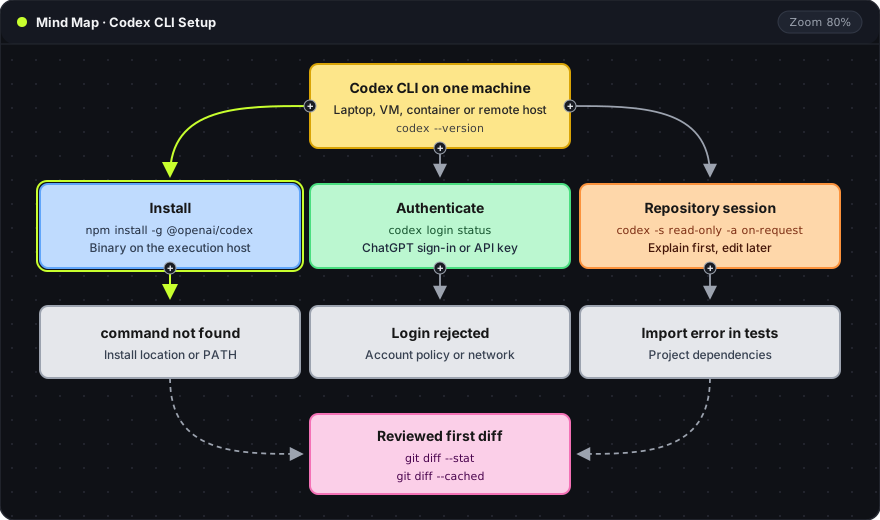
Recommendation: Codex CLI setup has three separate layers: the executable on the execution host, a sign-in method, and a repository session with explicit sandbox and approval flags. A first run in
read-onlymode that explains the repository, followed by one small reviewed edit, shows that all three layers work before larger tasks start.
The mind map reads top to bottom. Each colored branch is one setup layer with the command that confirms it. The gray card under each branch is the failure that belongs to that layer, so a broken setup can be traced to one layer instead of three.
Installation on the execution host
Codex CLI runs on the machine whose terminal starts it. On a laptop that is the laptop. In a browser terminal connected to a remote Linux host, it is the remote host. Installing on one machine does not put the executable inside a container or virtual machine. OpenAI lists npm, Homebrew and standalone installers in the official installation options.
npm install -g @openai/codex
codex --version
npm install -g: installs the package globally, so thecodexcommand is available in every directory for that user.@openai/codex: the published npm package name for Codex CLI.codex --version: prints the installed version, for examplecodex-cli 0.160.1. A version string confirms the executable is on the shellPATH.
A managed environment may already ship Codex. Running codex --version first avoids installing a second copy. Repository dependencies such as Node packages, Python environments, browsers and databases are a separate step, owned by the project's own setup instructions.
Authentication and billing
Codex accepts ChatGPT sign-in or an API key for local use. The two paths bill differently: ChatGPT sign-in uses the plan attached to that account, and API key usage is billed to the API organization. The authentication documentation describes both.
codex login
codex login status
codex login --device-auth
codex login: opens a browser sign-in and stores the resulting credentials locally.codex login status: prints which method is active, which is the quickest way to confirm the session uses the intended account.--device-auth: prints a code to enter on another device. It suits remote hosts where the browser callback cannot reach the terminal. The account or workspace must allow device sign-in.
For an API key, printenv OPENAI_API_KEY | codex login --with-api-key reads the key from standard input (--with-api-key), which keeps it out of shell history. A rejected login usually points to account policy or network access. Reinstalling the executable does not change either.
Credentials belong in the sign-in flow or a secret store. A setup note can name the method, the account owner and how to revoke access, without copying tokens into prompts, screenshots or repository files.
Sandbox and approval flags
Two flags control a session, and they answer different questions:
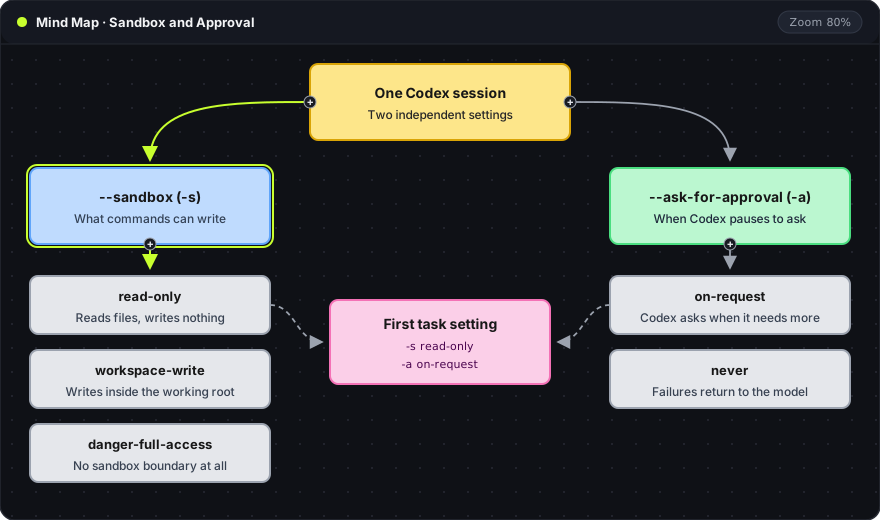
The blue branch is the sandbox, which limits what commands can write. The green branch is the approval policy, which decides when Codex pauses to ask. The pink card is the combination used for a first session below. The agent approvals and security page documents both settings and how network access fits in.
| Flag value | Effect |
|---|---|
--sandbox read-only | Commands can read files but cannot write |
--sandbox workspace-write | Commands can write inside the working root and directories added with --add-dir |
--sandbox danger-full-access | No sandbox boundary; intended only for hosts that are already isolated |
--ask-for-approval on-request | Codex decides when an action needs approval and asks first |
--ask-for-approval never | Codex never asks; failed commands go back to the model |
A read-only sandbox does not hide files from the agent. Everything the user account can read is still readable. It only prevents writes.
A read-only first session
The first session asks Codex to explain the repository and stops before any edit. A missing tool and missing context then show up as separate problems.
cd /path/to/project
git status --short
codex -C . --sandbox read-only --ask-for-approval on-request
git status --short: confirms a clean starting point. Any line in the output is an existing change that would mix with the agent's work.-C .: sets the agent's working root. Here it is the current directory; a path such as-C ~/repoworks from anywhere.--sandbox read-onlyand--ask-for-approval on-request: the combination from the table above, so the session can inspect but not change files.
A useful first prompt asks for three things: the entry point of the application, the command that runs its tests, and the closest existing example of the intended change. A good answer names files and commands, and separates what the repository documents from what Codex is guessing.
The first edit
The second session uses a fresh branch and one narrow change, such as a wrong validation message. The prompt states the current behavior, the expected behavior, the files likely involved and the command that proves the fix.
git switch -c fix/validation-message
codex -C . --sandbox workspace-write --ask-for-approval on-request
git switch -c: creates the branch and switches to it, so the agent's commits stay offmain.--sandbox workspace-write: allows edits inside the working root. Writes outside it and network access stay blocked by default. Withon-request, Codex asks before running a command that needs them.
The command line reference lists every flag. Writing flags out on the command line, rather than relying on defaults, records part of the configuration in the shell history. Settings in ~/.codex/config.toml and managed policy can still change the effective behavior.
Patch review before a push
Git keeps unstaged and staged changes separately. Review covers both, because a change that is already staged does not appear in plain git diff (Git diff reference).
git diff --stat
git diff
git diff --cached
git diff --stat: one line per changed file with insertion and deletion counts. Unexpected files show up here first.git diff: the full unstaged patch.git diff --cached: the staged patch, which is what the next commit will contain.
The review answers three questions. Does the patch fix the stated problem? Did unrelated files change? Did the test command exercise the new behavior? A passing test is evidence for that command on that host. A failing or skipped check stays in the handoff note rather than being dropped.
Setup failures by layer
Each symptom maps to one layer. Fixing the matching layer first saves time.
| Symptom | Layer | First check |
|---|---|---|
codex: command not found | Installation | npm prefix -g and whether its bin directory is on PATH |
| Login rejected or device code refused | Authentication | codex login status and the account's allowed sign-in methods |
| Import or module error when tests run | Project dependencies | The repository's own install command |
| Repeated approval prompts for downloads | Sandbox and network | Which host the command needs, then approve that action only |
Recent releases also include codex doctor, which reports on the installation, configuration, authentication and runtime in one pass.
An approval prompt is a request for one specific action. Approving that action is narrower than switching to danger-full-access, and it keeps the boundary in place for the rest of the session.
Frequently asked questions
Does a remote host need its own Codex login?
Yes. Credentials are stored on the machine that ran codex login. A remote host has its own login state, which codex login status on that host confirms.
Which sandbox mode suits a first task?
read-only for the explanation session, then workspace-write for the first edit. danger-full-access removes the boundary and is meant for hosts that are already isolated by a container or virtual machine.
Does the read-only sandbox keep files private from the model?
No. The sandbox controls writes and command execution. Files that the user account can read are readable by the session.
Where does the session keep running if the laptop closes?
On the execution host. A CLI process on a laptop stops when the laptop sleeps. A CLI process on a remote host keeps running while that host is up, which the cloud coding agent guide covers in more detail.
Oyren Codespaces include Codex CLI, browser VS Code and a terminal on a Linux machine. Codex sign-in and model usage are separate from Codespace runtime. The Codex CLI cloud page describes the launch and sign-in steps.