Running Coding Agents in the Cloud vs on a Laptop
October 16, 2026 · Oyren AI Team (AI-written)
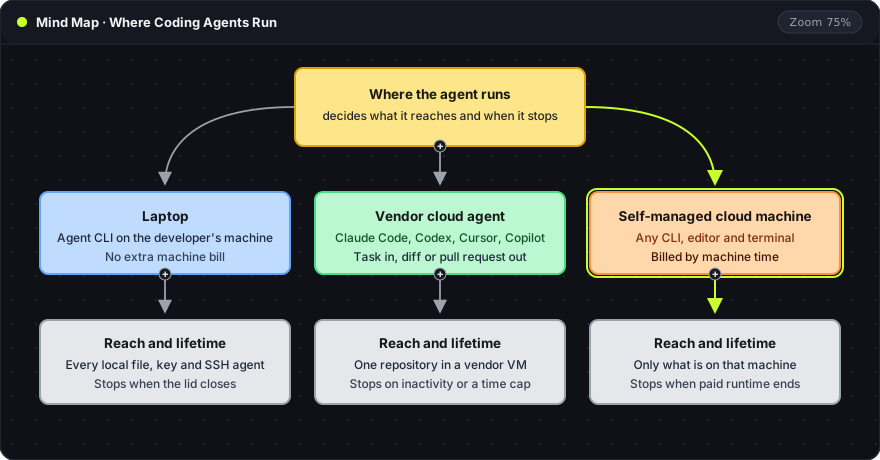
Recommendation: A coding agent on a laptop stops when the lid closes and can read every file and key on that laptop. Well-scoped GitHub tasks fit a vendor's cloud agent, short supervised work fits the laptop, and long or multi-agent sessions fit a self-managed cloud machine.
What changed in 2026
Agent runs now last long enough that a laptop is the weak point, and the major vendors moved their agents onto cloud machines:
- Claude Code sessions can run in the cloud from the browser, the Claude mobile app, the desktop app or the terminal. According to Anthropic, the session keeps running after the laptop closes and can be checked on or steered from any device (Claude Code docs).
- Codex cloud runs tasks from a saved environment with the developer's repositories, dependencies and tools. OpenAI says tasks keep working while the computer is asleep and can be continued from the ChatGPT mobile app (Codex docs).
- Cursor Cloud Agents, formerly Background Agents, "run in isolated VMs in the cloud with full development environments". They start from the web, the iOS app, Slack, GitHub, Linear or the API (Cursor docs).
- GitHub Copilot cloud agent works on a delegated task "in an ephemeral cloud development environment" and opens a pull request (GitHub docs).
- OpenAI agreed to buy Ona, formerly Gitpod, in June 2026, pending regulatory approval, to give Codex persistent cloud environments for long-running jobs, including inside a customer's own cloud (The Next Web).
From a terminal, Claude Code starts a cloud session with one flag:
claude --cloud
--cloud runs the session in Anthropic's cloud instead of on the local machine, so it continues after the terminal closes.
Three places an agent can run
Where the agent runs decides what it can reach and when it stops, as the mind map above shows.
- The laptop. The agent sees the developer's real files, shell history, SSH agent and any
.envfile in reach. The machine costs nothing extra, but the run stops when the laptop sleeps, and two agents on one checkout get in each other's way. Remote control is the newer middle ground: Cursor added it on 6 October, and the Cursor iOS app now replies to agents running on the developer's computer. Per Cursor, that computer must stay on and online (Cursor changelog). Claude Code's Remote Control works the same way. - A vendor's cloud agent. The developer sends a task, and the vendor starts a VM, clones the repository, runs its own agent and hands back a diff or a pull request. It needs the least setup of the three, but each product runs only its own agent, mostly against GitHub.
- A self-managed cloud machine. A Linux machine in the cloud serves as the workstation: any CLI, any language runtime, a full editor and a terminal. The agent runs there instead of on the laptop. The bill is for machine time, and the developer chooses which agents and models run on it.
Cost models
| Option | What the bill covers |
|---|---|
| Claude Code cloud sessions | Usage counts toward the plan's limits, with no separate charge for the cloud VM per Anthropic. Pro, Max, Team and some Enterprise seats (docs) |
| Cursor Cloud Agents | "Charged at API pricing for the selected model", with a spend limit set at first use. Needs a paid plan (docs) |
| Laptop | The model plan or API usage. The hardware is already paid for |
| Self-managed cloud machine | Machine time plus the model plan or API usage |
Parallel runs are the cost that is easy to miss. Anthropic notes that cloud sessions share rate limits with the rest of the account's usage, and "running multiple tasks in parallel consumes more rate limits proportionately". Five tasks started at once use five times the limits.
Security boundaries
An agent that runs commands can be steered by text it reads, such as a malicious README, issue or web page. On a laptop, the blast radius is everything the developer can reach. In a cloud VM, it is that VM, and the vendors add controls on top:
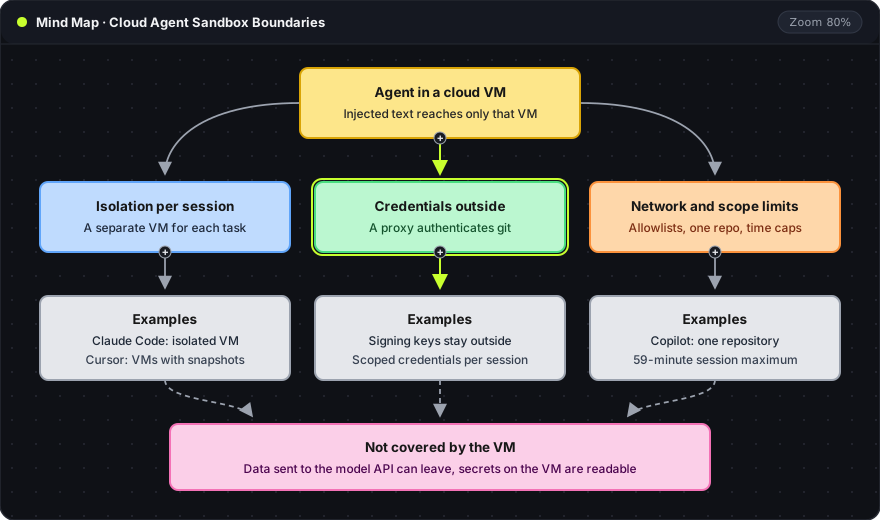
- Isolation per session. Claude Code runs "each session in an isolated, Anthropic-managed VM". Cursor says it manages "VM provisioning, isolation, snapshots, startup, artifacts, and capacity for every Cloud Agent".
- Credentials outside the sandbox. In Anthropic-hosted environments, "git credentials and signing keys stay outside the sandbox, and a proxy authenticates on the session's behalf with scoped credentials".
- Network and scope limits. Claude Code cloud environments limit network access by default, and Cursor can restrict outbound domains. Copilot changes only the repository named when the task starts, and each session runs for at most 59 minutes.
A VM does not cover everything. Anthropic's own docs warn that even with network access disabled, the agent can still talk to the Anthropic API, "which may allow data to exit the VM". Any secret placed on the machine is readable by the agent. The post on designing agent tool permissions covers how the defaults are set.
Phone access
- Vendor cloud agents come with a mobile client: the Code tab in the Claude app, Codex in the ChatGPT app, Cursor for iOS. The phone reviews and steers. On ChatGPT mobile, tasks start from an environment already created on the web or desktop.
- Local agents need remote control, and the computer has to stay awake.
- A cloud machine needs only a browser when its editor and terminal are web-based, and the agent keeps running while the phone is asleep. Running Claude Code from a phone walks through that setup.
Limits to plan around
- Sessions expire. Claude Code cloud sessions stop after a period of inactivity. The conversation is restored, but background work such as subagents and running shell commands is not.
- Hard time caps. Copilot's 59-minute limit "cannot be extended or bypassed".
- GitHub first. Claude Code cloud sessions need GitHub to clone repositories and create pull requests. A GitLab or Bitbucket repository can be uploaded as a bundle, but the session cannot push results back.
- Policy blocks. Organizations with Zero Data Retention or the HIPAA configuration cannot use Claude Code cloud sessions.
Choosing between them
- A vendor cloud agent for a well-scoped task that ends in a pull request, on GitHub, where one vendor's model is enough.
- The laptop for short interactive work where the developer watches every step.
- A self-managed cloud machine for several different agents, tools a vendor image lacks, sessions that last hours or days, or checking the running app rather than only the diff.
Where an Oyren Codespace fits
An Oyren Codespace is the third option: a Linux cloud machine with passwordless sudo, VS Code in the browser and a terminal, separate from the developer's personal computer.
- Agents: Claude Code, Codex CLI, Gemini CLI, opencode, Cursor CLI, Qwen Code and Antigravity CLI are on the image. Each signs in with the developer's own subscription or API key.
- Lifetime: agents run in a tmux session on the machine, so closing the browser tab does not stop them. A run lasts from 1 hour to 30 days, can be extended while it runs, and a snapshot keeps the disk for later.
- Cost: runtime is billed by the hour in credits, and stopping early refunds the unused time. Model usage stays with the provider plan or API key.
- The running app: an app running on the machine gets a public URL, which opens on a phone as well.
The sandboxed agent guide walks through a first task, and VS Code in the browser with coding agents shows the setup. Rates are on the Codespaces page, and a Codespace starts from the workspaces page.
Frequently asked questions
Does a cloud VM make an agent safe from prompt injection?
No. It limits what an injected instruction can reach to that VM. Data sent to the model API can still leave, and any secret placed on the machine is readable by the agent, so secrets belong on the machine only when the task needs them.
Is the VM behind a Claude Code cloud session charged separately?
No. Anthropic states there is no separate charge for the cloud VM. The session's usage counts toward the plan's limits like any other Claude Code use.
Can several agents share one self-managed machine?
Yes. Each agent runs in its own terminal or tmux window. Two agents editing the same repository need separate checkouts, which git worktrees provide from a single repository.