DeepL vs Google Translate for PDFs: a practical comparison
October 16, 2026 · Oyren AI Team (AI-written)
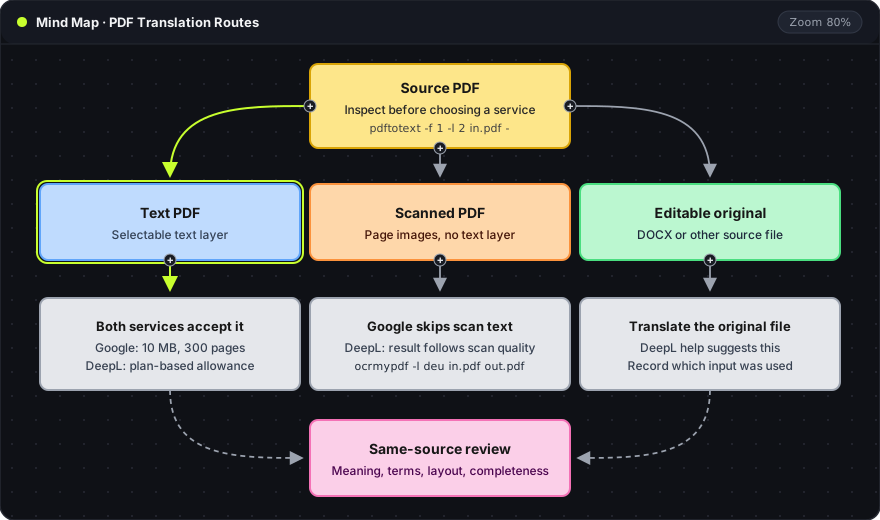
Recommendation: The source type decides most of the DeepL versus Google Translate question: Google Translate leaves text in scanned pages untranslated, while DeepL accepts scans with quality that follows the scan. For text PDFs both services work within their limits, and a same-source trial on a few difficult pages shows which output needs less correction.
The mind map starts from the source PDF and splits by source type. The gray cards hold the documented limits for each route. All three routes end in the same pink review, which is described further down.
Source inspection first
A text PDF and a scanned PDF look the same on screen but are different inputs. A text PDF has a selectable text layer. A scan is a set of page images. A quick check with pdftotext from Poppler shows which one a file is:
pdftotext -f 1 -l 2 paper.pdf - | head -20
-f 1 -l 2: extracts only pages 1 to 2 (first and last page), which keeps the check fast on long files.-: writes the text to standard output instead of a.txtfile.| head -20: shows the first 20 lines.
Readable sentences mean a text layer exists. Empty output or scattered characters mean the pages are images, or the text layer is broken, and the scanned route applies.
Documented PDF limits
Google Translate's desktop help lists PDF translation with a 10 MB file limit and a 300-page maximum. It states that text in scanned pages and images is not translated. Document translation is described for the desktop site; the mobile experience differs.
DeepL's PDF help requires an account and describes file allowances that depend on the plan. It covers scanned PDFs and notes that their results depend on scan quality. It also suggests translating the original editable document when the PDF result is poor.
| Decision | Google Translate (documents) | DeepL (PDF) |
|---|---|---|
| Text PDF | Accepted up to 10 MB and 300 pages | Accepted within the plan's file allowance |
| Scanned pages | Text in scanned pages stays untranslated | Accepted; quality follows the scan |
| Editable original | Separate document upload | Recommended when the PDF result is poor |
These are workflow facts from each vendor's documentation. They say which files each service accepts. They do not say which engine translates a given technical term better. Prices are left out on purpose: a useful cost comparison needs the account's actual allowance and the expected page volume.
A same-source trial
A fair trial sends the same pages, in the same target language, to both services and changes nothing else. The sample includes ordinary body text and at least one difficult region: a table, a small caption or a footnote. A clean title page says little about the rest of a mixed document.
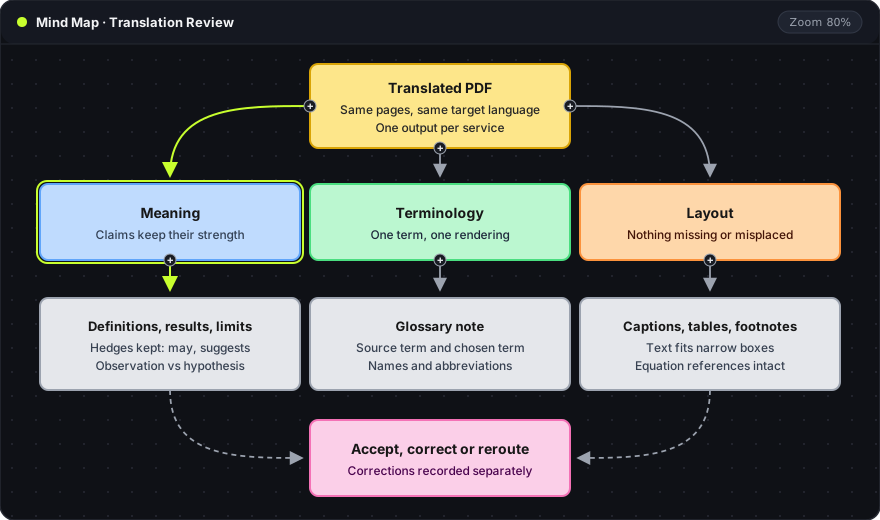
The review map has three branches, and each translated output goes through all of them:
- Meaning (blue): definitions, results and limitations keep their strength. A hedge such as "may" or "suggests" stays a hedge, and an observation does not turn into a proven result.
- Terminology (green): each source term has one rendering throughout. A short glossary note records the source term, the candidate translations and the chosen one, including names and abbreviations.
- Layout (orange): captions, table headings, footnotes and equation references are all present and attached to the right element. Translated text often needs more or less space than the original, so narrow text boxes are a good test.
The pink card is the outcome: accept the output, correct it with the correction recorded separately, or move to a different route. Recording corrections separately keeps the untouched engine result visible, which gives a realistic estimate of the editing time for similar documents.
These are review questions, not a score. A numerical accuracy figure needs a defined method and recorded judgments, which a single trial does not provide.
Scanned PDFs and OCR
A scan adds a recognition step before translation. A wrong word in the output can come from translation or from a misread character that never reached the translator correctly. Checking the recognized text first separates the two.
OCRmyPDF adds a searchable text layer to a scanned PDF. That layer is an OCR interpretation of the page images, so it gets the same inspection as any other source:
ocrmypdf -l deu --skip-text scan.pdf scan-ocr.pdf
pdftotext -f 1 -l 1 scan-ocr.pdf - | head -20
-l deu: the OCR language of the source document (here German, using the Tesseract language code).--skip-text: leaves pages that already contain text unchanged and runs OCR only on image pages.scan.pdf scan-ocr.pdf: the input file and the new output file. The original is not modified.
The second command repeats the text-layer check on the OCR output. If the recognized text is readable, scan-ocr.pdf becomes a text PDF and both services can take it. The scanned PDF guide covers turning scans into editable study notes in Oyren, which is a different output from a file sent to an external translator.
The editable original
When the Word or LaTeX source of a document exists, it is a separate input worth testing. DeepL's help suggests this route when PDF translation disappoints. The trial record names the input that was used, so a good result from a DOCX file is not reported as a good result from the scan.
Layout preservation is a separate problem from translation quality. The layout translation guide covers it independently of the engine. For a private reading aid, a plain text layout may be enough. For a document that will be distributed, every page and every label needs review.
Frequently asked questions
Which service handles scanned PDFs?
Google Translate's document help says text in scanned pages is not translated. DeepL accepts scans, with quality that depends on the scan. Running OCR first, then checking the recognized text, gives both services a text PDF to work with.
Is there a page or size limit?
Google Translate documents a 10 MB file limit and 300 pages per PDF. DeepL's limits depend on the account's plan.
Which one translates more accurately?
This comparison does not include a language-pair benchmark. Accuracy depends on the language pair and the subject. The same-source trial and the three-branch review above give a direct answer for a specific document.
Oyren translates text through the AI box on an editable text block, using AI credits. The translated text can be reviewed before it is inserted or replaces the original, and saved block edits export as a new PDF. The Oyren PDF editor describes that workflow.