Tmux for AI coding agents: sessions and reconnection
October 16, 2026 · Oyren AI Team (AI-written)
Recommendation: Run each remote AI coding agent inside a dedicated, task-named
tmuxsession (tmux new-session -s <task-name>) so closing a browser tab or dropping an SSH connection never kills the active CLI process. Treattmuxas protection against network disconnects, and rely ongit pushplus workspace snapshots to protect against machine stops.
Terminal-based coding agents such as Claude Code, Codex CLI, and OpenCode run as interactive foreground processes. When an agent is launched directly inside a raw SSH session or browser terminal tab, a brief Wi-Fi drop or closed window sends SIGHUP to the shell and interrupts the run midway through file edits or test suites. Wrapping the task in a named tmux session decouples the running process on the Linux host from the viewing client.
Session, window, and pane architecture for agent tasks
The tmux manual separates the background server (which owns pseudo-terminals on the execution machine) from the attached client (which renders the screen over SSH or a web socket). Naming each session after a single task and repository checkout makes reconnection deterministic without memorizing numeric session IDs or crowded split-pane grids.
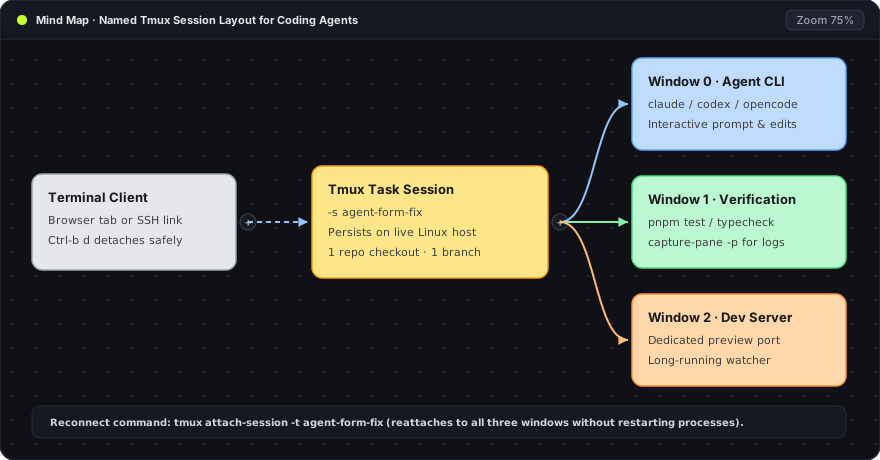
The Mind Map diagram above shows a clean three-window layout inside a single task session (agent-form-fix):
- Terminal Client (left card): A browser terminal tab or SSH client that attaches and detaches freely without stopping processes inside the session.
- Tmux Task Session (center card): The persistent server session (
-s agent-form-fix) bound to one repository checkout and one feature branch on the Linux host. - Window 0 · Agent CLI: Runs the interactive coding agent (
claude,codex, oropencode) in a full-width pane so diffs and tool calls remain readable. - Window 1 · Verification: Runs test suites and typechecks (
pnpm test,pnpm typecheck) on demand without scrolling the agent conversation off screen. - Window 2 · Dev Server: Holds the long-running preview server or watcher bound to a dedicated port.
Keeping one task per named session prevents log confusion. When ten unrelated agents share a single multi-pane window, identifying which checkout or port belongs to which pane slows down review and increases the risk of stopping the wrong process.
Creating, detaching, and reattaching a named session
From the task's assigned repository directory (or isolated Git worktree) on the execution host, a single command creates and attaches to a named tmux session:
tmux new-session -s agent-form-fix
The flags and arguments above set up the task container:
new-session: Starts a new session on the localtmuxserver (launching the server automatically if none is running) and attaches the current terminal to Window0.-s agent-form-fix: Assigns the human-readable session nameagent-form-fixso later reconnect commands can target the task by name rather than index0or1.
Once inside the session, start the coding agent CLI. To leave the session running in the background, press the default detach key sequence Ctrl-b followed by d. From any new SSH connection or browser terminal tab on the same host, list the active sessions and reattach by name:
tmux list-sessions
tmux attach-session -t agent-form-fix
Each command above handles a step of the reconnect flow:
tmux list-sessions: Prints every active session on the host along with its window count, creation time, and attachment status.tmux attach-session -t agent-form-fix: Reconnects the current terminal client to the target session (-t) namedagent-form-fix, restoring the exact screen state of the running agent.
Before starting a multi-hour refactor on a new host, a ten-second rehearsal—creating a test session, detaching with Ctrl-b d, closing the terminal tab, and running tmux attach-session -t from a fresh tab—confirms that the host keeps background processes alive when clients disconnect.
What tmux preserves versus what requires Git or snapshots
A common operational mistake is assuming that because tmux survives a closed browser tab, it also survives a stopped virtual machine or replaces version control. Separating client disconnects from host lifecycle events keeps work recoverable at every layer.
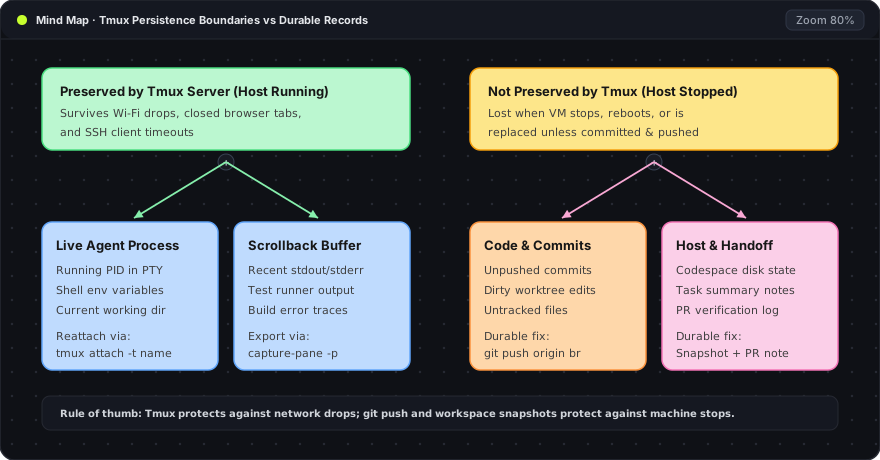
The Mind Map above divides task state into two distinct persistence domains:
- Preserved by the Tmux Server (left branch): While the Linux host stays powered on, the
tmuxserver preserves the running agent PID, pseudo-terminal environment variables, working directory, and pane scrollback buffers across network drops. - Not Preserved by Tmux Alone (right branch): If the Linux host stops, reboots, or is replaced, the in-memory
tmuxserver terminates. Unpushed commits, uncommitted working-tree edits, and task summaries require durable storage outside the terminal server.
| Layer of task state | What happens on client disconnect | What happens if the host stops | Durable record to maintain |
|---|---|---|---|
| Running agent process | Continues running inside tmux | Process terminates with the OS | Task prompt and checkpoint notes |
| Terminal scrollback | Preserved in tmux pane memory | Cleared when RAM resets | Exported failure excerpt in PR or note |
| Working-tree file edits | Untouched on host disk | Survives only if disk is persistent | Committed changes on a named branch |
| Local Git commits | Untouched in local .git | Unreachable while machine is off | Remote branch updated via git push |
| Agent internal checkpoints | Preserved in agent session store | Scoped to tracked edits only | Full Git commits (Claude Code checkpointing) |
When tmux attach-session -t <name> fails to find a session, checking the layers in order prevents launching a duplicate agent on top of an already-running checkout:
- Host identity: Verify
hostnameandpwdto confirm the terminal connected to the same machine and workspace. - Server state: Run
tmux list-sessionsto see whether the session was named differently or whether thetmuxserver table is empty after a machine restart. - Repository state: Run
git statusandgit log -n 3in the task checkout to inspect what the previous session committed before exiting.
Capturing pane output without leaking secrets
When a test suite or build fails inside a tmux window, copying only the relevant failure lines into a pull request or handoff note is cleaner and safer than dumping an entire terminal log. The capture-pane subcommand reads lines directly from a pane's scrollback buffer:
tmux capture-pane -pt agent-form-fix:1.0 -S -80
Each parameter in the command above controls what gets extracted:
capture-pane: Reads the visible screen and scrollback history of a target pane without interrupting the process running inside it.-p: Prints the captured text directly to standard output (stdout) instead of storing it only in an internaltmuxpaste buffer.-t agent-form-fix:1.0: Targets sessionagent-form-fix, window1(the verification window), pane0.-S -80: Starts capturing80lines above the top of the currently visible pane (-Ssets the starting line offset), capturing the error trace without pulling thousands of lines of package installation noise.
Before pasting captured output into a shared issue or pull request, inspect the snippet to ensure no API tokens, session cookies, or environment variable dumps (env, printenv) were printed in the scrollback window.
Parallel agent limits and session cleanup
Because tmux can create dozens of sessions with minimal overhead, terminal multiplexing never acts as the real bottleneck for parallel coding agents. True concurrency limits come from two host constraints:
- Filesystem and branch isolation: Two coding agents editing the same working directory will overwrite each other's uncommitted files and lock
.git/index. Every concurrenttmuxtask session should run in its own repository clone or isolated Git worktree. - Compute and memory headroom: Concurrent language servers, typecheckers, and test runners compete for CPU cores and RAM, as detailed in the guide on running 30 AI coding agents on one machine.
Once a task's pull request is merged or handed off, verify that git status is clean, confirm the branch is pushed to origin, stop any background preview server in Window 2, and close the session with tmux kill-session -t agent-form-fix so stale processes do not hold ports or memory.
In Oyren Codespaces, the browser terminal connects to a persistent Linux environment where tmux keeps agent sessions alive whenever the browser tab is closed or switched to another device. Stopping the Codespace halts the underlying virtual machine and ends running tmux processes while preserving disk state according to the workspace snapshot settings.
Frequently asked questions
Does detaching a tmux client stop the coding agent?
No. Detaching with Ctrl-b d (or losing an SSH or browser connection) only disconnects the display client. The tmux server process and any coding agent or test runner inside the session continue executing on the host.
Does a tmux session survive if the cloud machine stops or reboots?
No. The tmux server lives in the operating system's memory. If the virtual machine stops or restarts, all running tmux sessions end. Pushing commits with git push and saving workspace snapshots ensure the work survives machine stops.
Why use one named session per task instead of putting multiple agents in one window?
Dedicated task sessions (tmux new-session -s <task>) give each agent a full-width terminal, keep test and dev-server windows grouped with their matching branch, and allow closing one finished task without disturbing other active agents.