Reviewing AI-generated code: tests, diffs, and evidence
October 16, 2026 · Oyren AI Team (AI-written)
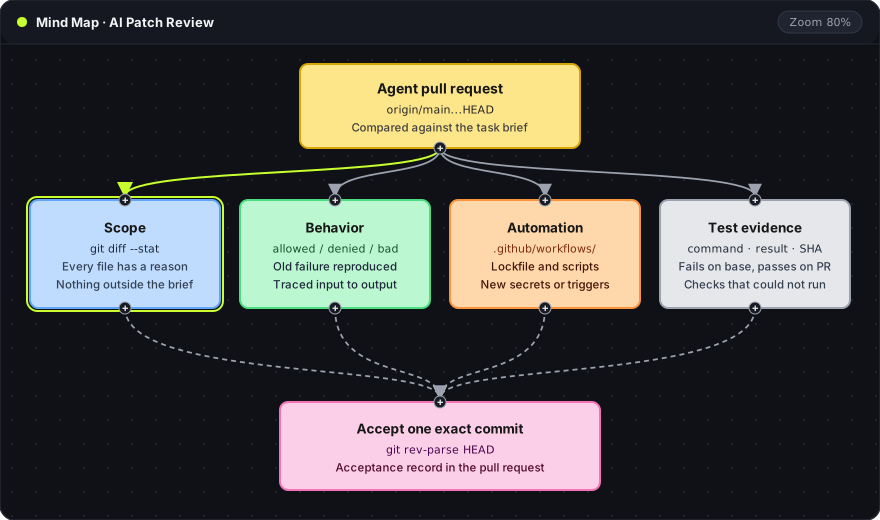
Recommendation: An agent's pull request is best reviewed against the original task brief and the full branch diff, not against the agent's own summary. The approval applies to one exact commit, with the checks that ran on it and the checks that could not run written down in the pull request.
The mind map shows the four questions a reviewer answers before merging. Scope asks whether every changed file belongs to the task. Behavior asks whether the change works for allowed, denied and malformed input. Automation asks whether the patch changes what CI or the package manager executes. Test evidence asks which checks ran, with what result, on which commit. All four end at the pink card: one commit hash that the review applies to.
The task brief as the acceptance test
A review needs something to compare the patch against. A useful brief has three parts:
- Observed problem: for example, "the signup form accepts an email with a trailing space and the API rejects it".
- Expected result: "the form trims the value, or shows the error Enter a valid email".
- What must not change: other form fields, the API contract, authentication.
An agent can write a reasonable patch for a different problem than the one in the brief. Reading the brief first and the diff second keeps that visible. A short exclusion list also helps. A copy fix has no reason to touch authentication. If the patch does, the reviewer needs an explanation before going further.
The full patch, not the last session
An agent may commit several times, across several sessions. The review covers every commit on the branch relative to its target:
git fetch origin
git log --oneline origin/main..HEAD
git diff --stat origin/main...HEAD
git diff origin/main...HEAD
git status --short
git fetch originupdatesorigin/mainso the comparison uses the current target branch.git log --oneline origin/main..HEADlists commits on the branch that are not onmain, one line each. Two dots mean "reachable fromHEADbut not fromorigin/main".git diff --stat origin/main...HEADlists every changed file with a count of added and removed lines. Three dots compare against the merge base, the point where the branch leftmain, so changes merged intomainlater do not appear as part of the patch.git diff origin/main...HEADshows the full patch with the same base.git status --shortlists uncommitted (M) and untracked (??) files. These are not part of the pull request yet, and a generated report or a scratch file often shows up here.
The Git diff documentation and Git status documentation describe each view. On GitHub, gh pr diff <number> prints the same branch diff for a pull request.
Grouping the changed files by purpose makes surprises easier to see: implementation, tests, configuration, dependencies and generated files. A lockfile change in a pull request about button text stands out once it sits in its own group.
Behavior and boundary cases
Reading the diff line by line shows how the code changed. It does not show whether the requested behavior now works. A better path follows one input from the entry point through the changed code to the visible result.
Each change has a boundary that the happy path does not test:
| Change type | Happy path | Boundary that also needs a check |
|---|---|---|
| Access control | Authorized user gets the page | Unauthorized user is denied |
| Parser fix | Valid input parses | Malformed input fails cleanly; the original failing input now works |
| Form validation | Correct value accepted | Value with spaces, empty value, value at max length |
The test selection follows the behavior at risk, not the lines the agent changed. An agent that wrote both the code and its tests can produce tests that only exercise the path it implemented.
Evidence tied to a named commit
A useful test report names the command, the outcome and the commit:
pnpm vitest run src/forms/signup.test.ts   pass   a1b2c3d
pnpm lint                                  pass   a1b2c3d
pnpm test:e2e                              not run: no browser in CI image
"Tests pass" without a command and a commit cannot be checked or repeated. A check that could not run is listed as not run, with the reason. That is still useful evidence, because it tells the next reviewer what remains open.
A new regression test is strongest when it fails on the old code and passes on the new code. A separate worktree makes that check without disturbing the branch:
git worktree add --detach ../review-base origin/main
cp src/forms/signup.test.ts ../review-base/src/forms/
cd ../review-base && pnpm install && pnpm vitest run src/forms/signup.test.ts
git worktree add --detach ../review-base origin/mainchecks outmaininto a second directory without creating a branch.cpcopies only the new test into that checkout.- The test should fail there. If it passes on
main, it does not cover the reported defect.
The Git worktrees guide explains worktrees in more detail. When an existing test fails after the patch, the expectation should not be edited to match the new output unless the brief asked for that behavior change.
Dependencies and automation
A patch can change what runs during install or in CI, not only what runs in the application. One command isolates those files:
git diff --name-only origin/main...HEAD -- package.json pnpm-lock.yaml .github/workflows/
--name-onlyprints file paths without the diff body.--ends the options. The paths after it limit the output to the dependency manifest, the lockfile and the workflow folder.
Any output from this command needs a reason linked to the brief. GitHub's secure use reference explains the risks in workflow files: untrusted input reaching a run: step, third-party actions referenced by a moving tag and secrets available to triggers like pull_request_target. A workflow change is executable code, and a passing unit test says nothing about it. The Claude Code GitHub Actions guide covers permissions for agent workflows.
The agent transcript versus the repository
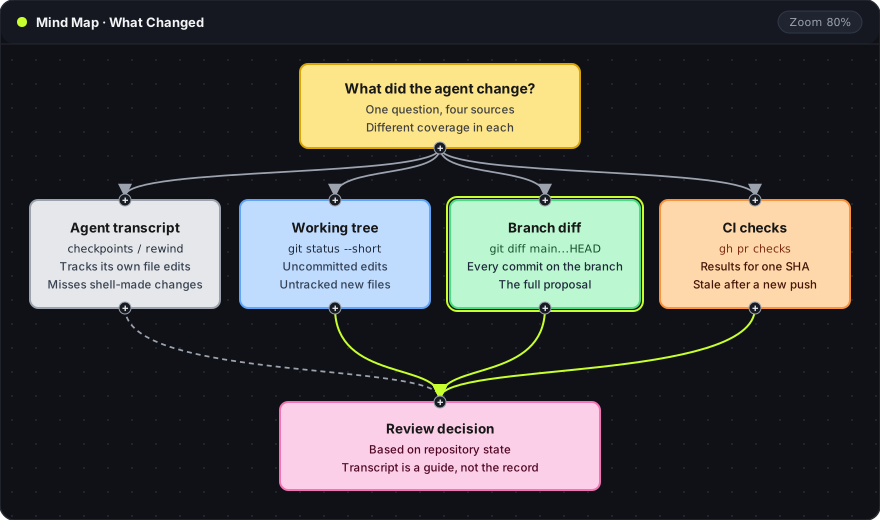
Each source in this map answers "what changed?" with different coverage:
- Agent transcript (gray, dashed): the conversation and its checkpoints. Claude Code's checkpointing documentation states that checkpoints track edits made through its file-editing tools, not changes made by shell commands such as
rmormv, or edits made outside the session. - Working tree (blue): uncommitted and untracked files on disk, shown by
git status --short. - Branch diff (green, highlighted): every commit on the branch. This is the actual proposal.
- CI checks (orange): results for one commit hash, shown by
gh pr checks <number>. A new push makes them stale.
The dashed line from the transcript means it is a guide for finding changes, not a record of them. The review decision rests on the three solid sources.
A second model can review the patch and often finds useful questions. Its approval is not a check result. A useful finding from any reviewer, human or model, names the behavior, the file and line, the input that fails and how to reproduce it.
A compact acceptance record
The pull request description or final review comment can hold a short record that makes sense without the agent transcript:
| Review item | Evidence |
|---|---|
| Requested behavior | Link to the issue or brief |
| Scope | git diff --stat output; every file explained |
| Regression | Test that fails on base and passes on the branch |
| Boundary case | Denied, empty or malformed input checked |
| Automation | Dependency and workflow changes, or "none" |
| Not run | Checks skipped and why |
| Revision | Full commit hash from git rev-parse HEAD |
git rev-parse HEAD prints the full hash of the commit that was reviewed. If the agent pushes again after approval, the hash no longer matches and the changed part needs another review. GitHub branch protection has a setting that dismisses stale approvals when new commits are pushed, and the pull request reviews reference describes how approvals and change requests work.
Permissions during generation are a separate topic, covered in designing agent tool permissions. An Oyren Codespace gives a browser VS Code and a Linux terminal where these commands and the repository checks run next to the agent's branch.
Frequently asked questions
Can a second AI model approve the pull request?
A model review can surface questions and likely bugs. It does not replace running the checks. The acceptance record should list model findings separately from executed test results.
What if CI cannot run the relevant check?
The record lists the check as not run, with the reason, such as a missing service or secret. The reviewer then runs it locally or narrows the approval to what was checked.
Should the agent's own tests be trusted?
They are a starting point. A test earns trust when it fails on main and passes on the branch, and when it covers a boundary case rather than only the path the agent implemented.