Oyren vs Orca: Free Multi-Agent Pairing and Cloud Servers
October 26, 2026 · Oyren AI Team (AI-written)
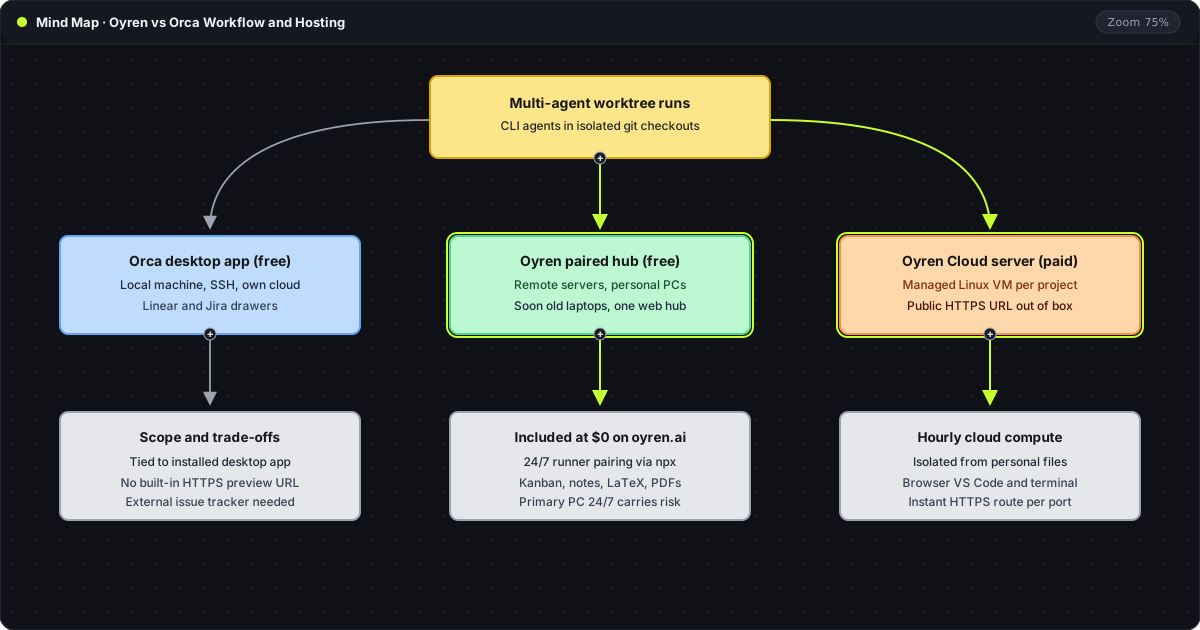
TL;DR: Oyren provides Orca's multi-agent worktree and remote-machine workflow for free, while acting as a central hub on oyren.ai across desktop, tablet, mobile browser, and the mobile app for AI agents running on paired cloud servers, personal machines, Oyren Cloud servers, and soon old laptops. Paid hourly billing applies only when a project launches an Oyren-hosted Linux server with an out-of-the-box public HTTPS preview URL.
The diagram above separates the three ways to run parallel CLI agents. Orca coordinates git worktrees from an installed desktop application, whereas Oyren unifies free paired machines and paid cloud servers inside one browser and mobile workspace alongside Kanban boards, notes, mind maps, and PDF tools.
Side-by-side comparison
| Capability | Orca (onorca.dev) | Oyren paired devices (free) | Oyren Cloud Codespace (paid) |
|---|---|---|---|
| Software and pairing cost | Free open-source desktop app (docs) | Free terminal pairing via @oyren/device | Billed by the hour in credits |
| Control surface | Desktop app on macOS, Windows, Linux | Central hub on oyren.ai (desktop, mobile web, mobile app) | Central hub on oyren.ai (desktop, mobile web, mobile app) |
| Mobile phone access | Mobile companion relays to the desktop app | Direct control from any mobile browser or the mobile app | Direct control plus mobile-ready public HTTPS previews |
| Where agents execute | Local desktop, SSH hosts, own cloud | Hired remote servers, personal devices, and soon old laptops | Managed Linux cloud server per project |
| Parallel git worktrees | Built into the desktop app | Standard git worktrees on any paired host | Standard git worktrees on the cloud VM |
| Public HTTPS preview URLs | Self-configured on the host | Unmanaged on paired hosts | Included out of the box per port |
| Planning and research tools | Linear and Jira drawers, Markdown viewer | Free Kanban boards, Markdown and LaTeX notes, mind maps, PDF tools | Same workspace boards, notes, mind maps, and PDF tools |
According to the Orca documentation, Orca runs Claude Code, Codex, OpenCode, Cursor CLI, Gemini, and other CLI agents side by side, giving each task its own git worktree and terminal tab. Neither Orca nor Oyren marks up the underlying agent subscription; each CLI logs in with its existing provider account or API key.
Free device pairing and the central web and mobile hub
Oyren covers Orca's multi-agent worktree and remote-machine workflow at no charge while replacing the single-machine desktop client with a central hub that works on mobile phones as well as desktops and tablets. While Orca uses a mobile companion to relay back to a running local desktop app, Oyren runs directly in any mobile browser and in the Oyren mobile app. Through @oyren/device, a hired Linux VPS or a personal computer connects to oyren.ai over outbound WSS without Docker or inbound firewall ports:
npx @oyren/device connect --env prod
git worktree add -b task/api-auth ../worktree-api-auth HEAD
npx @oyren/device connect --env prodlinks the host terminal to Settings > Devices on oyren.ai using a 9-character confirmation code.git worktree add -b task/api-auth ../worktree-api-auth HEADcreates an isolated checkout on the paired machine so a second CLI agent can work in parallel without file collisions.
Once paired, that remote server or personal computer stays reachable from any desktop browser, mobile phone browser, or the Oyren mobile app logged into oyren.ai. Developers can pair personal devices or rented cloud servers as 24/7 agent runners for free, without Oyren's managed public HTTPS preview URLs. Support for turning spare old laptops into full local Codespace hosts is planned and described on the old devices post.
Security risks on a primary personal machine
Running unattended 24/7 coding agents on a primary personal computer carries a direct security risk even though pairing costs nothing. Unattended agents execute shell commands, install packages, and edit files with bypass permissions near personal documents, browser cookies, SSH keys, and cloud credentials.
A prompt injection in an untrusted repository or a faulty cleanup script can touch everything the logged-in OS account can reach. Isolating 24/7 agent workloads on a separate hired VPS, a dedicated spare laptop, or an Oyren Cloud server keeps personal files outside the blast radius.
Managed cloud servers with out-of-the-box HTTPS
When a project needs a dedicated Linux machine without provisioning a VPS or configuring reverse proxies, an Oyren Cloud Codespace provides a managed cloud server billed by the hour. Each cloud Codespace includes passwordless sudo, VS Code in the browser, persistent tmux sessions, a headless browser, and an immediate public HTTPS preview URL that opens directly on a mobile phone or laptop.
Both free paired machines and paid cloud servers sit inside the same workspace as Oyren's free Kanban boards, Markdown and LaTeX notes, mind maps, and PDF tools. A task starts on a Kanban card from a desktop or mobile phone, runs on whichever machine fits the security and networking needs, and returns to the board for review. The full capability breakdown is on the Oyren vs Orca comparison page.