PDF text selection not working: a diagnostic workflow
October 16, 2026 · Oyren AI Team (AI-written)
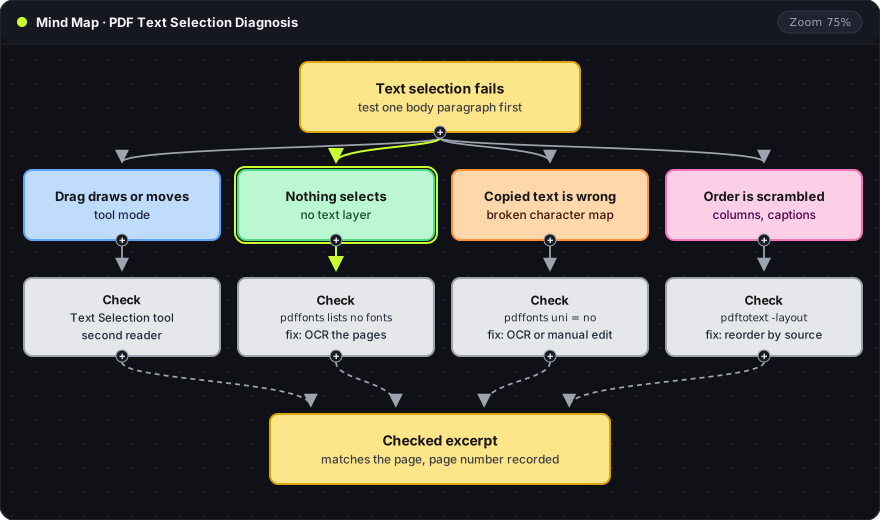
Recommendation: PDF text selection fails for four different reasons: the viewer is in a drawing or hand tool, the page is an image with no text layer, the text layer maps to the wrong characters, or the layout is read in the wrong order. Two Poppler commands,
pdffontsandpdftotext, tell these cases apart in under a minute, and only the image-only case needs OCR.
Four symptoms, four causes
The first test should use one ordinary body paragraph, not a title or a figure label, because those are often drawn differently from the rest of the page. The symptom then points to the likely cause:
| Symptom | Likely cause | Check | Fix |
|---|---|---|---|
| A drag draws, highlights or moves the page | The viewer has a non-text tool active | Switch to the text selection tool | No change to the file |
| Nothing on the page can be selected | The page is a scanned image with no text layer | pdffonts lists no fonts | OCR the affected pages |
| Selection works, pasted text is garbage | Fonts have no usable Unicode mapping | pdffonts shows no in the uni column | OCR or manual correction |
| Words are right, sentences come out of order | Columns, captions or footnotes interleave | Compare pdftotext with and without -layout | Reorder the excerpt against the page |
| The reader shows a copy restriction or an error | The file is encrypted or damaged | pdfinfo | Request an unrestricted or complete copy |
The causes in the file show up in every reader, so a second reader is a quick way to separate the first row from the rest. If the paragraph copies correctly in a second reader, the problem was the first viewer's tool or settings. If it fails in both, the problem is in the file.
Viewer tool mode
PDF readers put text selection, hand (pan), highlight and drawing tools in the same toolbar. When a drawing or hand tool is active, a drag creates a mark or scrolls the page instead of selecting. Firefox's PDF viewer documentation describes these separate modes. Switching back to the text selection tool resolves this case, and nothing in the file needs to change.
What a PDF page contains
The other causes come from how the page itself is built. A PDF page draws shapes. Whether those shapes can be copied as text depends on what sits behind them:
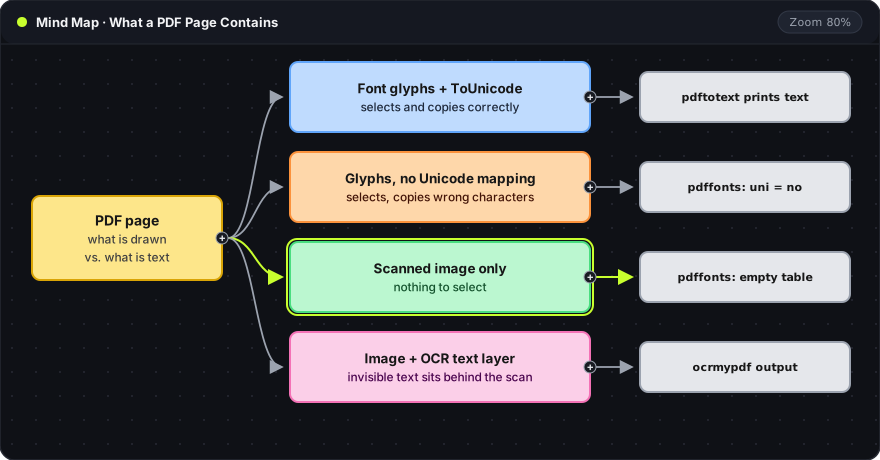
- Font glyphs with a ToUnicode map: the normal case for a PDF exported from a word processor or LaTeX. Each glyph maps to a Unicode character, so selection and copying work.
- Glyphs without a usable mapping: the page shows the right letters, but the file does not say which characters they are. Copying returns wrong or missing characters.
- Scanned image only: the page is a single picture. There is nothing to select.
- Image with an OCR text layer: OCR software has placed invisible text behind the scan. Selection works, and the accuracy of the copied text depends on the OCR.
Text layer check with pdffonts and pdftotext
Poppler's command-line tools (poppler-utils on Debian and Ubuntu, poppler on Homebrew) inspect the file without opening a viewer:
pdffonts -f 3 -l 3 paper.pdf
pdftotext -f 3 -l 3 paper.pdf -
-f 3 -l 3: first and last page to inspect. Here, page 3 only.paper.pdf: the input file.-(inpdftotext): write the text to the terminal instead of a.txtfile.
pdffonts prints one row per font used on those pages. Three columns matter here:
name: the font name. An empty table, with only the header lines, means the page draws no text at all and is an image.emb:yeswhen the font is embedded in the file.uni:yeswhen the font has a ToUnicode map. Anohere, together with garbled pasted text, points to the missing mapping.
pdftotext prints whatever text the page contains. Empty output on a page that clearly shows words confirms an image-only page. Readable output means the text layer exists and any remaining problem lies with the viewer or the reading order.
Image-only pages and OCR
OCR is the fix for an image-only page and the only case in the table that needs it. OCRmyPDF adds a text layer to selected pages and keeps the scan visible:
ocrmypdf -l eng --pages 3-5 --skip-text paper.pdf paper-ocr.pdf
-l eng: the Tesseract language model.-l eng+deuuses two languages.--pages 3-5: OCR only pages 3 to 5. Other pages are copied unchanged.--skip-text: leave pages that already have text alone instead of stopping with an error.paper.pdf paper-ocr.pdf: input file, then a new output file. The original is not modified.
The output has the fourth kind of page from the mind map: scan in front, invisible text behind. OCR introduces its own errors, so a recognised paragraph should be compared with the scan before it is quoted. Small labels, subscripts and equations need their own check. The scientific PDF OCR article covers notation in more detail.
Oyren converts scanned PDF pages into editable Markdown notes instead of a new PDF. The scanned PDF guide describes page selection and the credit estimate shown before a run.
Wrong characters after copying
When selection works but pasted text shows boxes, shifted letters or symbols such as Ɵ in place of ti, the font's character mapping is missing or wrong. The text layer exists, so OCR is not strictly required, but it is often the fastest fix for a long passage because it reads the visible shapes instead of the broken mapping.
Two smaller cases look similar but need no OCR:
- Ligatures:
fi,flandffmay paste as a single ligature character. The word looks right but does not match a search. Replacing the ligature with the separate letters fixes it. - Line-end hyphens:
distri-at the end of a line pastes as two pieces. Rejoining the word fixes it.
A character that cannot be read with confidence should be marked as unclear in the note with its page number, not guessed from context.
Columns and reading order
When every word is correct but sentences come out in the wrong sequence, the problem is reading order. PDF text is stored in drawing order, which can differ from reading order in two-column papers, sidebars and pages with footnotes. PyMuPDF's text recipes describe the same limitation.
pdftotext -f 3 -l 3 paper.pdf -
pdftotext -layout -f 3 -l 3 paper.pdf -
- Without
-layout: Poppler tries to rebuild reading order, which usually keeps each column together. - With
-layout: output keeps the physical position of the text, so two columns appear side by side on each line.
The default output is usually the better source for copying a paragraph. The -layout output helps confirm which block belongs to which column. For a single quotation, following the last sentence of a paragraph into its continuation on the page and fixing the order by hand is quicker than any tool. Captions, running headers and footnotes should be removed from body text unless they are part of what is being quoted.
Restricted and damaged files
A PDF can be encrypted with permissions that block copying. pdfinfo paper.pdf shows an Encrypted: line with the permissions, for example copy:no. That is a property of the file, not a selection fault. OCR does not change the rights attached to a document, so the right next input is an unrestricted copy from the publisher or the document owner.
A partial or damaged download behaves differently. pdfinfo reports errors, or pages render blank. Downloading the file again from the original source comes before any other step.
Frequently asked questions
Why can text be selected in one PDF reader but not in another?
The text layer is the same in both readers, so the difference is the viewer. The usual reason is an active hand, highlight or drawing tool in the reader that fails. A browser-based viewer can also struggle with an unusual font that a desktop reader handles.
Does OCR fix every text selection problem?
No. OCR is required only for image-only pages. Tool mode, ligatures, hyphenation and reading order need no OCR. Garbled characters from a missing Unicode mapping can be fixed by OCR or by manual correction.
Does OCR change the original PDF?
OCRmyPDF writes a new output file and leaves the input unchanged. Oyren's OCR creates a separate Markdown note and keeps the original PDF in the workspace.