Claude Code on a Raspberry Pi: requirements, install, memory
October 21, 2026 · Oyren AI Team (AI-written)
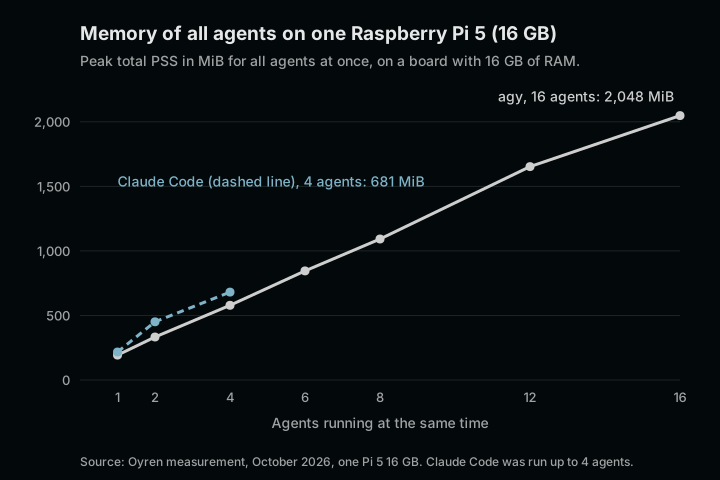
Claude Code runs on a Raspberry Pi 4 or Pi 5 with at least 4 GB of RAM and the 64-bit edition of Raspberry Pi OS. The model itself runs on Anthropic's servers. The Pi only runs the claude command line program and whatever tools the agent starts, such as git, npm or a test runner. On one Raspberry Pi 5 with 16 GB, a single Claude Code session used about 211 MiB of memory, and four sessions at once used 681 MiB in total.
This post covers which boards meet the official requirements, how to check the operating system, the install routes that work on ARM, and the numbers Oyren measured on a real Pi 5 in October 2026.
Official requirements, mapped to Raspberry Pi boards
Anthropic's setup page lists the requirements: 4 GB or more of RAM, an x64 or ARM64 processor, an internet connection, and an operating system such as Debian 10+, Ubuntu 20.04+ or Alpine Linux 3.19+. There is no Raspberry Pi section in the documentation, so the useful question is which boards match those lines.
| Board | CPU | Largest RAM option | Meets the stated requirement |
|---|---|---|---|
| Raspberry Pi 5 | Broadcom BCM2712, quad-core Cortex-A76, 2.4 GHz, 64-bit | 16 GB | 4, 8 and 16 GB models |
| Raspberry Pi 4 Model B | Broadcom BCM2711, quad-core Cortex-A72, 1.8 GHz, 64-bit | 8 GB | 4 and 8 GB models |
Sources: the Raspberry Pi 5 product page and the Raspberry Pi 4 product page. Models with less than 4 GB fall below the stated requirement. Claude Code may start on them, but nothing in the documentation promises that, and the measurements below were taken on a 16 GB board.
The current Raspberry Pi OS is a port of Debian 13 "trixie", released on 6 October 2026, so it is well inside the Debian 10+ requirement. It ships in 32-bit and 64-bit editions. That choice matters more than the board.
The 64-bit check
Claude Code publishes native binaries for linux-arm64 and linux-arm64-musl among its platforms, and no binary for 32-bit ARM. The troubleshooting guide states that Claude Code does not ship a binary for platforms outside its list. A Pi running the 32-bit edition of Raspberry Pi OS is therefore outside the supported set, even on a 64-bit capable board.
Two commands show what the Pi is actually running:
uname -m          # aarch64 means a 64-bit ARM kernel
getconf LONG_BIT  # 64 means a 64-bit userland
Both lines need to say 64-bit. If uname -m prints armv7l, or getconf LONG_BIT prints 32, the fix is to flash the 64-bit image of Raspberry Pi OS. According to the Raspberry Pi download page, the 64-bit image runs on the Pi 3B, 3B+, 3A+, 4B, 400, 5, 500 and 500+, Compute Modules 3 to 5, and the Zero 2 W.
An Illegal instruction error points the same way. The troubleshooting guide describes it as an architecture mismatch, for example an x86 binary on an ARM machine, and names uname -m as the first check.
Installation routes on a Pi
Raspberry Pi OS is Debian based, so Anthropic's signed apt repository is the most verifiable route. apt checks every package against the repository signing key, and updates arrive with apt upgrade, which suits a Pi that is managed like a small server:
sudo apt install curl gnupg
sudo install -d -m 0755 /etc/apt/keyrings
sudo curl -fsSL https://downloads.claude.ai/keys/claude-code.asc \
  -o /etc/apt/keyrings/claude-code.asc
gpg --show-keys /etc/apt/keyrings/claude-code.asc
# expected fingerprint: 31DDDE24DDFAB679F42D7BD2BAA929FF1A7ECACE
echo "deb [signed-by=/etc/apt/keyrings/claude-code.asc] https://downloads.claude.ai/claude-code/apt/stable stable main" \
  | sudo tee /etc/apt/sources.list.d/claude-code.list
sudo apt update
sudo apt install claude-code
The fingerprint in the comment is the one published on the setup page. If gpg prints a different one, or no key at all, the download is wrong and the repository should not be added.
The second route is the native installer, which Anthropic lists as its recommended method on Linux and which picks the ARM64 binary on a 64-bit Pi. The documented one-liner pipes a script from the network straight into bash. Saving the script first allows a read before it runs:
curl -fsSL https://claude.ai/install.sh -o install.sh
less install.sh
bash install.sh
claude --version
claude doctor
A native install updates itself in the background. On Linux the binaries are not individually code-signed. Anthropic instead publishes a GPG-signed manifest.json with a SHA256 checksum for every platform binary, and the setup page shows how to verify an installed version against it. The third route is npm (npm install -g @anthropic-ai/claude-code), which needs Node.js 22 or later and installs the same native binary through a per-platform package.
When the install is killed
A 1 or 2 GB board can run out of memory during installation. The troubleshooting guide says the install step needs roughly 512 MB of free memory, and that a Killed message with exit code 137 usually means the Linux out-of-memory killer stopped it. Its fixes are to close other processes or add swap space, then run the installer again. On a Pi with a desktop session, closing the browser is often enough.
Sign-in
Claude Code needs a Pro, Max, Team, Enterprise or Console account. The free claude.ai plan does not include it. When the ANTHROPIC_API_KEY environment variable is set and approved at the first prompt, Claude Code skips the browser login, which is convenient on a Pi that has no screen attached. Both details are on the setup page.
Measured memory on a Raspberry Pi 5 (16 GB)
In October 2026 Oyren ran coding agents on one Raspberry Pi 5 with 16 GB of RAM to see how many fit. Every agent received the same small task: add a test file to a tiny Node.js project, run npm test, and leave the source file untouched. A run only counted as a success if the test file existed afterwards, the source file was byte-identical and node --test passed. Memory was sampled every 5 seconds as PSS summed over each agent's whole process tree, read from /proc/<pid>/smaps_rollup.
| Claude Code 2.1.302 sessions at once | Median PSS per session | Peak total PSS | Median time per task | Peak CPU | Peak temperature |
|---|---|---|---|---|---|
| 1 | 211 MiB | 217 MiB | 12.0 s | 11% | 56.5 °C |
| 2 | 202 MiB | 451 MiB | 12.5 s | 22% | 57.1 °C |
| 4 | 162 MiB | 681 MiB | 19.2 s | 51% | 57.1 °C |
Every task finished. Swap stayed at 2 MiB and the Pi never throttled. Claude Code was run with claude -p, --permission-mode acceptEdits and an --allowedTools list limited to npm test and node --test, so the agent could edit files and run the tests but nothing else.
The same Pi also ran Antigravity (agy) agents up to sixteen at once. All sixteen finished, with a peak of 2,048 MiB for the whole group. CPU, not memory, was the first limit: the four Cortex-A76 cores reached 90% at sixteen agents, and the board peaked at 62 °C. Time per task stayed flat as more agents joined, at about 35 seconds for agy with one agent and with sixteen. The thinking happens in the cloud, so the Pi mostly waits.
PSS divides shared memory pages among the processes that share them, which is why the median per session falls as more identical sessions start. The memory usage post explains PSS against RSS in more detail and shows the same pattern on a larger machine.
What the numbers do not cover
The workload was deliberately small. A real repository changes the picture, because npm ci, a TypeScript build or a full test suite can each take far more memory than the agent itself. Oyren's estimate for real repositories is about eight agents on a 16 GB Pi 5 and four on an 8 GB board, but that is arithmetic from typical build sizes, not a measurement. The 8 GB figure was not run on 8 GB hardware either. Storage was not compared, so the difference between a microSD card and an SSD for npm install remains untested here.
The safe reading is narrow: the Claude Code process itself is light enough for a Pi, and the tools it runs set the real budget.
Keeping the agent running
A Pi that stays on is a natural home for a long agent session. The usual pattern is SSH into the board and start Claude Code inside tmux, so the session survives a dropped connection and can be picked up again from a laptop or a phone. The tmux guide for coding agents covers the session layout and reconnection.
Where Oyren fits
Oyren runs Claude Code, Codex and opencode today in a cloud Codespace with browser VS Code, so an agent can keep working without any hardware at home. Raspberry Pi and old Linux laptops as agent machines are listed as the next step on the Oyren homepage. They are not available yet.