Codex CLI vs cloud: execution, access, and review
October 16, 2026 · Oyren AI Team (AI-written)
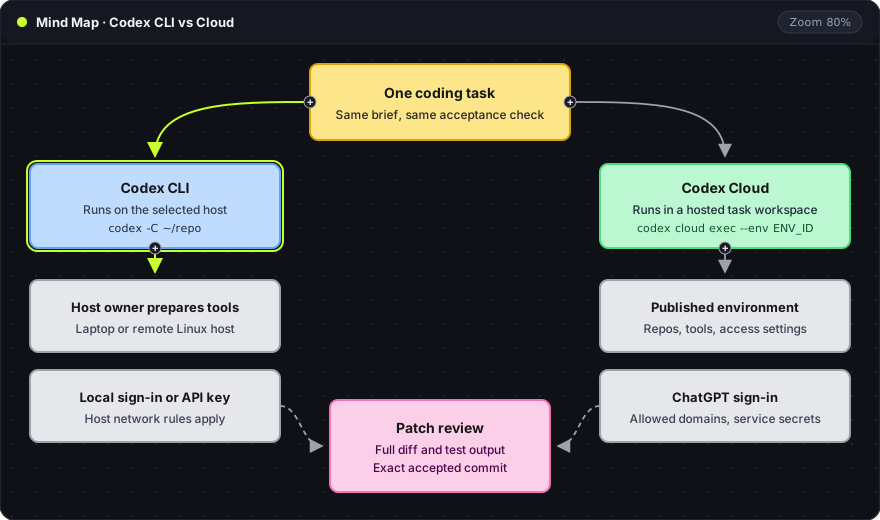
Recommendation: The choice between Codex CLI and Codex Cloud is a choice of execution host: CLI commands run on a machine the team maintains, and Cloud tasks run in a hosted workspace built from a published environment. Running the same small task with the same acceptance check on both shows which setup fits a repository better than any general claim about either surface.
The left branch is Codex CLI and the right branch is Codex Cloud. The gray cards under each branch name who prepares the tools and which access rules apply. Both branches end at the pink patch review, which is the same in either arrangement.
Where commands execute
Codex CLI runs commands on the machine that started it. That machine can be a laptop, a virtual machine or a remote Linux host opened through a browser terminal. A browser interface does not move execution; a terminal in a browser tab still runs commands on whatever host serves that terminal.
Codex Cloud runs each task in a hosted workspace. OpenAI describes these tasks as continuing while the viewing computer sleeps. A CLI process, by contrast, lives as long as its host does: a laptop that sleeps stops the task, and a remote host keeps it running while the host stays up.
A task record for either option names the execution host and the starting commit. For CLI work it also names who keeps the host running and who removes temporary resources afterwards.
Environment preparation
Codex Cloud uses published environments: a reusable definition containing repositories, dependencies, tools and access settings. Each new task gets its own workspace from that definition. The environment is tested before it is published, because every task inherits its gaps.
For CLI work, the equivalent is a reproducible host setup plus one repository acceptance command. An installed agent does not mean the compiler, test browser or private packages are ready. Each of those needs its own check on the host.
A team with a well-maintained development host can keep using its toolchain with the CLI. A team that wants identical, disposable task workspaces can evaluate published Cloud environments. Either way, the repository's acceptance command decides whether the setup works.
Side-by-side comparison
| Question | Codex CLI on a selected host | Codex Cloud |
|---|---|---|
| Where do commands run? | The machine running the CLI | A hosted workspace per task |
| Who prepares tools? | The owner of the host and repository setup | The published environment definition |
| Which sign-in applies? | ChatGPT sign-in or an API key | ChatGPT sign-in |
| What controls network access? | Host network rules and the CLI sandbox | Environment internet settings and allowed domains |
| What keeps the task alive? | The host staying up | The hosted service |
| What proves completion? | Commit SHA and acceptance output | Task diff plus acceptance output after applying it |
Each row is a question that a single trial task can answer for a specific repository. The table does not rank which surface writes better code. That depends on the repository and the environment, and a same-task trial measures it directly.
Sign-in, network and secrets
Local Codex accepts ChatGPT sign-in or an API key. Codex Cloud requires ChatGPT sign-in. The sign-in path also decides billing and which account controls apply, as the authentication documentation explains. A credential that works for the CLI therefore does not prove Cloud access, and workspace administrators can enable or restrict Cloud per organization.
The cloud environment guide documents internet settings, allowed domains and service credentials separately. Allowing a domain opens the network path. It does not grant an account on the service behind it. A private package registry needs both an allowed domain and a credential with read access.
A CLI host answers the same two questions through its own firewall and its own credentials. When a download fails, the useful diagnosis names the failing layer first: host network policy, registry URL or account permission. Broader access comes after that, and only for the layer that failed.
The same guide marks a legacy cloud experience separately from the current one. Setup and secret handling instructions apply to one or the other, so a tutorial written for the legacy flow can describe steps that no longer exist.
From a cloud task to a local commit
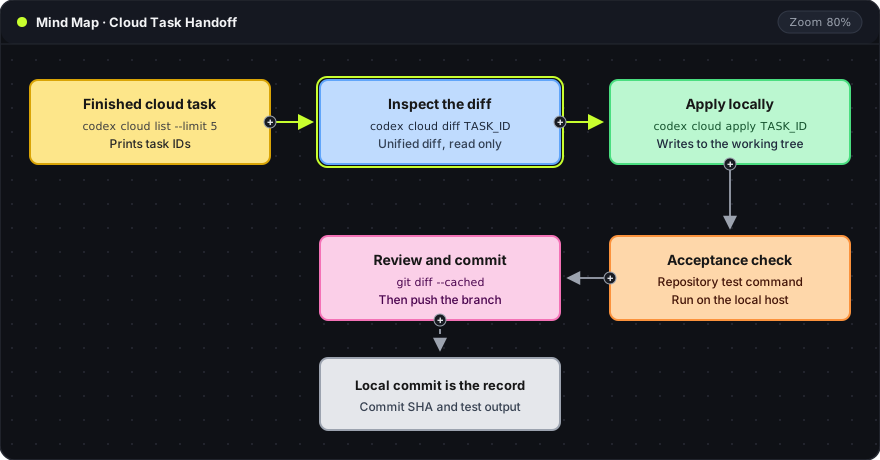
Recent Codex CLI releases include a codex cloud command group (marked experimental) that moves a finished Cloud task into a local checkout:
codex cloud list --limit 5
codex cloud diff TASK_ID
codex cloud apply TASK_ID
# run the repository's acceptance command here
git add -A
git diff --cached
codex cloud list --limit 5: prints the five most recent Cloud tasks with their IDs.--limitaccepts 1 to 20, and--env ENV_IDfilters by environment.codex cloud diff TASK_ID: prints the task's unified diff without changing any file.codex cloud apply TASK_ID: applies that diff to the local working tree. For a task run with several attempts,--attempt Nselects one of them.git add -Aandgit diff --cached: stage every change in the working tree, then show exactly what the next commit will contain. This step comes after the acceptance check has passed on the local host.
The handoff map shows the same order. Nothing is committed until the diff has been read, applied, tested locally and reviewed as staged changes. The local commit SHA and the test output become the record of what was accepted.
Permissions in local and scripted runs
Codex CLI controls local execution with --sandbox (read-only, workspace-write or danger-full-access) and --ask-for-approval (on-request or never). Repository instructions give the agent context. The sandbox is what enforces a boundary (agent approvals and security). The Codex CLI setup guide explains each value.
For scripted runs, codex exec runs a task without the interactive interface (CLI reference):
codex exec --sandbox workspace-write --json -o last.txt "Fix the failing date test"
--json: prints session events as JSON lines, which a CI job can store as a log.-o last.txt: writes the agent's final message tolast.txt.
A scripted run is complete when four things are recorded: the process exit status, the resulting diff, the validation output and any unresolved actions. The agent's final message alone is not proof that a test passed.
Frequently asked questions
Does a browser terminal make Codex CLI a cloud product?
No. The terminal in the browser connects to a host. Codex CLI runs on that host, under that host's tools, network rules and lifetime.
Can one task brief work on both surfaces?
Yes, when the brief states behavior and acceptance criteria separately from environment setup. The same brief then serves as a fair trial on both surfaces and stays valid if the hosting choice changes later.
Is the review different for Cloud results?
No. A Cloud diff is applied locally and reviewed like any CLI patch: full diff, acceptance command and the exact commit that is accepted.
The cloud coding agent guide covers hosting questions that apply beyond Codex. Oyren Codespaces include Codex CLI on a Linux machine with browser VS Code and a terminal. Agent sign-in and model usage are separate from Codespace runtime. The Codex CLI cloud page describes that hosting option.