PDF to Markdown converters: PyMuPDF, Docling
October 21, 2026 · Oyren AI Team (AI-written)
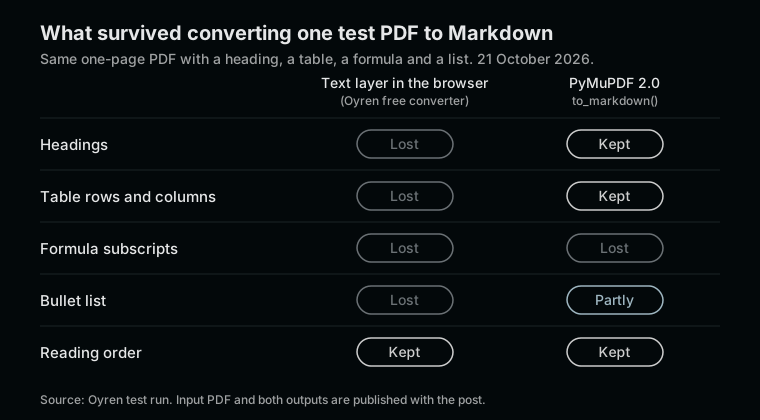
PDF to Markdown converters fall into three groups. Text-layer readers pull the characters a PDF already contains, quickly and often in the browser, like Oyren's free PDF to Markdown converter. Layout-aware libraries such as PyMuPDF, Docling and Marker also look at positions and fonts to rebuild headings, lists and tables, and some add OCR and models for formulas. Hosted OCR services such as Mathpix take an upload and return Markdown with LaTeX for equations. Pandoc, often the first tool people try, is not in any group: it writes PDF but does not read it.
To make the difference concrete, one small PDF was run through two of these tools on 21 October 2026, and the outputs are published with this post.
The tools at a glance
| Tool | Group | Runs | Formulas | Licence or price |
|---|---|---|---|---|
| Oyren free converter | Text layer | In the browser tab, no upload | As plain characters | Free, no account |
| PyMuPDF 2.0 | Layout-aware library | Locally, Python | As plain characters | AGPL-3.0 or Artifex commercial licence |
| Docling | Layout-aware library | Locally, Python | Formula support listed | MIT |
| Marker | Layout-aware library with models | Locally, GPU, CPU or Apple Silicon | Converted to LaTeX by a vision-language model | Code Apache 2.0, model weights under a modified Open Rail-M licence |
| Mathpix | Hosted OCR | Upload to the Snip editor, or the MPX CLI | LaTeX | Free 10 PDF pages a month, Pro $4.99 a month for 1,000 pages |
| Pandoc | Not a PDF reader | Locally | Not applicable | GPL |
Sources: PyMuPDF on PyPI, Docling, Marker, Mathpix PDF to Markdown, Mathpix Snip pricing, the Pandoc manual and pandoc.org.
One test PDF, two converters
The test file is a one-page PDF with a title, a short paragraph, a three-row table, a formula with subscripts and a two-item list: soil-moisture-field-notes.pdf. It was generated from HTML, so it has a clean text layer and no scanned pages. That is the easy case, and it still separates the tools.
The browser text-layer converter returned every word in the right order, as one paragraph under a ## Page 1 heading. The table became "Plot Moisture (%) Temperature (°C) A 21.4 12.1 B ...", and the formula became "θ v = V w / V t × 100". Full output: oyren-browser-output.md.
PyMuPDF 2.0, called as pymupdf.open(path).to_markdown(), rebuilt the title as #, the section names as ## and the table as a proper Markdown table with a header row. The first list item kept its - marker and the second lost it. The formula came out as _θv = Vw / Vt × 100_: readable, but the subscripts were flattened into ordinary letters. Full output: pymupdf-2.0-output.md.
The script used for PyMuPDF was three lines:
import pymupdf
doc = pymupdf.open("soil-moisture-field-notes.pdf")
print(doc.to_markdown())
One packaging detail saves time: since 19 October 2026, the pymupdf4llm package on PyPI is an empty placeholder, and its page says the Markdown code now lives in PyMuPDF 2.x itself. Older tutorials that import pymupdf4llm need pymupdf 2.0 instead.
Docling, Marker and Mathpix were not run for this post. The notes below describe what their own documentation says.
Docling
Docling was started by the AI for knowledge team at IBM Research Zurich and is MIT licensed. Its README lists "advanced PDF understanding" including page layout, reading order, table structure, code and formulas, plus OCR for scanned PDFs, with Markdown, HTML and lossless JSON among the outputs. It installs with pip install docling on Python 3.10 or later, and docling <file or URL> writes a Markdown file. The MIT licence makes it the simplest of the layout-aware options to embed in a commercial product.
Marker
Marker describes itself as converting "PDF to markdown + JSON quickly with high accuracy". Equations and inline math go through a vision-language model and come out as LaTeX. Tables are rebuilt mostly from the text layer, with the model as a fallback for low-confidence cases, and a --use_llm mode can merge tables across pages using an outside model provider. It needs PyTorch and runs on a GPU, a CPU or Apple Silicon. The licensing needs care: the code is Apache 2.0, but the model weights are free only for research, personal use and startups under $5M in funding or revenue, according to the README.
Mathpix
Mathpix converts PDFs to Mathpix Markdown, which its page describes as ordinary Markdown plus the structures scientific documents need, and to standard Markdown. Equations come out as LaTeX between delimiters and tables as Markdown tables, with HTML for tables too complex for Markdown. The usual workflow uploads the PDF to the Snip web editor. The free plan covers 10 PDF pages a month and Pro is $4.99 a month for 1,000 pages. For files that cannot leave the machine, Mathpix offers the MPX CLI, which its page says converts PDFs without uploading them, and a self-hosted option.
Pandoc
Pandoc's manual lists PDF as an output format, produced through a LaTeX engine by default, but there is no pdf entry among its input formats. A PDF has to be converted by one of the tools above first. Pandoc is then useful for the next step, for example turning the Markdown into DOCX or HTML.
Choosing a converter
- A private text PDF, converted once, without installing anything: a browser text-layer converter. The no-upload conversion post shows how to confirm that the file stays in the tab.
- A batch of text PDFs with tables, in a script: PyMuPDF 2.0 or Docling, checking the licence against the project. AGPL-3.0 for PyMuPDF has obligations that MIT does not.
- Scientific papers where equations must survive as LaTeX: Marker locally, within its weights licence, or Mathpix when an upload or its CLI is acceptable.
- Scanned pages: any tool with OCR. Oyren's workspace OCR is billed per page in credits and returns a note to compare against the original, described in the scanned PDF guide.
Whatever the tool, the output needs a check against the page. The test above shows how a clean-looking result can still flatten a subscript. The free PDF to Markdown converter is the fastest way to see what a PDF's text layer contains before choosing something heavier.