PDF to Markdown for LLMs: a checked conversion workflow
October 16, 2026 · Oyren AI Team (AI-written)
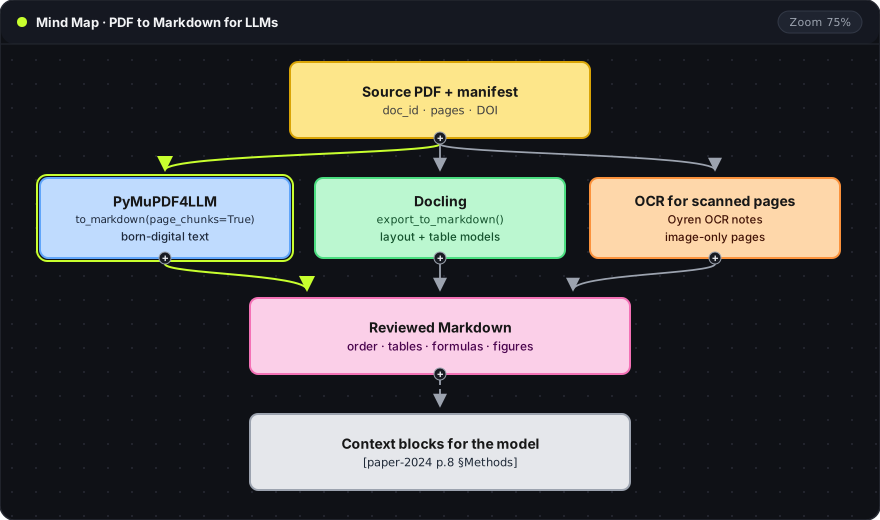
Recommendation: Convert a PDF to Markdown with PyMuPDF4LLM for born-digital text or Docling for complex layouts, then review a small sample for reading order, tables, formulas and figures before converting a whole collection. Every block of text passed to a model should carry its document ID and page, so each claim in the answer can be traced back to the PDF.
Why Markdown between the PDF and the model
A PDF stores positioned text, not paragraphs. Pasting raw extracted text into a prompt often mixes two columns, splits sentences at page breaks and flattens tables into loose numbers. Markdown keeps the structure a model needs (headings, lists, table rows) in plain text that can be read and corrected before it reaches the model.
The pipeline in the mind map has four stages, and each one produces a file that can be checked:
- Manifest: which document and which pages are in scope.
- Extraction: PDF to Markdown with one of three routes.
- Review: a sample checked against the PDF and corrected.
- Context blocks: selected sections, each labelled with its source.
Source manifest
A short manifest per document records what was converted. It is written before extraction so the scope is fixed:
doc_id: paper-2024
title: Example Paper Title
source: https://arxiv.org/abs/0000.00000
pages: 1-12
ocr_pages: [9, 10]
extractor: pymupdf4llm
revision: 2
doc_id: a short, stable label used in every context block and citation.source: the DOI, arXiv URL or other stable location of the original.pages: the page range converted. A methods-only extract says so here, so no one later assumes the limitations section was included.ocr_pages: pages that are scanned images and need OCR instead of text extraction.extractor: the tool that produced the Markdown.revision: increases each time the Markdown is corrected, so an answer can be matched to the version it used.
pdffonts from Poppler finds the ocr_pages: a page with an empty font table has no text layer. The text selection troubleshooting guide explains that check.
Extraction routes
| Route | Best fit | Output |
|---|---|---|
| PyMuPDF4LLM | Born-digital papers and reports | Markdown, optionally one chunk per page |
| Docling | Complex layouts and tables, mixed scanned pages | A document model that exports to Markdown |
| Oyren OCR notes | Scanned pages to be corrected beside the PDF | Editable Markdown notes in a workspace |
PyMuPDF4LLM
PyMuPDF4LLM reads the PDF's existing text layer, which makes it fast and keeps characters exact when the text layer is good:
import pymupdf4llm

pages = [0, 1, 2, 7]
chunks = pymupdf4llm.to_markdown("paper.pdf", pages=pages, page_chunks=True)
for pno, chunk in zip(pages, chunks):
    print(f"<!-- paper-2024 page {pno + 1} -->")
    print(chunk["text"])
pages: the pages to convert, counted from 0. Here pages 1, 2, 3 and 8 as a PDF reader numbers them.page_chunks=True: return a list with one dictionary per page instead of one long string. Without it, page boundaries are lost.chunk["text"]: the Markdown for that page.pno + 1: turns the 0-based index into the page number shown by a PDF reader, written into an HTML comment so it stays in the file but does not render.
Docling
Docling runs layout and table-structure models over each page, and by default applies OCR to image regions. It handles multi-column pages, tables and scanned pages in one pass, and is slower than PyMuPDF4LLM. Model files are downloaded on the first run.
from docling.document_converter import DocumentConverter

result = DocumentConverter().convert("paper.pdf")
markdown = result.document.export_to_markdown()
DocumentConverter().convert("paper.pdf"): parses the PDF into a structured document. A URL works as input too.result.document: the document model. Each text item keeps its page number in its provenance data (prov).export_to_markdown(): serialises the whole document as one Markdown string. Page numbers are not included in this string, so a per-page pipeline reads them fromprov.
Oyren OCR notes
For scanned pages that will be read and corrected by hand, Oyren converts the selected pages into an editable Markdown note in the same workspace as the PDF. The scanned PDF guide covers page selection and the credit estimate shown before a run.
Sample review before the full batch
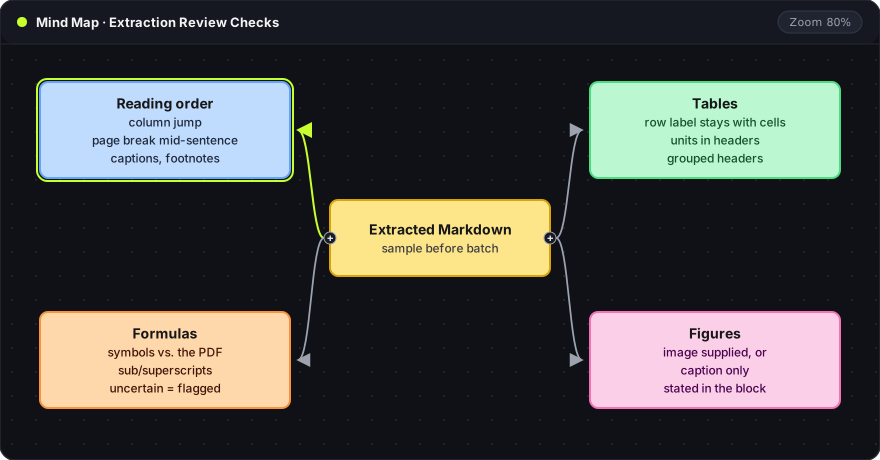
The same tool can produce clean output on one page and broken output on the next. A review sample of four or five pages catches this before a whole collection is converted. The sample should include a normal paragraph, a page break inside a sentence, a table, a formula and a figure.
| Check | What goes wrong | How it is checked |
|---|---|---|
| Reading order | Text from the right column appears inside a left-column sentence. Captions or footnotes land in the body. | The last sentence of a paragraph is followed into its continuation on the page |
| Tables | A row label separates from its cells. Units in a header are dropped. Grouped headers flatten. | Two rows and one column are compared with the PDF |
| Formulas | Subscripts become plain digits. Symbols are swapped for similar ones. | Each symbol is compared with the page. Uncertain notation is flagged, not guessed |
| Figures | A figure becomes only its caption, or disappears. | The Markdown states whether the image is attached or only the caption is present |
Running headers and page numbers repeat on every page and can be removed from body text. A section heading that happens to repeat should stay. Each removal rule should be checked on the sample before it runs on the batch.
Each sample page is marked as correct, corrected or unresolved. If the sample has many unresolved pages, the better move is to switch tools or settings, not to fix the whole batch by hand. For formulas specifically, the scientific PDF OCR article covers notation checks in more depth.
Context blocks for the model
After review, only the sections a question needs are sent to the model. Each block carries its source in a form the model can repeat back:
<source doc_id="paper-2024" page="8" section="Methods">
The method assumes that inputs are drawn from a single distribution.
</source>
doc_id: the label from the manifest. With several documents in one prompt, it keeps each passage attributed.page: the PDF page, so the passage can be found again in the original.section: the heading the passage came from.
A block should keep a definition together with the assumptions needed to read it. Splitting at a fixed number of characters can separate a result from the condition it depends on.
The prompt can then ask for answers that cite doc_id and page for each claim. A cited page is a pointer to check, not proof: the passage on that page should actually support the claim. Notes on the answer belong in a separate file, so the reviewed Markdown stays a faithful copy of the source. The PDF OCR to Markdown Notes feature keeps the PDF, the corrected Markdown and later notes in one workspace.
Frequently asked questions
Which tool fits a scanned PDF?
PyMuPDF4LLM reads only an existing text layer, so a scanned page returns little or nothing. Docling applies OCR to image regions by default. Oyren OCR notes fit when the scanned pages will be corrected by hand next to the original.
Why keep page numbers if the model only needs the text?
Page numbers make an answer checkable. A claim that cites paper-2024, page 8 can be verified in seconds. A claim with no source location has to be searched for across the whole document.
Can a model read the PDF directly instead?
Some model APIs accept PDF files. That skips extraction, but the extracted text is then not reviewed, and corrections cannot be saved and reused. Reviewed Markdown suits documents that will be queried many times.