Claude Code remote: cloud sessions, SSH, tmux
October 21, 2026 · Oyren AI Team (AI-written)
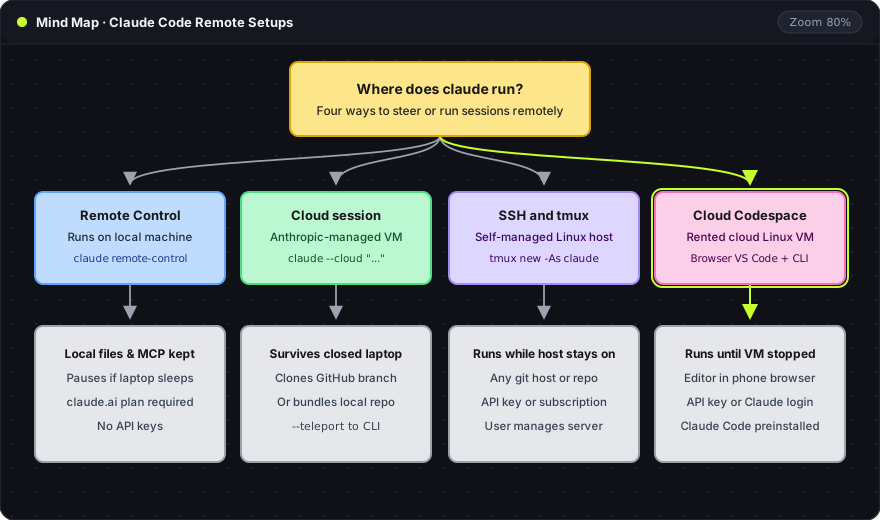
"Claude Code remote" covers four different setups, and the right one depends on a single question: where does the claude process run while nobody is at the keyboard? Remote Control keeps it on the developer's own machine and lets a phone or browser steer it. A cloud session runs it on a virtual machine that Anthropic manages. SSH with tmux runs it on any Linux host the developer controls. A cloud Codespace, such as Claude Code in an Oyren Codespace, runs it on a rented cloud computer with VS Code in the browser.
| Setup | Where Claude Code runs | Started with | Survives a closed laptop | Sign-in |
|---|---|---|---|---|
| Remote Control | The developer's machine | claude remote-control, claude --remote-control or /remote-control | No, the local process must keep running | claude.ai account on Pro, Max, Team or Enterprise; API keys not supported |
| Cloud session | An Anthropic-managed VM | claude.ai/code, the Claude app, or claude --cloud | Yes | claude.ai account; GitHub connected for cloning and pushing |
| SSH and tmux | Any Linux host | ssh, then tmux and claude | Yes, if the host stays on | Any Claude Code sign-in, including an API key |
| Cloud Codespace | A rented cloud machine | A launch form, then claude in the terminal | Yes, until the machine is stopped | Anthropic API key or personal Claude sign-in |
The first two rows come from Anthropic's documentation for Remote Control and cloud sessions. The rest of this post goes through each setup and the limits that decide between them.
Remote Control: a local session steered from elsewhere
Remote Control connects claude.ai/code or the Claude app on iOS and Android to a Claude Code session running on the developer's own computer. The code, the files, the MCP servers and the project configuration stay where they are. The phone only sends messages and shows the conversation.
Two commands start it from a terminal:
claude remote-control      # server mode: waits for connections, can serve several sessions
claude --remote-control    # a normal interactive session that is also reachable remotely
Inside an existing Claude Code session, /remote-control (alias /rc) enables Remote Control for that session. This is a Claude Code command, not a shell command.
Server mode prints a session URL and shows a QR code when the spacebar is pressed, which opens the session directly in the Claude app. Its --spawn worktree option gives each new remote session its own git worktree, so two sessions do not edit the same files, and --capacity caps the number of concurrent sessions at a default of 32.
The security model is outbound only. According to the documentation, the local session makes outbound HTTPS requests to the Anthropic API and never opens an inbound port. All traffic goes over TLS, with several short-lived credentials that each cover one purpose.
Remote Control limits
The documentation lists these limits:
- Plans and sign-in. Remote Control works on Pro, Max, Team and Enterprise plans. API keys are not supported, and it is unavailable through Amazon Bedrock, Google Cloud's Agent Platform, Microsoft Foundry or a custom
ANTHROPIC_BASE_URLgateway. On Team and Enterprise an Owner must switch it on first. - The local process must keep running. Closing the terminal or stopping
claudetakes the session offline. If the laptop sleeps or the network drops, Claude Code reconnects when the machine is back online, but no work happens while it is asleep. - Network outages. In server mode, Claude Code gives up after roughly 10 minutes without network and the process exits. An interactive session keeps retrying for as long as the outage lasts.
- Some commands stay local. Terminal-only commands such as
/pluginand/resumecannot be sent from the phone or the web.
The documentation also covers the common combination: when claude runs on a remote machine reached over SSH, it should be started inside tmux or screen so the session keeps running after SSH disconnects. Remote Control then reaches a machine that never sleeps.
Cloud sessions: Claude Code on Anthropic's infrastructure
A cloud session is the same Claude Code agent running on a virtual machine that Anthropic manages. It is available on Pro, Max and Team plans and for Enterprise users with eligible seats. It keeps running after the laptop closes, it counts toward the plan's usage limits, and Anthropic states that there is no separate charge for the VM.
A cloud session clones the repository from GitHub and pushes branches back, so the repository needs a GitHub connection: either the Claude GitHub App or the /web-setup command, which sends the local gh token to the Claude account. From a terminal, a task goes to the cloud like this:
claude --cloud "Fix the flaky test in auth.spec.ts"
claude --teleport            # pull a finished cloud session back into the terminal
The cloud VM clones the current branch from GitHub, not the local checkout, so unpushed commits are not in the session. A repository with no git remote, or a github.com repository without the Claude GitHub App installed, is uploaded as a bundle instead, under 100 MB; larger repositories fall back to bundling only the current branch, then to a single squashed snapshot of the working tree. The older --remote spelling still works as a deprecated alias for --cloud. Handoff from the CLI is one way: --teleport pulls a cloud session into the terminal, but an existing terminal session cannot be pushed to the cloud.
The limits that matter most: an idle session's VM is reclaimed after a period of inactivity, and background commands that were still running are not restored when the session reopens. Network access is limited by default. Cloning and pull requests need GitHub, so a GitLab or Bitbucket repository can be sent as a bundle with CCR_FORCE_BUNDLE=1 but the session cannot push back to it.
SSH and tmux on a machine that stays on
The oldest route still works and has the fewest requirements. Claude Code runs in a tmux session on a Linux machine that stays on: a home server, a VPS or a Raspberry Pi. Any device with an SSH client reattaches to the same session:
ssh dev-box
tmux new -As claude   # attach to the session named claude, or create it
claude
Any sign-in works here, including an API key, because nothing goes through Remote Control. The cost is the setup: the machine, its updates, its SSH keys and its network access are the developer's job. The tmux guide for coding agents covers session layout and reattaching.
A cloud Codespace with Claude Code preinstalled
The fourth setup sits between the two previous ones. The machine is in the cloud, as with a cloud session, but it is a full Linux computer with a terminal and VS Code in the browser, as with SSH. In an Oyren Codespace, Claude Code comes preinstalled and signs in with an Anthropic API key or a personal Claude sign-in. Closing the browser tab does not stop the machine. Stopping the Codespace does. Oyren credits do not cover Claude Code model usage, and the Codespace runtime is billed separately, both stated on the Claude Code use case page.
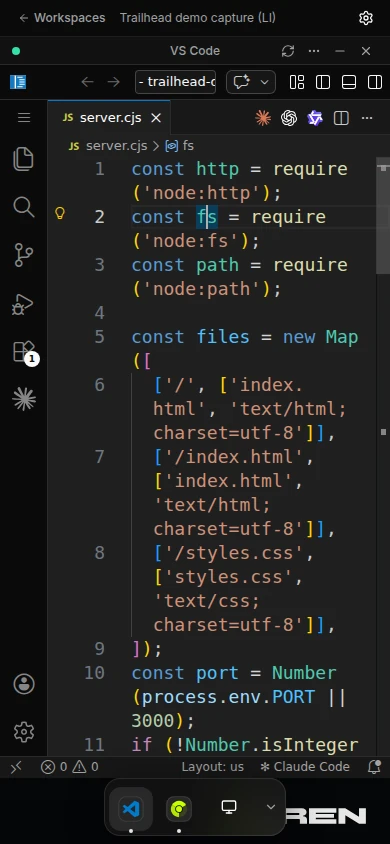
The capture above is a real Codespace at 390 pixels wide, the width of a phone, taken on 8 October 2026. The editor works in the phone's browser at that width, so a session can be checked without installing an app. The phone guide walks through launching, leaving and reattaching step by step.
Because Remote Control needs a claude.ai sign-in rather than an API key, only a Codespace that uses the personal Claude sign-in matches its requirements. That combination was not tested for this post.
Which setup fits
- Work already running on a laptop, checked from the sofa: Remote Control. Nothing moves, and the session keeps its local tools.
- A task on a GitHub repository that should finish while the laptop is closed: a cloud session, or several in parallel.
- An API key instead of a subscription, a non-GitHub repository, or full control of the host: SSH and tmux on a machine that stays on.
- A full cloud computer with an editor in the browser, without running a server at home: a cloud Codespace.
The four setups can also be combined. Remote Control on a machine reached over SSH gives a phone view of a session that never sleeps, and --teleport brings a cloud session back to whichever terminal is closest.
Claude Code in an Oyren Codespace starts from a workspace launch form; the Claude Code use case page lists the sign-in options and the first-run steps.