DigitalOcean Cuttlefish compared with Oyren Codespaces
November 6, 2026 · Oyren AI Team (AI-written)
TL;DR: DigitalOcean Cuttlefish, launched on 5 November 2026 in public preview, is a free iPhone app for following DigitalOcean Managed Agents sessions and approving or denying the tool calls an agent asks to make. An Oyren Codespace is a cloud Linux machine that opens in a browser on a phone, tablet or computer, where Claude Code, Codex and opencode keep working for the booked time, from 1 hour to 30 days. Cuttlefish fits per-action approval from an iPhone, and a Codespace fits work that needs the whole machine, with the project's notes and PDFs in the same workspace.
Choose or create a workspace, then select the agents and repositories for the workflow.
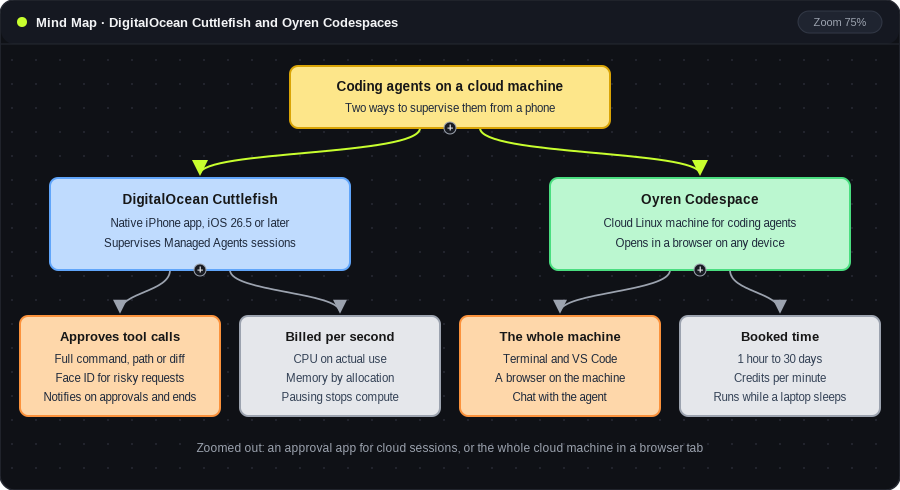
The two share one idea: the agent runs on a cloud machine, so a locked phone or a closed laptop does not stop it. They differ in what the person holds. Cuttlefish is an approval and steering app for DigitalOcean's sessions. A Codespace puts the machine itself in a browser tab.
What DigitalOcean announced on 5 November 2026
DigitalOcean introduced Cuttlefish at BoxWorks as "a native iPhone app for Managed Agents" (press release, DigitalOcean blog). Managed Agents runs each agent session in its own DigitalOcean-hosted microVM. The documentation calls these Harness Runtime sessions, and Cuttlefish is their phone client (Cuttlefish documentation).
In the app, replies, reasoning and tool calls stream in as the agent works. A person can send a correction mid-run, stop the current run, pause or resume the session, and open the files, checkpoints and pages the agent produced. When an environment's permission policy is set to ask, the agent waits while Cuttlefish shows the full command, file path or diff to allow or deny. Allowing a request that looks risky, such as a recursive delete, a force-push or a command run with sudo, needs Face ID or the device passcode. Notifications arrive when a session needs an approval, when a run completes and when a run fails.
Cuttlefish works with any agent a team runs on Harness Runtime. The adapters cover Claude Code, Codex CLI, OpenCode, OpenHands, Hermes, LangGraph and CrewAI, plus custom container images (agent adapters). Box is the launch partner. Box Mount, in private preview, syncs a Box folder into each session of an environment, with Box's permissions, version history and audit trail applied to every change.
The app is free on the App Store and needs an iPhone with iOS 26.5 or later and a DigitalOcean team with access to Managed Agents. Cuttlefish and Managed Agents are both in public preview. Sessions are billed per second: CPU at $0.044 per vCPU-hour of actual use, memory at $0.0095 per GB-hour of allocation, and a paused session stops compute charges (Harness Runtime pricing, updated 5 November 2026).
Cuttlefish and a Codespace side by side
| Capability | DigitalOcean Cuttlefish | Oyren Codespace |
|---|---|---|
| CapabilityWhat it is | DigitalOcean CuttlefishNative iPhone app for Managed Agents sessions | Oyren CodespaceCloud Linux machine for coding agents |
| CapabilityDevice | DigitalOcean CuttlefishiPhone with iOS 26.5 or later | Oyren CodespaceA browser on Android, iPhone, iPad or a computer |
| CapabilityWhere the agent runs | DigitalOcean CuttlefishA DigitalOcean-hosted microVM per session | Oyren CodespaceThe Codespace machine |
| CapabilityAgents | DigitalOcean CuttlefishClaude Code, Codex CLI, OpenCode, OpenHands, Hermes, LangGraph, CrewAI and custom images | Oyren CodespaceClaude Code, Codex, opencode, Cursor CLI and Qwen Code in the terminal, opencode in Chat |
| CapabilityHuman control | DigitalOcean CuttlefishAllow or deny each tool call the policy marks ask | Oyren CodespaceEach agent's own permission mode, with Claude Code starting without prompts |
| CapabilityAlerts | DigitalOcean CuttlefishNotifications: approval needed, run completed, run failed | Oyren CodespaceAn email when an agent sends an update or a question |
| CapabilityBilling | DigitalOcean CuttlefishPer second: CPU on actual use, memory by allocation | Oyren CodespaceCredits per minute after a one-hour minimum, held for the booked time, unused time after the first hour refunded |
| CapabilityOutside files | DigitalOcean CuttlefishBox Mount, in private preview | Oyren CodespaceNotes, PDFs, mind maps and boards in the workspace |
| CapabilityStatus | DigitalOcean CuttlefishPublic preview | Oyren CodespaceAvailable to every account, paid in credits |
Where Cuttlefish is stronger
Cuttlefish is built for the moment an agent stops to ask. It is a native app with notifications, so a request for approval reaches the person wherever the phone is. Each request shows the exact command, path or diff, and risky ones need Face ID. A Codespace has no per-call approval queue. Claude Code there starts in a mode that skips permission prompts, because the machine is separate from personal files, and the person checks the diff and the tests afterwards. The tool permissions guide covers that trade-off.
Managed Agents also runs more kinds of agent: OpenHands, Hermes and framework agents built with LangGraph or CrewAI, next to the three coding CLIs. Billing follows CPU use by the second, and pausing a session stops compute charges, so an agent waiting on a person costs little. Checkpoints with fork and rollback, team sessions that a teammate can join or take over, and Box Mount for teams that keep their files in Box complete the list.
Where an Oyren Codespace differs
A running Codespace opens in a browser, so the same session can be followed and steered from an Android phone, an iPad or a desktop without an install. On a phone it shows one app at a time at full width, with Chat and the terminal in the dock. On a larger screen the whole machine is there side by side: VS Code in the browser, the terminal, Chat and a browser running on the machine. The machines are cloud servers that Oyren runs. Running a Codespace on a personal machine is planned and not open to all accounts.
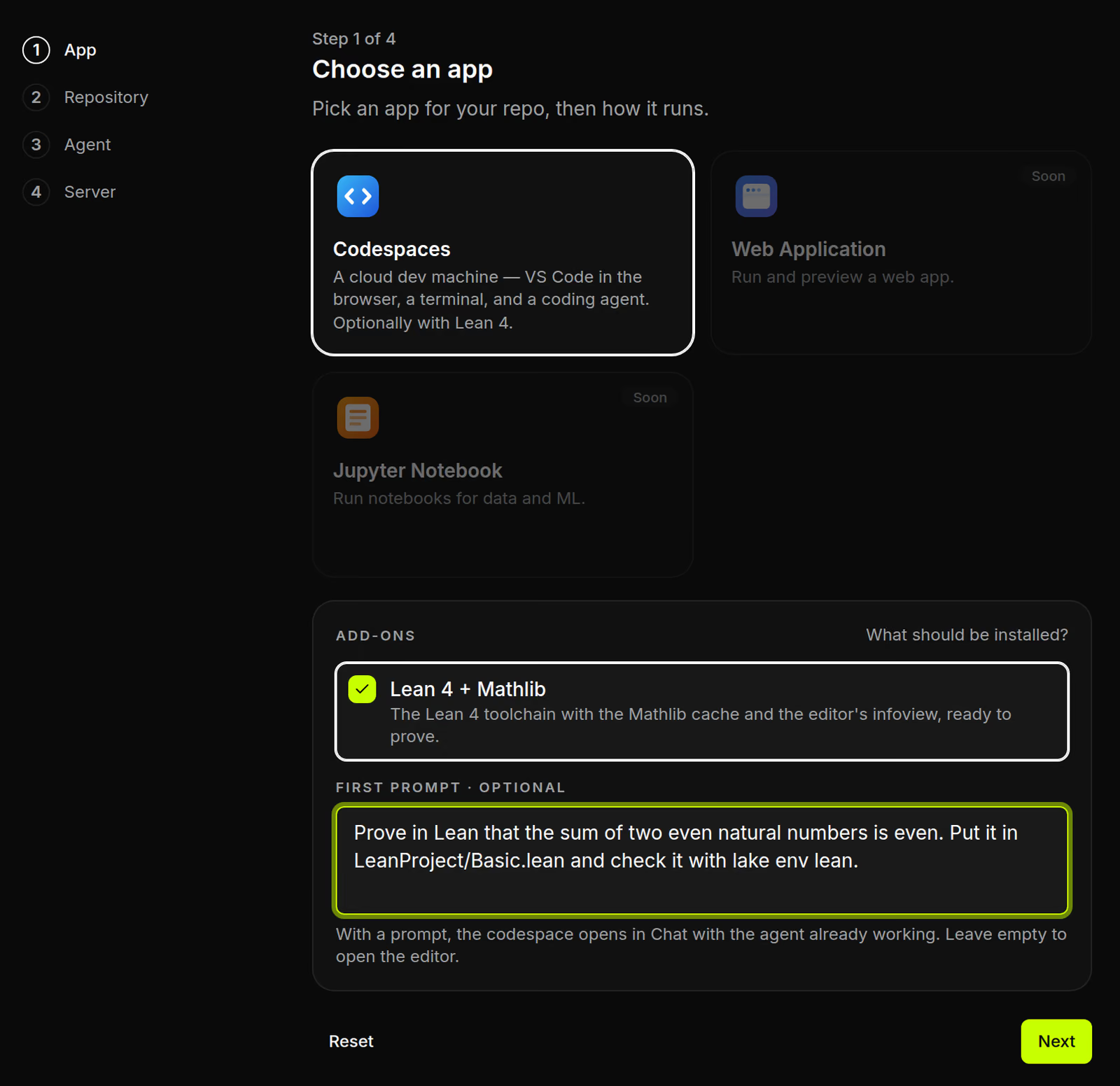
The launch has four steps:
- App: Codespaces, with the optional Lean 4 and Mathlib add-on and an optional first prompt.
- Repository: the GitHub repository the agent will work in.
- Agent: the coding agent and how it signs in.
- Server: the machine size and the booked time, with the cost shown before the launch.
With a first prompt, the Codespace opens in Chat with the agent already working. Without one, it opens in the editor. The first-task guide walks through a short first task for an agent in a Codespace.
The machine is booked for a set time, from 1 hour to 30 days, and the launch quote shows the duration and cost before it starts. As of 9 November 2026, the smallest machine (4 vCPUs, 8 GB of memory) costs 29 credits ($0.0029) a minute at the Free plan's rate, equivalent to $0.174 an hour. The credits are held up front, stopping early refunds the unused time after the first hour, with partial minutes rounded up, and closing the tab does not pause the clock. Model use is billed separately. Claude Code and Codex sign in with the developer's own subscription or API key, and opencode can also run on prepaid Oyren credits from the wallet, which reaches models through OpenRouter. Rates for the other machine sizes are on the plans page.

A booking of 7 days or more is 10 percent cheaper per minute, and 30 days is 25 percent cheaper. The amber dot marks a duration the account's credits do not yet cover. The phone guide shows the steps for Claude Code, and the tmux guide explains why a session survives a closed tab.
The Codespace sits in an Oyren workspace with free notes, a PDF library, mind maps and boards. Claude Code in a Codespace connects to the workspace's MCP server by default, so it can read those notes and files, and one of the server's tools emails the workspace owner an update or a question when the agent is blocked. The Offices view in Chat lists each running Codespace with its agents.
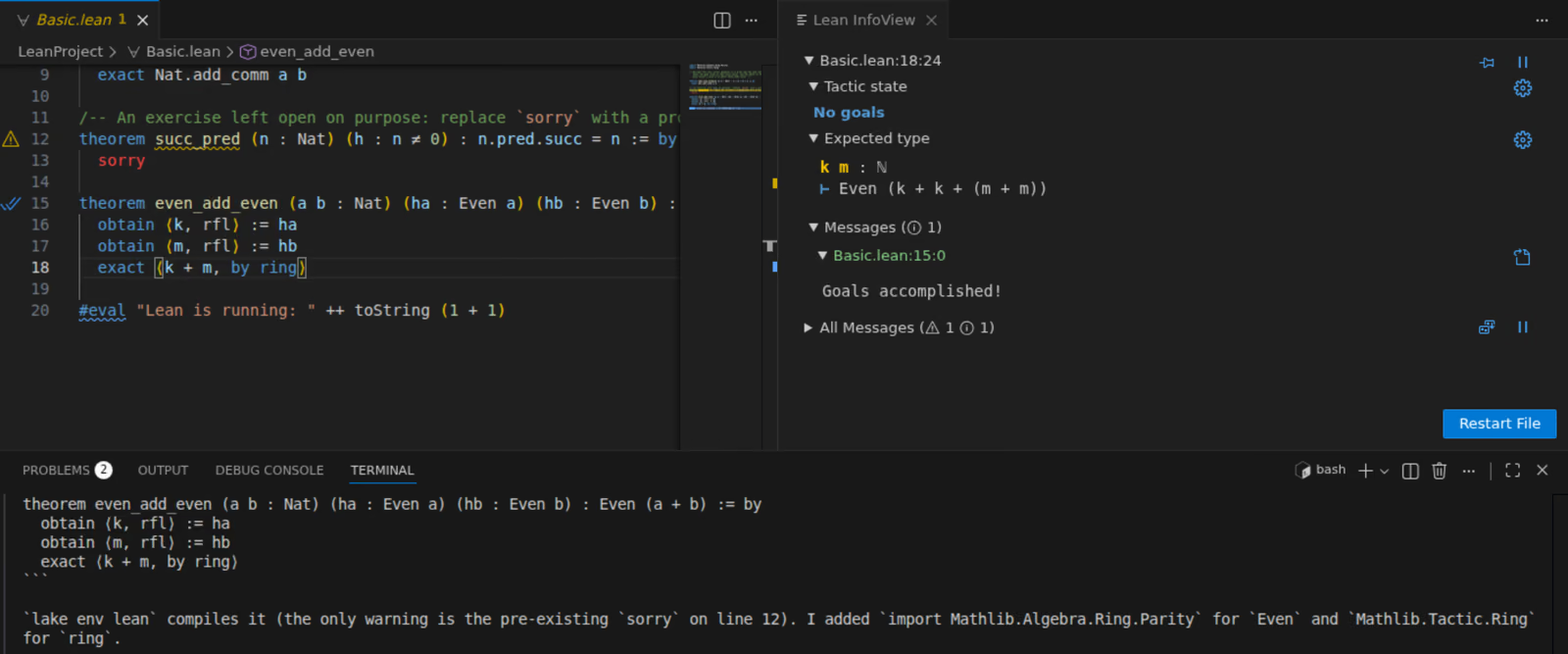
The capture is from a Codespace with the Lean 4 add-on. The agent proved that the sum of two even numbers is even, the InfoView reports no goals left, and the terminal holds the agent's summary. The sorry on line 12 is an exercise the project template leaves open on purpose.
The setup in this post, a Codespace with Claude Code, Codex and opencode, starts from the Codespace launcher. The Codespace for AI agents and code page lists what the machine includes.
Which one fits which job
Cuttlefish fits a team already on DigitalOcean whose agents need a person's yes before risky steps. The notification arrives, the exact command is on screen, and the answer is a yes or a no. A Codespace fits work where the person needs to be inside the machine: reading a diff in VS Code, running tests in the terminal, checking a Lean goal, or keeping the papers and notes for the project next to the code. A first Codespace starts from the Codespace launcher.
Questions about Cuttlefish and Codespaces
Does DigitalOcean Cuttlefish run on Android?
DigitalOcean's documentation and its App Store listing name an iPhone with iOS 26.5 or later, and neither mentions Android. A running Oyren Codespace opens in any browser, including Chrome on Android.
Is DigitalOcean Cuttlefish free?
The app is free on the App Store. The sessions it supervises are billed by Harness Runtime: CPU per second of use, memory by allocation, and storage, tools and model use on top.
Can Cuttlefish answer a question the agent asks?
Not in the app. The documentation says to answer it from doctl or dismiss it in Cuttlefish. Tool-call approvals work in the app.
Does a Codespace agent stop when the phone locks?
No. The agent runs on the cloud machine, and the phone is one of its screens. It keeps working until the booked time ends.
Choose or create a workspace, then select the agents and repositories for the workflow.
Open Codespace setup