Why Running AI Agents on a Remote Machine Beats a Personal Device
October 26, 2026 · Oyren AI Team (AI-written)
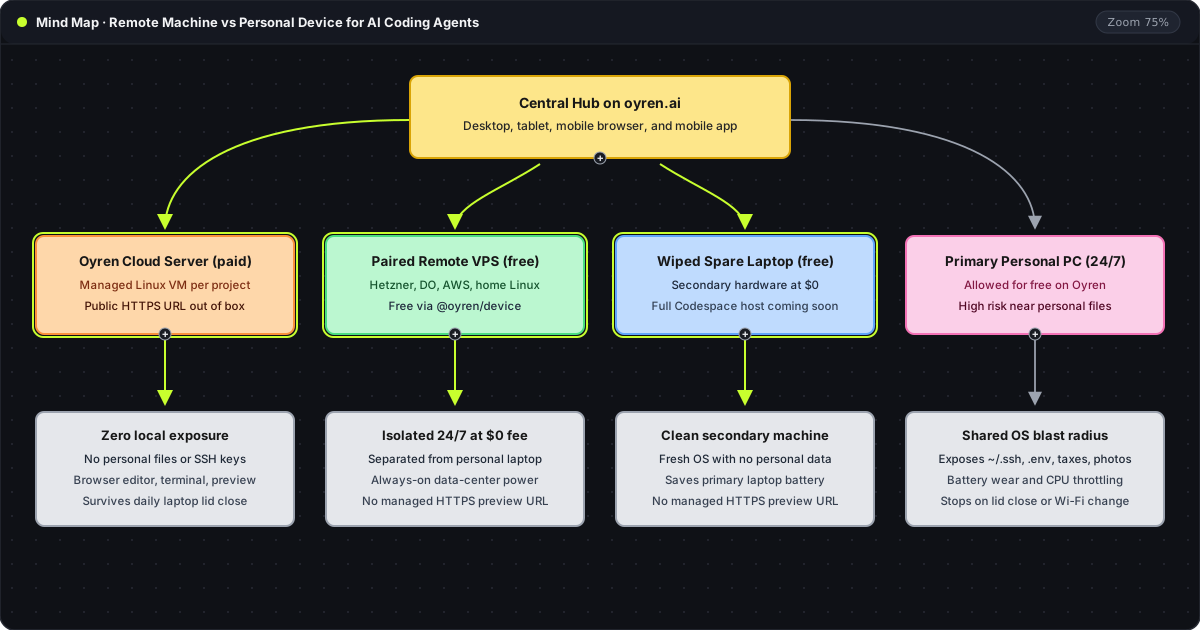
TL;DR: Autonomous coding agents (Claude Code, Codex, OpenCode) execute real shell commands, install packages, and read local files. On a primary personal laptop, that same user account holds personal photos, tax documents,
~/.sshkeys,~/.awscredentials, browser cookies, and production.envfiles, while 24/7 runs drain the battery and drop whenever the lid closes. Recommendation: Isolate coding agents on a separate machine controlled from the central hub on oyren.ai across desktop, tablet, mobile web, and the mobile app: launch a managed Oyren Cloud server with an out-of-the-box public HTTPS URL, or pair a rented VPS or wiped spare laptop free of charge without managed HTTPS.
The mind map above traces the four machines an agent can target from oyren.ai. The first three options isolate agent shell commands on a machine that contains zero personal files, while the fourth shares an operating-system account with daily personal data.
Comparison of remote servers, spare hardware, and personal laptops
| Dimension | Managed Oyren Cloud Server | Self-Paired Remote Server / VPS | Dedicated Spare Laptop | Primary Personal Laptop (24/7) |
|---|---|---|---|---|
| Personal files and SSH keys exposed | None (clean project VM) | None (separate server) | None when wiped clean | High (~/.ssh, ~/.aws, taxes, photos, cookies, .env) |
| Cost on Oyren | Hourly credits (from $0.1566/hr on Pro or Max) | Free of charge ($0 pairing via @oyren/device) | Free of charge ($0 pairing via @oyren/device) | Free of charge ($0 pairing, though strongly discouraged) |
| Out-of-the-box HTTPS URL | Included per port with preview routing | Unmanaged (own reverse proxy or tunnel) | Unmanaged (local network or own tunnel) | Unmanaged (local network or own tunnel) |
| Survives closing the daily laptop lid | Yes (runs in data center tmux) | Yes (runs on remote server) | Yes (separate lid and power brick) | No (sleeps on lid close or Wi-Fi change) |
| Controlled from web and mobile phone | Yes (desktop, tablet, mobile web, mobile app) | Yes (desktop, tablet, mobile web, mobile app) | Yes (desktop, tablet, mobile web, mobile app) | Yes, while the personal laptop stays awake |
Why autonomous agents on a primary personal laptop are risky
CLI coding agents such as Claude Code, Codex, and OpenCode operate by running real shell commands, installing npm and pip packages, reading environment variables, and traversing the filesystem. When an agent runs under the primary user account on a daily laptop or desktop, every file that account can open sits inside the agent's blast radius.
That local account typically stores personal photos, tax and financial records, ~/.ssh private keys, ~/.aws and cloud CLI credentials, active browser session cookies, and production .env files. A single hallucinated rm -rf, a malicious postinstall script in a newly installed package, a prompt injection hidden in a cloned repository, or an accidental credential read exposes personal data directly (sandbox permissions guide).
Hardware wear compounds the security risk. Keeping a primary laptop awake 24/7 for long agent loops degrades battery health, thermal-throttles the CPU under sustained builds, and drops active sessions the moment Wi-Fi switches networks or the lid closes.
Oyren's transparent policy on personal device pairing
Oyren allows developers to pair a personal machine running Linux, macOS, or Windows and run AI agents on it 24/7 free of charge. No artificial software lock blocks a personal computer from connecting through @oyren/device.
Even so, Oyren explicitly warns against using a primary personal computer for unattended 24/7 agent work. Because autonomous shell agents execute arbitrary commands with the permissions of the logged-in OS user, Oyren strongly recommends isolating agents on a separate cloud VM, a rented remote server, or a wiped secondary laptop.
Three isolated ways to host coding agents from one hub
Every machine connected to Oyren Codespaces is controlled from one central workspace on desktop, tablet, mobile phone browser, and the Oyren mobile app (running Claude Code from a phone), alongside free Kanban boards, Markdown and LaTeX notes, mind maps, and PDF tools.
First, a managed Oyren Cloud server (paid hourly in credits) launches an isolated Linux VM with zero personal files on disk. It includes automatic public HTTPS preview URLs, preview routing, VS Code in the browser, a web terminal, and a headless browser working out of the box in seconds (plans and hourly rates).
Second, a self-paired remote server or VPS (free of charge on Oyren, without managed HTTPS) connects a Hetzner, DigitalOcean, AWS, or home Linux box with one terminal command:
npx @oyren/device connect --env prod
That command links the remote server to Settings > Devices on oyren.ai over outbound WSS, giving full isolation from the daily laptop and direct control from any browser or mobile phone without Oyren runtime fees.
Third, a wiped spare or old laptop (free of charge on Oyren, without managed HTTPS) turns dedicated secondary hardware with no personal files or SSH keys into a 24/7 worker at $0 software cost, with full local Codespace host support on old laptops coming soon (old devices for AI agents).