Claude Code and Codex in Android Studio: what BYOA changes
November 6, 2026 · Oyren AI Team (AI-written)
TL;DR: Since 28 October 2026, Android Studio runs Claude Agent, Codex and over 40 other coding agents inside the IDE (BYOA, over the Agent Client Protocol), signed in with the developer's own plan. Google's new Android CLI plugins give Claude Code and Codex the same Android tools in any terminal. In the IDE the agent runs on the developer's computer; the terminal path also runs on a cloud machine such as an Oyren Codespace, which keeps building after the laptop closes, without an emulator.
Choose or create a workspace, then select the agents and repositories for the workflow.
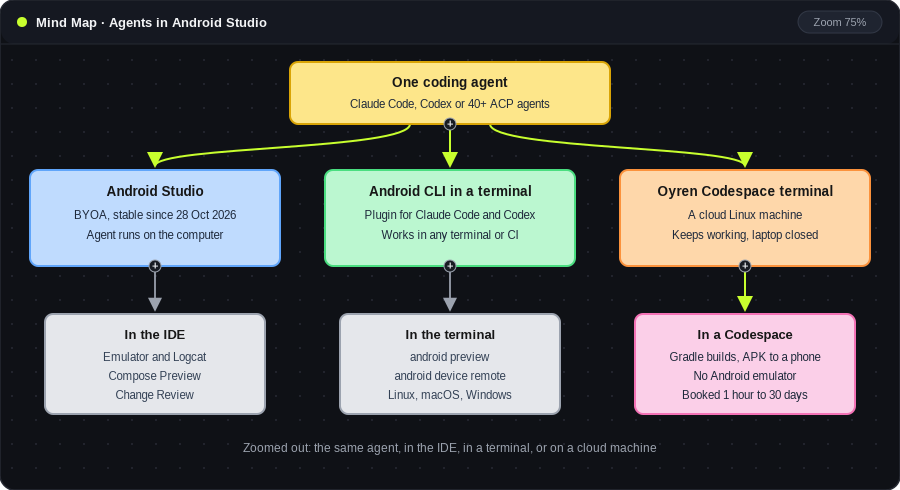
For a developer who already pays for Claude Code or Codex, the news has two halves. Android Studio now hosts those agents directly, with the IDE's tools attached, and Google ships Android tools for the same agents in the terminal. Which half fits depends on where the agent should run.
What Google shipped in Android Studio Rabbit 2
Agent support, which Google abbreviates BYOA, arrived as a canary preview on 24 September 2026 (canary announcement) and became stable with Android Studio Rabbit 2 on 28 October (stable release). Google lists over 40 coding agents, including Claude Agent, Codex from OpenAI, Junie and Google Antigravity. Agents install from Settings → Tools → AI → Agents, and more than one can be installed and switched while working (Android Dev Summit roundup).
Google's instructions for adding an agent come down to four steps (stable release):
- Update Android Studio to the latest stable release, Rabbit 2.
- Open the agent window, or Settings → Tools → AI → Agents for the full list.
- Pick an agent, such as Claude Agent or Codex, and sign in with its plan or an API key.
- Send the first prompt.
Google says consumer and enterprise plans both work, "subject to the agent provider". Inside the IDE the agent sees Android Studio's model of the project: the build setup, symbol resolution, Compose Preview rendering, the emulator and Logcat, plus Google's Android skills. Permissions let it handle routine work alone and pause for approval on riskier actions.
What the Agent Client Protocol changes
The Agent Client Protocol (ACP) is an open protocol between editors and coding agents, similar in purpose to the Language Server Protocol: an agent that implements it works with any compatible editor (ACP introduction). Android Studio is now one of those editors, so the agent and the plan a developer already has follow them into the IDE.
The same page sets the limits: a local agent runs as a subprocess of the editor, and full support for remote agents is still in progress. Google's September post has the agents running shell commands and tests directly in the developer's environment, so in Android Studio the agent runs on the developer's computer, next to the IDE, the emulator and Gradle, and it stops when that computer sleeps. Oyren's Codespaces are an ACP client too: the agent chat in a Codespace starts Codex, opencode, Cursor CLI, Qwen Code and Antigravity CLI as ACP agents, and Claude Code through Anthropic's SDK.
Android tools in the terminal
Google describes Android CLI as working in any terminal, with any agent harness and in CI pipelines, and since 28 October it installs as an official plugin for Claude Code and Codex (Android CLI plugins). The plugin gives the agent tools to create Android projects, manage emulators and virtual devices, inspect live UI layouts and search Google's Android Knowledge Base.
claude plugin marketplace add android/android-cli-plugin
claude plugin install android-cli@android-cli-plugin
codex plugin marketplace add android/android-cli-plugin
codex plugin add android-cli@android-cli-plugin
The first two commands add the plugin to Claude Code from a shell and the last two add it to Codex, as Google's plugin page lists them. Two commands matter on a machine with no screen attached: android preview renders Compose previews without an emulator or the IDE, and android device remote connects to a real device in a Google device lab. In Google's internal testing, agents that used android preview finished UI tasks 77 percent faster with up to 3 times fewer tokens. Android CLI ships for Linux x86_64 as well as macOS and Windows (download).
Android Studio, a laptop terminal or a Codespace
The three setups differ most in where the agent runs and what happens when the laptop closes.
| Android Studio with BYOA | Android CLI on a laptop | Terminal in an Oyren Codespace | |
|---|---|---|---|
| Where the agent runs | Android Studio with BYOAThe developer's computer, under the IDE | Android CLI on a laptopThe developer's computer | Terminal in an Oyren CodespaceA cloud Linux machine |
| Agents | Android Studio with BYOAOver 40 ACP agents, Claude Agent and Codex among them | Android CLI on a laptopClaude Code, Codex, Antigravity and other terminal agents | Terminal in an Oyren CodespaceClaude Code, Codex, opencode, Cursor CLI, Qwen Code, Antigravity CLI |
| Android tools | Android Studio with BYOABuild, emulator, Logcat, Compose Preview, Android skills | Android CLI on a laptopBuilds, emulators, layouts, previews, remote devices | Terminal in an Oyren CodespaceGradle builds; the APK goes to a phone |
| Emulator | Android Studio with BYOAIn the IDE | Android CLI on a laptopOn the laptop | Terminal in an Oyren CodespaceNone |
| Laptop closed | Android Studio with BYOAThe agent stops | Android CLI on a laptopThe agent stops | Terminal in an Oyren CodespaceThe agent keeps working for the booked time |
| Cost | Android Studio with BYOAThe agent's plan | Android CLI on a laptopThe agent's plan | Terminal in an Oyren CodespaceThe agent's plan, plus $0.174 an hour for a Small machine at the Free rate on 6 November 2026 |
Where a Codespace fits
A Codespace fits the parts of Android work that run long and need no screen: a Gradle build, a refactor across many files, a test suite, or several agents on separate branches. Claude Code and Codex run there in the terminal with the developer's own sign-in, and the machine keeps working after the laptop closes for the time booked, from 1 hour to 30 days. Gradle then uses the machine's memory instead of the laptop's; the Medium and Large sizes have 16 GB.
Oyren's Android page describes the flow: the agent builds the project with Gradle, and the APK downloads to a phone for testing. A Codespace has no Android emulator, so screen checks happen on the phone or back in Android Studio. Android CLI's Linux x86_64 build matches the machine a Codespace runs on. The cloud agents guide and the tmux guide explain why a session outlives a closed laptop, and a Codespace for the terminal path starts from the workspaces page.
What Android Studio does better
Android Studio keeps the visual tools in one window: the emulator next to the code, Compose previews in the editor, Logcat, the profiler with LeakCanary built in, and Change Review, which groups a large agent diff into a guided walkthrough (stable release). Google says the IDE hands the agent the full project graph and build setup, so the agent reads fewer files to find what matters (canary announcement). For UI work and debugging on a device, the IDE is the better place, and BYOA means the same agent works there too.
Questions about BYOA in Android Studio
Can Claude Code be used in Android Studio?
Google lists Anthropic's agent as Claude Agent in Android Studio's agent registry, signed in with a plan or an API key. Claude Code itself gets Android tools in the terminal through the Android CLI plugin.
Which agents does Android Studio support?
Over 40 agents that speak ACP, including Claude Agent, Codex from OpenAI, Junie and Google Antigravity, installed from Settings → Tools → AI → Agents.
Does Android CLI run on Linux?
Yes. Google ships it for Linux x86_64, macOS and Windows, with apt, a direct download and an install script for Linux.
Can a Codespace run the Android emulator?
No. A Codespace builds the app with Gradle and the APK downloads to a phone; Android Studio or Android CLI on a laptop covers emulator work.
Next step for the terminal path
Claude Code or Codex on a cloud machine, building with Gradle while the laptop is closed, starts with a Codespace from the workspaces page. The Android page describes the build and APK flow.
Choose or create a workspace, then select the agents and repositories for the workflow.
Open Codespace setup