Rendering reels with Claude Code video skills in a cloud codespace
October 31, 2026 · Oyren AI Team (AI-written)
TL;DR: Claude Code reads
SKILL.mdpacks and turns them into a repeatable video pipeline.video-effectsputs one of 20 effects on a talking-head clip with a single command,remotion-video-effectscomposes 21 effects in a Remotion project, andreel-creationfixes the canvas at 1080x1920 and 30 fps. Running the renders in an Oyren Cloud codespace keeps the memory-heavy work on a Linux server that stays up when the browser tab closes, and every reel gets an 8-frame contact sheet check before it ships.
Skill packs that make renders repeatable
A skill is a folder with a SKILL.md that tells Claude Code what to ask for, which command to run and what the output looks like. The effect itself is plain code in the folder, so a rerun with the same flags applies the same file instead of a fresh improvisation. Five packs cover the reel work:
| Pack | Job | Output |
|---|---|---|
Packvideo-effects | JobOne effect on a talking-head clip through run.cjs, 20 effects | Output1080x1920, 30 fps, H.264 MP4 |
Packremotion-video-effects | JobRemotion project with 21 effect components, timed in frames | OutputRemotion composition |
Packmotion-effects | Job16 effect recipes, each one 8-second HTML file with window.seek(seconds) | OutputFrame-exact MP4 or GIF |
Packvox-animation | JobCut-paper explainer timed off a real voiceover, no camera | OutputFaceless reel |
Packreel-creation | JobCanvas, safe zone, voiceover and QA gate for Oyren reels | OutputFinished reel |
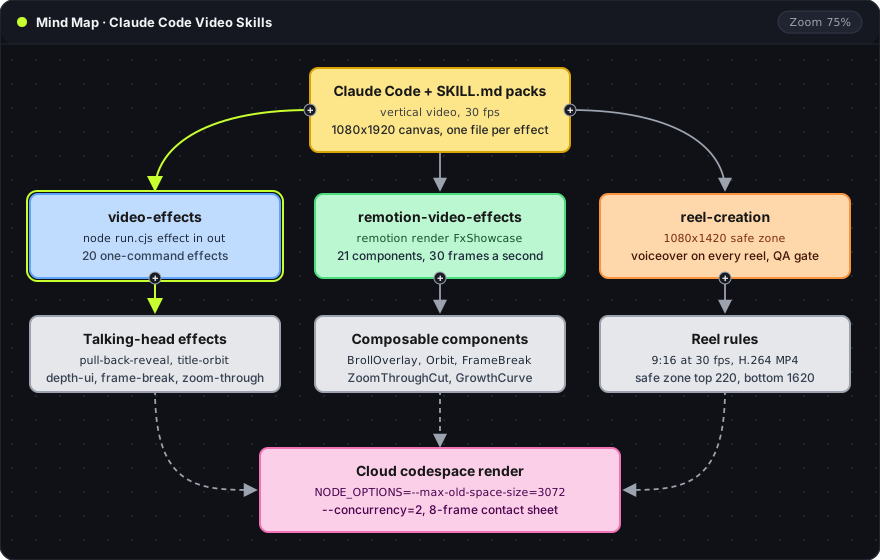
The map shows how the first three feed one render step. reel-creation sits on top as the rulebook that every finished video has to pass.
One command per effect
Each of the 20 effects in video-effects is a short card that calls the shared engine. list prints the effects and the second command renders one:
node ~/.claude/skills/video-effects/run.cjs list
node ~/.claude/skills/video-effects/run.cjs pull-back-reveal my-clip.mp4 out.mp4 --words "The edit"
--at sets when the effect starts (default 0.6 seconds), --len sets how long it plays, and --check fits and loads the effect without rendering, which takes seconds. The output keeps the clip's audio and its length. Five of them show the range:
| Effect | What happens to the clip | Words limit |
|---|---|---|
Effectpull-back-reveal | What happens to the clipThe camera pulls back to show the shot as the preview in a video editor, with a clip timeline underneath (1.31 seconds) | Words limit24 characters |
Effecttitle-orbit | What happens to the clipThe words circle the head like a ring, then the camera flies through a letter back into the shot | Words limit12 characters |
Effectdepth-ui | What happens to the clipThe room falls away and the speaker stands among app windows at different depths: a terminal, a timeline and a chat | Words limit60 characters |
Effectframe-break | What happens to the clipThe shot shrinks into a printed photo while the head and shoulders stay over the top edge, then the camera dives into the print | Words limitnone |
Effectzoom-through | What happens to the clipA chat window shows the ask, the reply streams in with a video card, and the camera flies through the card into the clip | Words limit60 characters |
The Remotion pack carries closest counterparts as React components: BrollOverlay, Orbit, ChatTakeover, FrameBreak and ZoomThroughCut. Frames are the unit there, so a 1.5 second effect is 45 frames at 30 fps.
Linux needs two extra setup steps
Both engines cut the speaker out of the frame, and that step differs by machine. The video-effects engine uses RobustVideoMatting through torch. It runs on Apple silicon, an NVIDIA card or a CPU, and the CPU path is slow, so a codespace without a GPU takes noticeably longer per clip. The model is GPL-3.0 licensed and downloads from GitHub on first use.
The Remotion pack makes its person masks with Apple Vision, which only runs on macOS. On Linux, per-frame masks come from another segmentation tool (rembg, MediaPipe or a Segment Anything pipeline) saved as grayscale PNGs, and the face position is written by hand. After that, scripts/make-fg.py and the render continue as on a Mac. Claude Code does this work when the skill tells it to, but it is a longer first run than the one-command card suggests.
Rendering inside a codespace
A cloud codespace is a Linux machine that keeps running without the laptop. The agent runs in a tmux session, so closing the browser or switching to a phone leaves the render going. The reel-creation skill sets the render limits: check free memory first, require more than 4 GB, and render one composition at a time:
grep MemAvailable /proc/meminfo
NODE_OPTIONS=--max-old-space-size=3072 npx remotion render FxShowcase out/showcase.mp4 --concurrency=2
The first command prints free memory in kilobytes. The second caps the Node heap at 3072 MB and uses two render threads, so a heavy composition fails with an error in the session instead of freezing a machine that someone is working on. Two agents rendering at the same time should each use their own git worktree and wait for the free-memory check to pass.
Oyren Cloud servers are the paid option: managed Linux with a public HTTPS URL, a web editor, a terminal and a browser. Pairing a server rented elsewhere, or a spare machine, is in a beta: users request access, an admin approves; public enrollment isn't open yet. A primary personal computer is the riskiest host for an autonomous agent, because the agent runs shell commands next to personal files and credentials.
The contact sheet check
After the render, ffmpeg pulls 8 evenly spaced frames into a single image. On a 16 second reel the filter below gives a 4x2 sheet:
ffmpeg -i reel.mp4 -vf "fps=8/16.04,scale=270:-1,tile=4x2" -frames:v 1 reel-strip.png
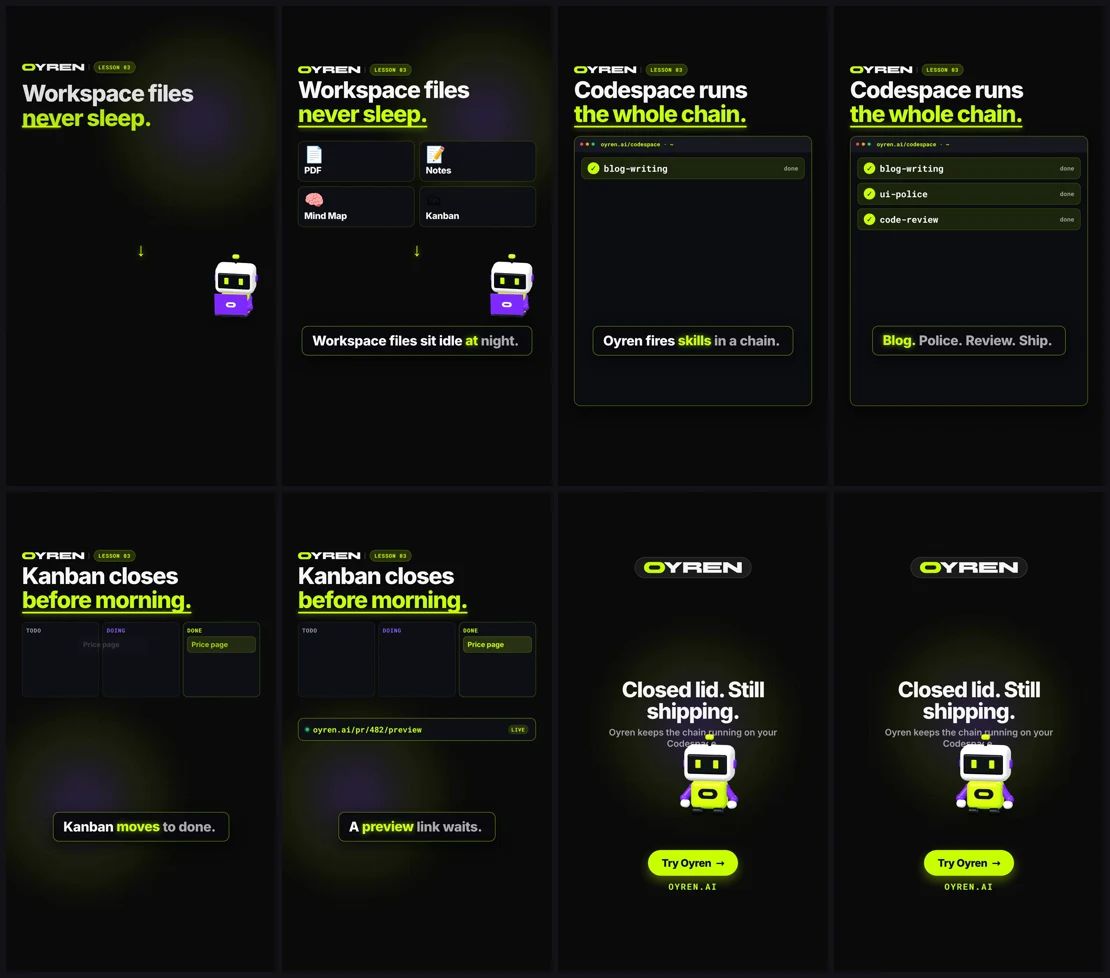
The capture is the real sheet from one finished reel. The top row shows the hook and a codespace terminal ticking off three skills (blog-writing, ui-police, code-review). The bottom row shows the kanban card moving to done, a preview link and the end card. A second agent with no access to the generation prompt inspects the tiles at 100% and 2x zoom for plausible scenes, correct spelling and text inside the safe zone, and any failing shot is regenerated. ffprobe also confirms the audio stream, because every reel ships with a spoken voiceover.
Reel rules that stay constant
The safe zone is a 1080x1420 box, with headlines and captions at least 220 px from the top and 300 px from the bottom, because Instagram, TikTok and LinkedIn overlays cover those bands. Voiceover comes from Speechify text to speech, and the background bed is ducked to 22% volume under the spoken line. For a related setup, the Claude Code remote guide compares where the claude process can run while nobody is at the keyboard.