Conductor is shutting down: where to run several coding agents
November 6, 2026 · Oyren AI Team (AI-written)
TL;DR: Conductor joined Meta on 4 November 2026: Conductor Cloud goes read-only on 13 November and shuts down on 20 November, and the Mac app gets new models and critical fixes until early 2027. Cloud work needs a transfer or an export before 20 November, and agents that must keep running with the laptop closed need another cloud machine. An Oyren Codespace is one, running Claude Code, Codex and opencode side by side for 1 hour to 30 days, opened in any browser.
Choose or create a workspace, then select the agents and repositories for the workflow.
Conductor is a Mac app that runs Claude Code, Codex, Cursor and OpenCode in parallel, and gives each task its own workspace, branch, terminal, diff and pull request (Conductor docs). Since 30 July 2026 its cloud workspaces have kept those agents working after the laptop closes (Conductor Cloud), and they are the first part to go.
What Conductor announced on 4 November 2026
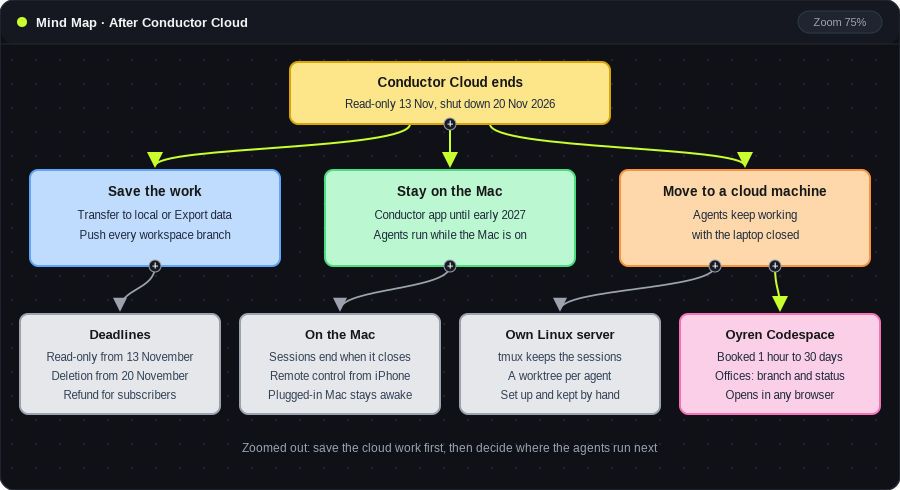
Conductor announced on 4 November that it is joining Meta (announcement, changelog 0.93.0). The wind-down has four dates:
- 4 November: sign-ups and app downloads close. Free users can no longer upgrade, and Pro users keep Pro features at no charge.
- 13 November: Conductor Cloud workspaces go read-only. Old chats stay readable and exportable, new messages cannot be sent, and active subscribers get a refund.
- 20 November: Conductor Cloud shuts down and Conductor begins deleting Cloud user data.
- Early 2027: the local Mac app stops getting new models and critical bug fixes and starts winding down. Conductor says it will delete all user data when the app shuts down.
Conductor says something new will follow in early 2027, without details.
Saving the work before 13 November
Cloud work is best moved before 13 November, when the workspaces stop taking messages, and the export stays open until deletion starts on 20 November. Two commands in the app do the move. Right-clicking a cloud workspace and choosing Transfer to local moves it and its chats to the Mac, and Settings → Account → Export data downloads an archive of all Conductor data (changelog 0.93.0).
The code itself lives in git. Conductor calls the workspace branch "the review unit" (git worktrees in Conductor), so a push of every unfinished branch to GitHub keeps the work reachable from any machine, whatever happens to the chats.
What changes for agents that ran in Conductor Cloud
A transferred workspace keeps its code and chats and loses its cloud machine. Conductor's documentation puts the difference in one row: when the Mac closes, local processes stop, while cloud agents keep running until the sandbox sleeps (Conductor Cloud docs). Each cloud workspace runs in a Vercel sandbox in us-east-1 with 8 vCPUs, 16 GB of RAM and 32 GB of temporary storage (Cloud FAQ).
Remote control, added on 23 October 2026, lets the Conductor iPhone app drive the Mac's local workspaces and keeps a plugged-in Mac awake while the phone is connected (changelog 0.92.0). That covers a desk machine that stays on, while a laptop in a bag still stops its agents. Conductor's worktree page also calls workspace isolation "development isolation, not a security boundary" (git worktrees in Conductor): local agents run with the user's own permissions, next to personal files and credentials.
Where several coding agents can run now
Three setups cover what Conductor users did, and the deciding question is what happens when the laptop closes.
| Conductor on the Mac | Own Linux server | Oyren Codespace | |
|---|---|---|---|
| Where agents run | Conductor on the MacThe Mac | Own Linux serverA rented server | Oyren CodespaceA cloud Linux machine |
| Laptop closed | Conductor on the MacLocal processes stop | Own Linux serverAgents keep running in tmux | Oyren CodespaceAgents keep running for the booked time |
| One branch per task | Conductor on the MacConductor creates a worktree per workspace | Own Linux servergit worktree add by hand | Oyren Codespacegit worktree add by hand, one tmux window per agent |
| Agents | Conductor on the MacClaude Code, Codex, Cursor, OpenCode | Own Linux serverAny CLI installed on it | Oyren CodespaceClaude Code, Codex, opencode, Cursor CLI, Qwen Code, Antigravity CLI |
| All agents at a glance | Conductor on the MacThe workspace list in the app | Own Linux servertmux windows over SSH | Oyren CodespaceOffices: each agent's branch and status |
| Phone | Conductor on the MaciPhone app, remote control while the Mac is awake | Own Linux serverAn SSH app | Oyren CodespaceA running Codespace in a phone browser, one app at a time |
| Cost | Conductor on the MacNo new sign-ups; existing Pro users keep Pro features | Own Linux serverThe server's rent | Oyren Codespace$0.174 an hour for a Small machine at the Free rate on 6 November 2026, model use separate |
An own server is the most flexible option and the most work, because its installation, updates and security fall to the developer. Oyren's own development ran 26 to 30 agents on one 8 vCPU, 32 GB cloud server in October 2026, and the 30 agents post covers the limits that machine hit.
A Conductor branch in a Codespace
A pushed Conductor branch moves into a Codespace in three steps:
- A Codespace launches on the repository, either one attached through Oyren's GitHub App or any public repository by its URL. An optional first prompt starts an agent as soon as the machine is up.
- Each branch gets its own worktree on the machine.
- Each agent runs in its own tmux window, started inside its worktree.
git fetch origin
git worktree add ../login-page login-page
git worktree add ../flaky-test flaky-test
cd ../login-page && claude
git worktree add checks out each pushed branch in its own folder, and creates a local branch that tracks origin when the branch exists only there (git worktree). The agent started in ../login-page works on that branch, and a second tmux window does the same for ../flaky-test. New chat in the Chat app opens the same kind of tmux window with Claude Code, Codex, opencode or another installed agent, so the Terminal's tabs and the chat list show the same sessions. The worktree guide and the tmux guide explain both tools.
The Offices section of Chat lists every agent on every running Codespace with its kind and branch, and whether it is working, waiting for an answer or idle. Conductor chats do not carry over: the export keeps them, and a short summary of the task in the new agent's first message gives it the context.

The machine runs for the time booked at launch, from 1 hour to 30 days, and closing the browser tab does not pause it. Credits are held up front, and unused time after the first hour is refunded when the machine stops early. Bookings of 7 days or more cost 10 percent less per minute and 30 days cost 25 percent less; the amber dot in the picker marks a length the account's credits do not cover yet. The Large size matches a Conductor Cloud sandbox at 8 vCPUs and 16 GB of RAM, with a 480 GB disk, and rates for every size are on the plans page.
Claude Code and Codex sign in with the developer's own subscription or API key, and opencode can also run on prepaid Oyren credits. A running Codespace also opens in a phone browser, one app at a time, and the phone guide covers reaching a running agent from a phone. This setup starts with a Codespace from the workspaces page.
What Conductor does better
Conductor builds the workflow around the worktree. It creates the branch and worktree for each workspace, copies the ignored files a project needs, runs setup scripts, keeps the diff and pull request state together, and archives the workspace when the task is done (git worktrees in Conductor). Until 20 November its cloud also offers shared chats for a team and an API for starting work from scripts and bots (Conductor Cloud), and its iPhone app chats with agents and merges pull requests (Conductor for iOS).
A Codespace gives the agents a whole machine instead: VS Code in the browser for reviewing diffs, a terminal, a browser on the machine, and the workspace's notes and PDFs next to them. The worktree per agent is a manual step, and the machine stops at the end of its booked time unless it is extended.
Questions about the Conductor shutdown
When does Conductor Cloud shut down?
Conductor Cloud goes read-only on 13 November 2026 and shuts down on 20 November 2026, when Conductor begins deleting Cloud user data.
Does the Conductor Mac app keep working?
Yes, for now. Local Conductor keeps getting new models and critical bug fixes until early 2027 and then winds down. New users can no longer download it.
Is there a refund for Conductor subscribers?
Conductor's timeline says active subscribers get a refund when Cloud goes read-only on 13 November.
Can Claude Code and Codex run side by side in one Codespace?
Yes. Each runs in its own tmux window on the same machine with its own sign-in, and a worktree per agent keeps their branches apart.
Next step for a Conductor Cloud setup
The setup above, several agents on one cloud machine with a worktree each, starts with a Codespace from the workspaces page. The Codespaces page lists the machine sizes and their per-minute rates, with a one-hour minimum.
Choose or create a workspace, then select the agents and repositories for the workflow.
Open Codespace setup