Coding agents from an iPad or phone, same session
October 31, 2026 · Oyren AI Team (AI-written)
TL;DR: An iPad or phone does not run Claude Code, Codex or OpenCode. It steers agents that run on another machine. Each agent belongs in a persistent
tmuxsession on a Codespace, in its owngit worktree. The tablet reads diffs, checks the browser preview and searches OCR notes. Oyren offers those screens in the browser and in the mobile app.
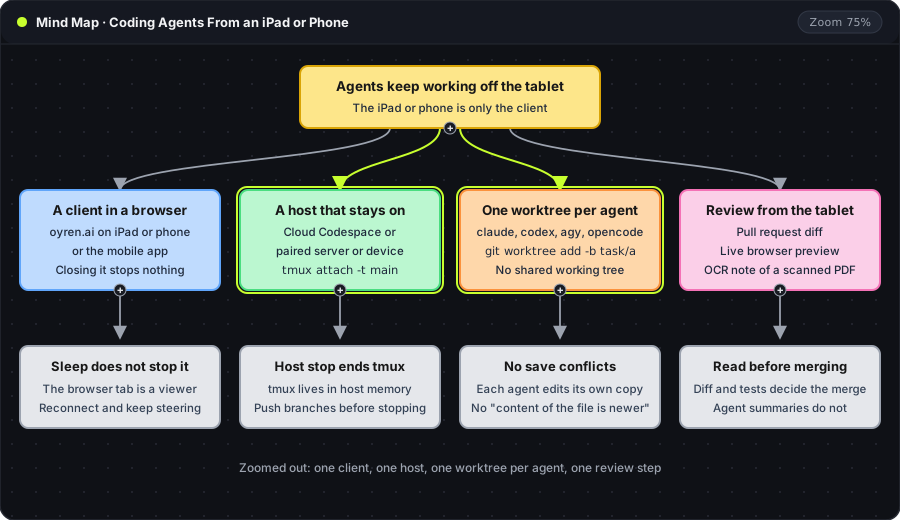
The map has four parts. The client is a browser or the mobile app and can close at any time. The host stays on and holds the tmux session. Each agent (claude, codex, agy, opencode) works in a separate worktree. The review step is the only part that needs the tablet's attention.
A client that can disconnect
Every agent named here is a terminal program, so the run belongs on a machine with a shell. The tablet attaches to that machine through oyren.ai in a browser or through the mobile app, which opens the same Codespace terminal, editor and browser. Closing the tab or locking the screen disconnects the display only. The tmux guide covers why: the tmux server keeps the process and its scrollback alive while no client is attached.
The host is an Oyren Cloud Codespace, which has a managed HTTPS preview URL; a Mac or 64-bit Raspberry Pi paired to Oyren in the device beta runs without managed HTTPS through Docker and the private GitHub kit, after a user requests access and an admin approves, since public enrollment isn't open yet and there is no general Linux-server or Windows production enrollment. Pairing a primary Mac in that device beta and leaving autonomous agents on it around the clock is risky, because agents run shell commands next to personal files and credentials. A dedicated Mac or a 64-bit Raspberry Pi keeps that exposure away from daily work.
Reattaching to a running session
On a fresh connection, one command returns to the session that holds the agents:
tmux attach -t main
attach connects the terminal to an existing session, and -t main names the target. If the host was stopped, the session is gone, since tmux lives in the memory of the machine. Agents started in the Codespace chat app open their own tmux windows, so a reconnect shows every one of them without a typed command. Anything worth keeping should be committed and pushed before the host stops.
One worktree per agent
Two agents in one checkout write to the same files. The visible symptom on a tablet is the editor message Failed to save: The content of the file is newer. The editor holds an older copy of a file than the one an agent just wrote to disk, and the save is refused. Separate directories remove the cause:
git worktree add -b task/claude ../agent-claude main
git worktree add -b task/codex ../agent-codex main
git worktree add -b task/opencode ../agent-opencode main
Each line creates a branch (-b), a directory beside the repository, and a starting point (main). The agent for that task starts inside its directory, and a file edited there does not change in the other two. The worktree guide shows the capture below with the isolation checks, and also lists what stays shared, such as dev server ports and local databases.
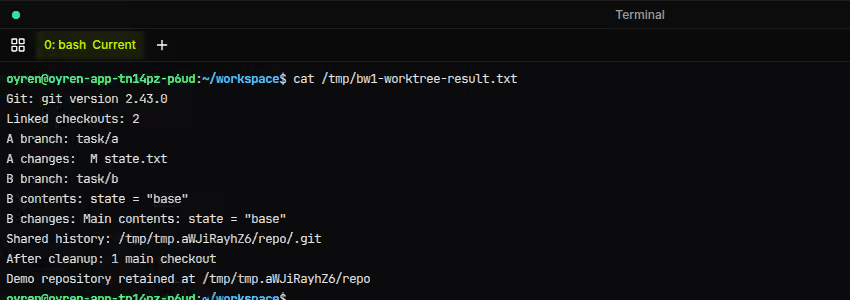
The capture shows two linked checkouts on their own branches. One has a modified state.txt and the other reports a clean git status, while both point to the one .git directory.
What the tablet is used for
| Job on the tablet | Where it happens |
|---|---|
| Job on the tabletReading the diff of an agent's branch | Where it happensPull request on GitHub, or git diff main...task/codex in the terminal |
| Job on the tabletChecking a running app | Where it happensBrowser preview from the Codespace |
| Job on the tabletFinding a passage in a scanned report | Where it happensOCR note in the workspace |
| Job on the tabletAnswering an agent's question | Where it happensThe agent's tmux window |
Review is the job that fits a tablet best, since it needs reading and a yes or no. The review guide lists what to check before merging. Test results and the diff decide the merge, and an agent's own summary does not.
Scanned PDFs are the other common tablet task. Running OCR on the file saves the recognized text as a Markdown note, and workspace search then finds phrases that the image-only scan hid. The capture below is the same check on a test page.
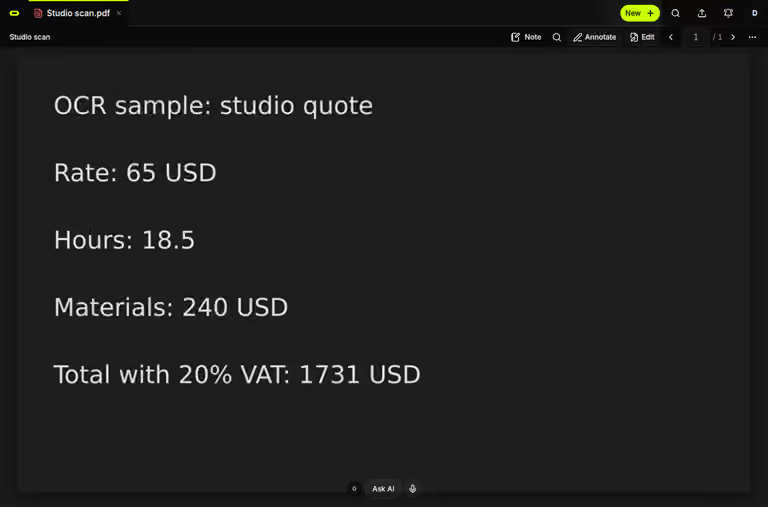
The capture shows the page before OCR: five lines of text that exist only as pixels, so no search can match them. Once OCR has saved the note, a search for a visible phrase should match it. A phrase that returns nothing points to a misread character or an unprocessed page, as the scanned PDF search guide explains.
Frequently asked questions
Can Claude Code run natively on an iPad?
No. Anthropic's setup page lists macOS, Windows and Linux for the CLI and does not list iPadOS. The iPad guide compares Remote Control with a browser editor.
Does the agent stop when the iPad sleeps?
No, as long as the host stays on. The session runs on the host, and the tablet is one of its clients. A stopped host ends the session.
How many agents fit on one host?
The limit is memory and CPU on the host, since tmux adds almost nothing. The memory guide shows how to measure it.